How to stop spam responses on Google Forms
Last updated September 2026 · ~8 minute read
Short answer: there is no anti-spam setting, because Google publishes nothing about CAPTCHA, bot detection or spam filtering for the responses your form receives. Not in the help centre, and not in the API — the live Forms REST discovery document contains no field matching captcha, spam, abuse or bot in any of its 64 schemas. What you actually have are four blunt levers, and every one of them costs you real respondents.
Form+ analyses your real Google Forms responses on your own account and device — duplicates, repeat submitters, bursts and spam — and nothing is removed until you say so. Get Form+ free on the App Store.
That is the part most articles on this subject skip. A form a stranger can answer without an account is the only form a stranger will answer. Every technique below buys you fewer junk submissions by buying you fewer submissions.
What Google does publish — and which way it points
Google is not silent about spam in Forms. It is silent about spam arriving at your form: everything it publishes treats a form as the weapon, not the target.
- The Abuse Program Policies, which apply to Forms among the other editors, carry a Spam clause — “Do not spam. This may include unwanted promotional or commercial content, unwanted content that is created by an automated program, unwanted repetitive content, nonsensical content, or anything that appears to be a mass solicitation.” — and a Phishing clause: “Do not use this product for phishing. This includes soliciting or collecting sensitive data such as passwords, financial details, and social security numbers.” Both bind you, the owner.
- Report a violation is the flow for someone who received an abusive form and wants it taken down. It has a Google Forms section with separate paths for editors and responders.
Neither helps with the twelve rows of gibberish in your Responses tab. The one place Google uses the words at all in a responses context points outward too: on View & manage form responses, the single mention is a tip that “responders may not receive expected response receipts due to spam filters or other counter-abuse measures” — that is your outgoing receipt landing in someone else's junk folder. The same page covers summaries, individual responses, the linked spreadsheet and notifications, and never once offers a way to filter what comes in.
The honest trade
Because there is no filter, everything that reduces junk works by narrowing who can submit at all. Price that cost before you start switching things on.
| Measure | What it actually stops | What it costs you |
|---|---|---|
| Restrict to a domain or audience | Everyone outside the organisation | Workspace only, and the public cannot answer at all |
| Require a Google sign-in | Casual automation and account-less drive-bys | Anyone without a Google account, and anyone who will not log in to answer three questions |
| Limit to 1 response | The same account submitting twice | The sign-in above, plus genuine second submissions |
| Close the form | Everything | Every remaining real response |
There is no row in that table with an empty third column. If your form is a public feedback link on a website, the correct answer may well be to accept some junk and clean up afterwards.
The four levers, cheapest to the responder first
- Narrow the audience before touching anything else. If everyone who should answer is inside one organisation, restricting the form to that domain or to a trusted audience removes the entire stranger population in one step — see restricting a Google Form to one domain for what the options mean and why it is Workspace-only.
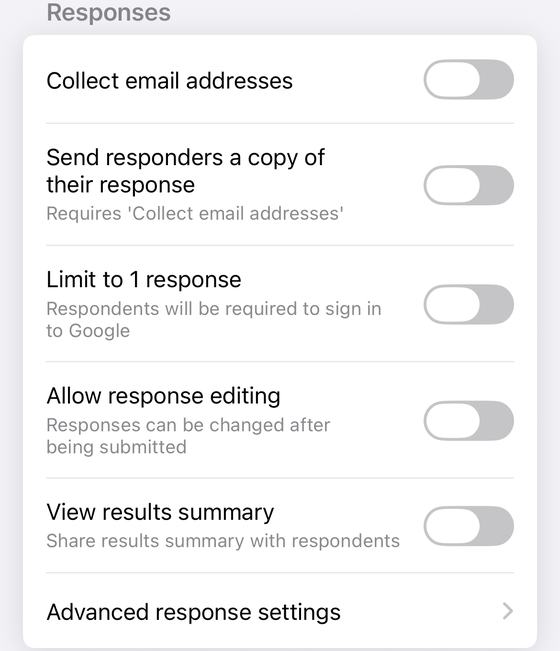
- Turn on Limit to 1 response. On Publish & share your form with responders, the path is Settings → next to “Responses”, the Down arrow → Limit to 1 response, and Google states the consequence in the same breath: “To access and fill out the form, users must sign in to their Google Account.” That sign-in wall is the closest thing Forms has to bot protection, and Google describes it as a side effect of counting, never as a defence.
- Know which other settings force a sign-in by accident. Adding a file upload question does it silently and permanently — Google's question-type help page says “To answer this question, responders need to sign in to a Google Account”, with no switch to turn that off. Setting Collect email addresses to Verified is described the same way in Google's AppSheet documentation — “Collect verified email addresses. Users must be signed in to a Google account” — although the Forms help centre itself never says so on the page where the setting lives. Three settings, three reasons, one identical login screen for your responders; making a Google Form public pulls them apart.
- Close the form when you stop needing it. A form left accepting responses forever is a URL that accepts submissions forever. Nothing expires on its own.
Validation is not a spam filter
The most common bad advice here is to add a response validation rule as a filter — a regex answers must match, or a “what is 3 + 4” question acting as a homemade CAPTCHA. Validation checks the shape of an answer, not the humanity of whoever typed it. A pattern requiring a plausible email address is satisfied perfectly by a plausible fake, and it constrains the honest while inconveniencing nobody else. Worth doing for data quality; not worth believing in for spam. The operators, and the dialect Google refuses to name, are in Google Forms regex validation.
A homemade arithmetic question is marginally better, because it is unique to your form. It also asks every genuine respondent to do arithmetic before helping you, and one person's bot deterrent is another person's reason to close the tab.
Cleaning up what got through
Deleting junk responses is the other half of the job, and it is worth knowing two things before you start.
The first is that it is final: Google's own wording for the scripted equivalent, deleteAllResponses
in the Apps Script Forms service, is “Beware: this method is irreversible”, and the per-response
deleteResponse carries the matching warning. There is no bin for responses, and the Forms REST
API exposes only get and list — there is not even a delete method to undo.
The second is that deletion does not reach your linked spreadsheet. Apps Script is explicit that the form's response store and an external destination are two separate copies, so rows removed from Forms are still sitting in the sheet. If you report from the sheet, you have two cleanups to do. Clearing Google Form responses covers the exact click-path, the warning text and what survives.
If what you are staring at is two near-identical rows rather than obvious junk, duplicate responses in Google Forms covers how to tell an accidental double-submit from a deliberate resubmission.
Finding the junk on your phone
Form+, a native iOS client for your real Google Forms, includes a Duplicates & spam tool under Clean up in a form's response tools. It is a PRO feature. It runs four detectors over the responses already loaded on the device — no upload, no server — and groups what they find: Duplicate answers (an identical non-empty answer set to an earlier response), Repeat submitters (the same collected email more than once, keeping the first), Rapid-fire submissions (six or more inside a two-second window), and Possible spam (a long run of repeated characters, two or more links, or a long stretch that is mostly symbols).
It is a detector, not a preventer, and that distinction matters more here than anywhere else on this page. It reads submissions that have already arrived; it cannot stop the next one, and nothing is deleted automatically. Selecting rows and tapping Remove only marks them — the app's own confirmation says so — and nothing actually leaves Google until you tap Save on the responses screen. Prevention is still the four levers above, with the costs they carry.
Review junk responses from your phone
Form+ analyses your real Google Forms responses on your own account and device — duplicates, repeat submitters, bursts and spam — and nothing is removed until you say so.
Get Form+ free on the App StoreFrequently asked questions
Does Google Forms have a CAPTCHA or bot detection?
No, and more to the point Google documents none. There is no such setting in the editor and no help page describing one, and the live Forms REST discovery document has no field matching captcha, spam, abuse or bot anywhere in its 64 schemas. Any guide promising you a built-in CAPTCHA is describing a third-party add-on or a trick question you wrote yourself.
How do I stop bots from filling out my Google Form?
By making the form harder to reach, which is the only mechanism Google gives you: restrict it to a domain or audience, require a Google sign-in through Limit to 1 response, or close it. Each one removes genuine respondents along with the junk, so decide how much of your audience you can afford to lose first.
Does Limit to 1 response stop spam?
It raises the cost of automated submission considerably, because Google states that “to access and fill out the form, users must sign in to their Google Account”. It is not a spam filter, and Google never describes it as one — it limits one response per Google Account, and accounts are free to create. It is also the closest Google Forms comes to a password on a form, which is to say not very close.
Can I undo deleting a spam response?
No. Google's Apps Script reference calls the equivalent methods irreversible, responses never reach the Drive bin, and the Forms REST API has no delete method at all. Deleting also leaves your linked spreadsheet untouched, so the rows remain there until you remove them separately.
Can I find spam responses on my phone?
Yes. Form+ for iPhone and iPad has a PRO Duplicates & spam tool that runs four detectors over the responses already loaded on the device and groups them as duplicate answers, repeat submitters, rapid-fire submissions and possible spam. It finds them after they arrive — it does not prevent them — and Remove only marks rows until you save.