Google Forms question types: all twelve, and what each one can do
Last updated September 2026 · ~9 minute read
Twelve. Google's reference page, Choose a type of question for your form, lists exactly twelve: Short answer, Paragraph, Multiple choice, Checkboxes, Dropdown, File upload, Linear scale, Rating, Multiple choice grid, Checkbox grid, Date and Time. What they can do is not evenly spread: six take a quiz answer key, five have response-validation rules, two can branch, two can carry an “Other” row, and three can shuffle their options.
Form+ is a native editor for the Google Forms already in your Drive — your account, your files, no migration. Get Form+ free on the App Store.
This page is a reference, not a tutorial. Every row below is quoted from, or read off, a Google help page that is linked inline — including the three places where two Google pages disagree with each other. Each type also has its own guide here; this page exists to let you compare them in one screen.
The twelve, in Google's order
Google's own descriptions, verbatim. The order is Google's, and it happens to be the order the picker uses in the editor too.
| Question type | Google's own one-line description |
|---|---|
| Short answer | “You can provide an open question. Responders can find one line to write their answer in a few words.” |
| Paragraph | “You can provide an open question. Responders can write long answers in paragraphs.” |
| Multiple choice | “You can provide a set of options. Responders can choose only one option.” |
| Checkboxes | “You can provide a set of options. Responders can select multiple answers.” |
| Dropdown | “You can provide a set of options. Responders can choose only one option.” |
| File upload | “You can ask the responder to upload a file in your form.” |
| Linear scale | “You can ask responders to provide a rating on a scale.” |
| Rating | “You can ask responders to provide a rating.” |
| Multiple choice grid | “You can create a grid where responders can select one or more answers per row.” |
| Checkbox grid | “You can create a grid where responders can select one or more answers per row.” |
| Date | “Responders can fill out a date in mm/dd/yyyy format.” |
| Time | “Responders can fill out the: Time in hh:mm AM/PM format” or “Duration in Hrs Min Sec format”. |
Two things are not question types and are sometimes counted as though they were: an image and a video are content blocks. They accept no answer and appear nowhere in the list above. A place is missing in a different way: there is no location, map or address entry among the twelve at all, and the map or location question guide covers what to build instead.
The capability matrix
This is the table the rest of the page exists for. Each column has one source, named underneath.
| Type | Answer key | Validation rules | Branching | “Other” | Shuffle options |
|---|---|---|---|---|---|
| Short answer | Yes | Number, Text, Length, Regex | No | n/a | n/a |
| Paragraph | No | Length, Regex only | No | n/a | n/a |
| Multiple choice | Yes | None | Yes | Yes | Yes |
| Checkboxes | Yes | Select at least / at most / exactly | Disputed — see below | Yes | Yes |
| Dropdown | Yes | None | Yes | No | Yes |
| File upload | No | None | No | n/a | n/a |
| Linear scale | No | None | No | n/a | n/a |
| Rating | No | None | No | n/a | n/a |
| Multiple choice grid | Yes | Per-row required, one per column, shuffle rows | No | No | No |
| Checkbox grid | Yes | Per-row required, one per column, shuffle rows | No | No | No |
| Date | No | None | No | n/a | n/a |
| Time | No | None | No | n/a | n/a |
Where each column comes from
- Answer key — Create & grade quizzes: “You can make an answer key on certain question types”, then names six — Short answer, Multiple choice, Checkboxes, Dropdown, Multiple choice grid, Checkbox grid. Six of twelve.
- Validation rules — Set rules for your form has exactly five “Rules for…” sections: short answer, Paragraph, checkboxes, Multiple choice grid, Checkbox grid. The other seven types have no rules section at all. Google states the principle plainly: “The rule options available depend on the type of question chosen.”
- Branching — Show questions based on answers, in a Tip: “‘Go to section based on answer’ is only available for Multiple choice and Dropdown question types.”
- “Other” — the sentence “You can include ‘Other’ as an
option. Responders can type a short answer” appears twice on the question-type page, under Multiple
choice and under Checkboxes, and nowhere else. Google's Forms API agrees in code: the
isOtherflag “Currently only applies toRADIOandCHECKBOXchoice types, but is not allowed in aQuestionGroupItem” — andQuestionGroupItemis how both grids are built, which rules them out too. - Shuffle options — Create a form: “You can shuffle answers to multiple choice, checkbox, and drop-down questions.” Grids get a different control, “Shuffle row order”, documented on the validation page instead; the two are not the same setting, and neither is the form-wide Shuffle question order.
Three places Google contradicts Google
All three surfaced while checking the matrix above, and we are reporting them rather than picking the tidier sentence.
1. Answer keys. The quiz page lists six types that can take an answer key, then adds a Note a few lines below: “You can assign points and add feedback on all question types.” Both sentences are on the same page. They are reconcilable — points and feedback are not the same feature as an automatically graded key — but only if you read carefully. Paragraph and Rating can hold points; they cannot be marked right or wrong for you.
2. Branching on Checkboxes. The question-type page puts the line “Based on a responder's answers, you can send them to a certain section of the form” under three types: Multiple choice, Checkboxes and Dropdown. The branching page's Tip says the feature is “only available for Multiple choice and Dropdown”. Google has not published which page is current, so we leave the Checkboxes cell as disputed. If your form depends on it, test it before you build on it — and see the conditional logic guide.
3. What a Multiple choice grid allows. The question-type page gives Multiple choice grid and Checkbox grid the identical description — “select one or more answers per row” — which cannot be right for both, since the whole difference between them is how many ticks a row takes. The validation page settles it in the opposite direction: “In multiple choice grid questions responders can only choose one column per row.” One per row for the multiple choice grid; the shared description on the reference page looks like a copy-paste. That same sentence is then repeated under the Checkbox grid heading, where it does not belong, so the duplication runs in both directions.
What each type stores — and where Google is silent
Google publishes a stored format for exactly three of the twelve. Date is “a date in mm/dd/yyyy format”. Time is “hh:mm AM/PM” or, in duration mode, “Hrs Min Sec” — and Google documents the toggle between them but not which of the two lands in your sheet for a given question, so treat Time versus Duration as unconfirmed until you have collected one response. File upload stores a file, and Google says where: “For the form owner, uploaded files are stored in a new folder on Google Drive.”
For the rest, Google describes the input and stops. It does not publish what a Linear scale or a Rating point becomes in a linked spreadsheet — a number, a label, the icon name — and it does not publish how a grid packs a row that took several ticks into a single cell. Those are the two most common questions about this list and the two Google leaves unanswered. We are not going to invent the answers: collect one test response into a linked sheet and read the cell before you build a formula on top of it.
The picker groups by shape, not by capability
On iPhone and iPad the Form+ question type sheet opens in one of two modes, and they are not the same list. Tap an existing question's type row to change it and you get exactly these twelve, in Google's order, split into five groups by thin rules — that is the screenshot below. Tap + to add a question and those twelve are followed by eight more rows that are not question types at all.
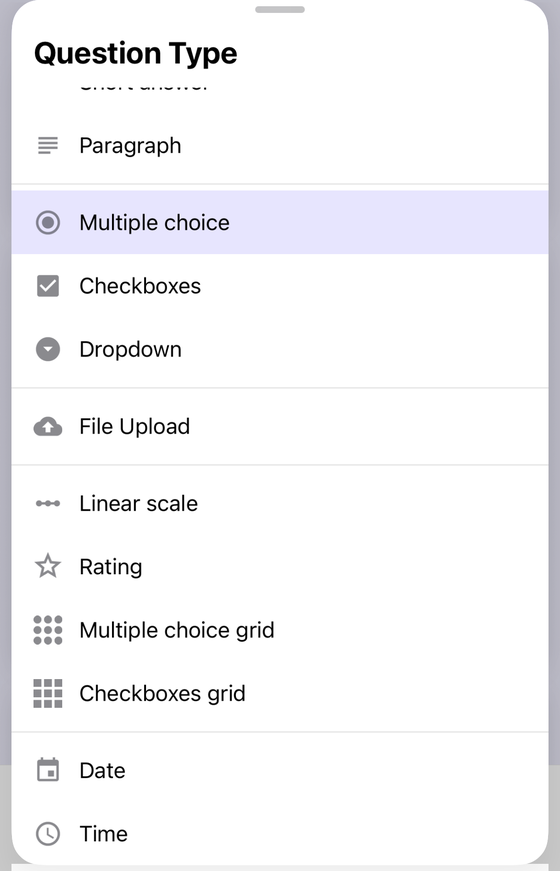
One naming detail: the app labels the tenth type Checkboxes grid where Google's help page writes Checkbox grid. Same type.
The add sheet keeps those twelve and appends two groups underneath. Content blocks come first — Image, Video, Math Equation — then import helpers: Add questions from camera (only on a device that has one), …from photos library, …from files, …from clipboard, and Tutorials. Eight extra rows, none of them a Google question type, which is why the count in this guide stays at twelve.
Which rows are PRO. On the change sheet, File upload is the only one of the twelve that raises an upgrade prompt — converting a question to File upload runs through the same paid gate as adding one — and the other eleven conversions are free. On the add sheet File upload is PRO again and it is not alone: Math Equation is gated, the four import rows are gated (that gate can also offer a watch-an-ad unlock), and Image is gated at the next step whichever source you pick. Free on the add sheet: the other eleven question types, Video and Tutorials. Changing a question from one type to another is its own operation, and the picker highlights the current type when you open it that way.
Twelve UI types, eight API question kinds
If you are reading this because you are working against the
Forms API, the counts
do not line up and it is worth knowing why before you write a switch statement. A Question
carries exactly one of eight kinds: choiceQuestion, textQuestion,
scaleQuestion, dateQuestion, timeQuestion,
fileUploadQuestion, rowQuestion and ratingQuestion. Twelve types,
eight kinds, and no one-to-one mapping.
Three collapses account for the gap. Short answer and Paragraph are both textQuestion,
separated only by a boolean. Multiple choice, Checkboxes and Dropdown are all choiceQuestion,
separated by a type enum — RADIO, CHECKBOX, DROP_DOWN. And neither grid
is a Question at the top level at all: a grid is a QuestionGroupItem whose child
questions each carry a rowQuestion. That last one is also why “Other” is unavailable
in a grid, as the isOther documentation spells out.
All twelve types, on your iPhone
Form+ is a native editor for the Google Forms already in your Drive — your account, your files, no migration.
Get Form+ free on the App StoreFrequently asked questions
How many question types does Google Forms have?
Twelve. Google's “Choose a type of question for your form” page names Short answer, Paragraph, Multiple choice, Checkboxes, Dropdown, File upload, Linear scale, Rating, Multiple choice grid, Checkbox grid, Date and Time. Images and videos are content blocks, not question types.
Which Google Forms question types can carry a quiz answer key?
Six: Short answer, Multiple choice, Checkboxes, Dropdown, Multiple choice grid and Checkbox grid. The same page adds that you can assign points and add feedback on all question types, which is a different feature — Paragraph and Rating can hold points but cannot be graded automatically.
Which Google Forms question types support branching?
Google's branching page says “Go to section based on answer” is only available for Multiple choice and Dropdown. Its question-type page also shows the branching line under Checkboxes, so the two pages disagree and Checkboxes is unconfirmed.
Does every Google Forms question type support response validation?
No. Google's rules page has five sections only — short answer, Paragraph, checkboxes, Multiple choice grid and Checkbox grid. Paragraph gets just two rule families, Length and Regular expression, where Short answer gets four.