How to schedule a Google Form to open or close
Last updated September 2026 · ~7 minute read
Short answer: Closing is now built in. Since January 2026 a published Google Form can stop accepting responses automatically on a date and time, or after a number of responses — it is off by default, and you turn it on in the published form's response settings. Opening is not: Google documents no way to make a form start accepting responses at a future moment. For that — and for recurring windows like weekdays 9–5 — you still need something on top, such as the Form Scheduler in Form+.
Form+ gives your real Google Forms an opening date, a closing date, or a repeating daily window, with a message for early and late respondents — on your own Google account. Get Form+ free on the App Store.
That asymmetry is the whole story on this page, and it is where most search results are still wrong in one direction or the other. Half of them insist Google cannot close a form on a date at all. The other half assume that because it can, it must be able to open one too. Neither is right.
This changed in January 2026
For years the answer to “can a Google Form close itself on a deadline?” was no, and an add-on such as formLimiter filled the gap. Google closed that gap: it announced automatic closing on 12 January 2026 for Rapid Release domains, with Scheduled Release domains following from 29 January 2026 — both as gradual rollouts.
Three details from that announcement are worth holding on to, because they explain nearly every “it isn't there” complaint:
- Everyone gets it. All Google Workspace customers, Workspace Individual subscribers, and users with personal Google accounts. This is not a paid-edition feature.
- It is off by default. Nothing closes on its own until the form's creator switches it on.
- It lives on a published form. The setting is enabled after you publish, so a draft you are still editing will not show it.
Google's own help centre documents the two triggers as alternatives — a close date or a response limit — rather than as a pair you combine.
Close a Google Form on a date and time
- Publish the form if you have not already. The setting does not exist before that.
- In the published form's response settings, under Accepting responses, choose Set close date or response limit.
- For a deadline, pick the date and time option and choose when it should close. For a cap instead, choose After a number of responses and enter the maximum.
- Edit the message responders see once the form is closed — the default is generic, and this is the only thing a late responder will read.
- Save. To change or clear it later, use Manage under Accepting responses.
Two things Google notes about the response-count trigger: if the form already has responses, the number you enter must be higher than the count so far, and if several people submit at the same instant the form accepts them regardless of the cap. Treat a cap as “about this many”, not as a hard gate. The date trigger does not have that caveat.
Can a Google Form be scheduled to open?
No — not with Google's own settings. This is the part worth being precise about, because the January 2026 change invites the assumption that opening arrived with closing. It did not. The announcement describes closing only, and the help centre's steps are entirely about when a form stops accepting responses. There is no documented option that makes a form start accepting them at a future date and time.
In practice that means the “open” half of a registration window is still manual: you publish the form yourself at 9am, or you leave it open early and accept the stray early submissions. Nor is there a recurring option — the two triggers fire once. A window that reopens every weekday morning is not something the built-in setting expresses.
Open and close on a schedule, from your iPhone
Form+ keeps both halves in one screen on your real Google Forms and your own account. Its Form Scheduler is a button in the editor toolbar on forms your own account owns, and it offers five schedule types: Off, Before Date, After Date, Between Dates and Daily.
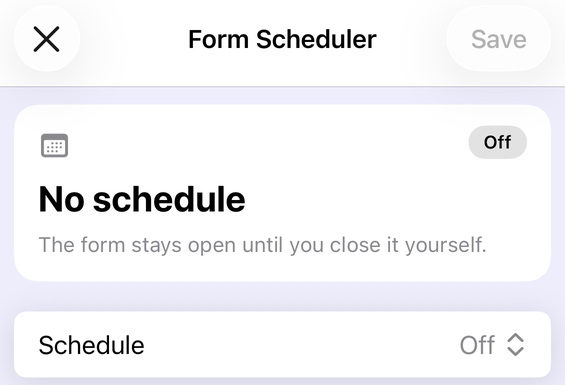
- Open the form in Form+ and publish it if it is still a draft — the Scheduler will ask you to, and offers to publish it for you.
- Tap Form Scheduler in the editor toolbar. It is drawn only on forms you own: on a form someone else shared with you, Form+ removes the Scheduler button, the Response Limiter and the response-notifications bell from the toolbar entirely rather than locking them, so scrolling the toolbar will not reveal them. Scheduling a shared form has to be done from the owner's account.
- Choose a Schedule type. After Date opens the form on a date and leaves it open; Before Date closes it on one; Between Dates does both ends of a window; and Daily repeats a start and end time on the days of the week you pick under Repeat — all week, weekdays, weekends, or any set of days.
- Set Form opens and Form closes, and check the Time zone row — it tells you which zone the schedule is saved in and flags it when your device is somewhere else.
- Optionally write a message for respondents, shown to anyone who reaches the form outside its window.
- Turn on Notify me when the form status changes for a push notification when the form actually opens or closes.
- Tap Save.
That ownership rule is worth planning around before a deadline, because it is not a paywall you can buy your way past and not a setting you can turn on. Form+ reads the owner from Drive: if the form arrived in your account because a colleague shared it, the three owner tools are simply not built into that form's toolbar. The practical routes are to have the owner set the schedule, to have ownership transferred in Google Drive first, or — if the form is yours in substance but sitting on the wrong account — to make your own copy and schedule that. A few long-standing accounts, still on the app's previous scheduling backend, do keep the three buttons on shared forms; and because each button can also be switched off remotely, a missing one is not by itself proof of who owns the form.
The Scheduler's status card then reads back in plain language what will happen next — “Opens Tuesday”, “Closes in 3 hours”, “Open since 12 March” — and warns you if the end date lands before the start. If you also set a cap with the Response Limiter, it tells you that too, so you are never guessing which of the two will close the form first. Form Scheduler is one of the Pro tools in Form+.
Where each one stops
| Google Forms, built in | Form+ Form Scheduler | |
|---|---|---|
| Close on a date and time | Yes, since January 2026 | Yes |
| Close after N responses | Yes (or the date — documented as alternatives) | Via the separate Response Limiter |
| Open at a future date and time | Not documented | Yes — After Date / Between Dates |
| Recurring window (e.g. weekdays 9–5) | Not among the documented options | Yes — Daily, with Repeat days |
| Message shown when closed | Yes | Yes |
| Tell you when it opens or closes | Not documented | Optional push notification |
| Needs the form published first | Yes | Yes |
| Where you set it | The published form's response settings | Editor toolbar, on iPhone and iPad |
| Works on a form someone else owns | Only if you are an editor | No — the button is not drawn on a shared form |
Where a row says “not documented”, that is exactly what it means: Google has not described it, so we do not claim it either way.
Schedule a form to open and close — from your phone
Form+ gives your real Google Forms an opening date, a closing date, or a repeating daily window, with a message for early and late respondents — on your own Google account.
Get Form+ free on the App StoreFrequently asked questions
Can Google Forms close a form automatically at a set date and time?
Yes, since January 2026 — announced on 12 January for Rapid Release domains and 29 January for Scheduled Release. A published form can stop accepting responses on a date and time, or after a number of responses. The setting is off by default.
Can I schedule a Google Form to open at a future date?
Not with Google's own setting. The announcement and the help centre describe closing only, and there is no documented option to start accepting responses at a future date and time. Opening on a schedule needs a tool on top — the Form Scheduler in Form+ has Before Date, After Date, Between Dates and Daily types.
Does automatic closing work on a personal Google account?
Yes. Google made it available to all Workspace customers, Workspace Individual subscribers, and users with personal Google accounts. It is not restricted to paid editions.
Why can't I find the close date setting on my form?
Usually one of two reasons: the form is not published yet — the setting only exists on a published form — or the gradual rollout had not reached your account when you looked.
Can a Google Form close on a recurring schedule, like weekdays only?
Google documents two triggers, a date and time or a response count, and neither repeats. A window that reopens each day needs something on top; Form+ has a Daily schedule type with a Repeat setting for the days of the week.
Can I schedule a Google Form from my phone?
Google's steps assume the published form's settings in the web editor. Form+ puts a Form Scheduler button in the editor toolbar on iPhone and iPad, with opening and closing date pickers, a time zone, a message for respondents, and an optional push notification when the form's status changes. It appears on forms your account owns; on a form someone else shared with you the button is absent rather than locked.