Google Forms response count: where the number comes from
Last updated September 2026 · ~10 minute read
Short answer: the form is the record and the spreadsheet is a copy. Google's Apps Script reference states that “All forms, including those that do not have a destination set explicitly, save a copy of responses in the form's response store.” The number on the Responses tab reads that store. A linked sheet holds a second copy that Google explicitly describes as “a separate file in Google Drive”. When the two disagree, trust the form. And if you want a count from code, there isn't one: the Forms API returns responses and a page token, never a total.
Form+ puts the Summary, Question and Individual views of your actual Google Forms on iPhone and iPad — your account, your Drive, no migration. Get Form+ free on the App Store.
This page is about the count itself — not how many responses a form can hold (see Google Forms response limits) and not how to cap submissions (see how to limit responses). The question here is narrower and more annoying: you are looking at two numbers and only one of them can be right.
The two places a count appears
1. The form's own Responses section
Google's “Choose where to save form responses” help page frames the whole thing in one sentence: “When responders fill out your form, you can find a summary of the responses in the form or you can store the responses in a linked Google Sheet.” (support.google.com/docs/answer/2917686). The first of those — the summary inside the form — is fed by the form's own response store. Google's instruction is simply to open the form, click Responses, and read the Summary tab, where, in Google's words, “you can find the list of people who responded to your form.”
There is a documented precondition that catches people out: “The ‘Summary’ tab displays on a form only when there's one or more responses.” Google repeats that tip on both the destination page and on View & manage form responses. A form with zero responses is not missing a tab — the tab has a condition, and zero does not meet it.
2. The row count in a linked spreadsheet
The second place is the sheet, where “count” means something different: it is a row count you work out yourself, by scrolling to the bottom or writing a formula. Google documents how the link is made — Responses › More › Select destination for responses — and documents what that link produces: “If you store responses in a spreadsheet, you have a separate file in Google Drive.”
That phrase is the whole story in miniature. Two files. Two numbers. One of them is the record.
What Google publishes, and what it does not
| Question | What Google publishes |
|---|---|
| Where the in-form count comes from | Published. The form's response store — “All forms … save a copy of responses in the form's response store.” |
| Whether the Summary tab always appears | Published. “The ‘Summary’ tab displays on a form only when there's one or more responses.” |
| Whether the spreadsheet is a separate file | Published. “If you store responses in a spreadsheet, you have a separate file in Google Drive.” |
| What deleting responses in the form does to the sheet | Published. Deleting “does not delete copies of responses stored in an external response destination (like a spreadsheet)”. |
| What deleting a row in the sheet does to the form's count | Not published. No Google help page or API reference states an effect in that direction. |
| Whether an edited response adds to the count | Documented only in the API, through two timestamps on one response ID. The help centre is silent. |
| A total-count field in the Forms API | Not published. No total, totalSize or count field is documented on forms.responses. |
Why the two numbers disagree
The mechanism is that the sheet is downstream. Google's Apps Script reference says it twice, in two
different methods. setDestination(): “Sets the destination where form responses are saved.
All forms, including those that do not have a destination set explicitly, save a copy of responses in the
form's response store.” And removeDestination(): “Unlinks the form from its current
response destination. The unlinked former destination still retains a copy of all previous responses.”
(Apps Script Form
reference.) The help centre says the same thing in plainer words for the UI route: unlinking means
“New responses won't be sent to the spreadsheet, but your current data remains intact.”
So a sheet that was ever linked keeps everything it received, whether or not it is still linked. That alone produces a sheet with more rows than the form has responses.
The direction Google does document
Deletion from the form side is spelled out. deleteAllResponses(): “Deletes all submitted
responses from the form's response store. This method does not delete copies of responses stored in an
external response destination (like a spreadsheet), but does clear the form's summary view.”
deleteResponse(responseId) carries the same caveat for a single response, “but does remove
the response from the form's summary view.” Emptying the form's count leaves every spreadsheet row
standing. Google also warns, on the help side, that “If you delete any responses in a form, it can't be
undone.”
The direction Google is silent about
Now reverse it. You delete rows in the linked spreadsheet — tidying test submissions, removing a duplicate, clearing an old batch. What happens to the form's count?
Google does not publish an answer. Not in the help centre pages on viewing responses or choosing a destination, not in the Apps Script reference, not in the Forms API reference. Every documented statement describes the form's store as the origin and the destination as the copy, and every documented deletion behaviour runs form-to-sheet. Nothing documents sheet-to-form.
The practical conclusion follows from what is published rather than from folklore: the form's response store is the record, the sheet is a copy of what was sent to it, and a spreadsheet is an ordinary spreadsheet that anyone with access can sort, filter, delete rows from or type into. If the two numbers differ, the form's number is the one to act on — and if you need the sheet to be authoritative, treat it as an export you do not edit in place.
What actually counts as one response
The other half of the confusion is definitional. If someone submits, then goes back and edits their answer, is that one response or two?
Google's help page on letting people edit a submission describes the setting and nothing else — it does
not say whether an edit replaces the original. The API does. In the Forms API, a FormResponse
carries one responseId and two timestamps: createTime is the
“Timestamp for the first time the response was submitted”, and lastSubmittedTime is the
“Timestamp for the most recent time the response was submitted. Does not track changes to grades.”
(forms.responses
reference.)
One ID, a first submission time and a most-recent submission time. That structure describes a response that is updated in place when it is edited — not a second row appended to the tally. Note the exclusion in Google's own sentence, too: that timestamp does not move when you re-grade a quiz.
A genuinely separate submission is a different matter: it gets its own response ID and its own place in the count. That is why a form left open to repeat submissions can show a count higher than the number of people. If that is your situation, our guide to duplicate responses in Google Forms covers the settings that change it, and seeing who responded covers identifying people rather than submissions.
Getting a count without opening the form
This is where expectations meet the reference documentation. The forms.responses resource
documents exactly two methods, get and list. The
list
method's response body has two fields: responses[], and nextPageToken —
“If set, there are more responses. To get the next page of responses, provide this as
pageToken in a future request.”
There is no total. No totalSize, no totalResults, no count
field of any kind is documented. To know how many responses a form has, you list them and count what comes
back — paging until there is no token. Google documents the page behaviour: “The maximum number of
responses to return. The service may return fewer than this value. If unspecified or zero, at most 5000
responses are returned.” The list method does document a filter supporting timestamp
comparisons, so “how many since Monday” is answerable — still by enumeration, not by asking for a number.
Apps Script is the same shape: getResponses() “Gets an array of all of the form's
responses.” An array has a length, which is a count, but it is a count you produce by fetching
everything. Any tool that shows you a Google Forms response count is doing one of these two things
underneath, and that is worth knowing when a form has tens of thousands of responses — at which point
Google's published thresholds start to matter more than
the count does.
A count on your phone
Form+ is a native iPhone and iPad client for your real Google Forms, signed in to your own Google account. Its Responses tab leads with the count, with a freshness line underneath so you know whether the number you are reading is current or cached:
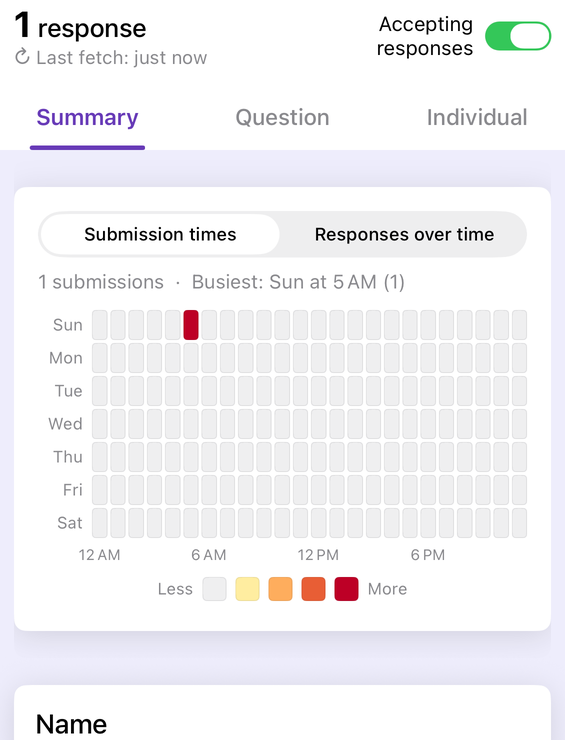
Two details on that screen come from the argument above. The count is drawn from the form's responses,
not from a spreadsheet — the same choice the app's Apps Script side makes deliberately, iterating the
privileged form.getResponses() read rather than a sheet. And because there is no count field to
ask for, a displayed count is always as fresh as its last fetch, which is exactly why the app prints the
fetch time next to it.
Read your real response count from your pocket
Form+ puts the Summary, Question and Individual views of your actual Google Forms on iPhone and iPad — your account, your Drive, no migration.
Get Form+ free on the App StoreWhen the numbers differ: what to do
- Write both numbers down, with the time you read each. A count read an hour apart on a live form is not a discrepancy.
- Check whether the sheet is still linked. An unlinked sheet stops receiving new responses and keeps every old one — Google documents both halves.
- Count the sheet properly. A row count is not a response count until you have excluded the header row and any rows added by hand.
- Ask who has edited the sheet. Google notes that form collaborators may also have access to the linked spreadsheet, and that permissions on the two files do not stay in step.
- Treat the form as the record. Everything Google publishes describes the sheet as a copy of what was sent to it. Where it is silent, that direction of travel is still the only documented one.
- Re-export rather than repair. If the sheet has drifted, a fresh CSV download from the form's Responses section is the cheapest way back to a number you can defend.
Frequently asked questions
Why does my Google Form show a different number of responses than the spreadsheet?
Because the spreadsheet is a copy, not the record. Apps Script states that all forms save a copy of responses in the form's response store, and that an unlinked former destination “still retains a copy of all previous responses”. Google documents that deleting responses in the form does not delete the spreadsheet's copies — and publishes nothing about what deleting a spreadsheet row does to the form's own count. Trust the form's number.
Does editing a response increase the response count?
The API describes one responseId with a createTime (“the first time the response
was submitted”) and a lastSubmittedTime (“the most recent time”), which is an update in place
rather than a new response. Google's help centre does not address it either way.
Why is there no Summary tab on my form?
Google publishes the condition: “The ‘Summary’ tab displays on a form only when there's one or more responses.” Zero responses, no tab. Separately, Google publishes that the summary may stop displaying on forms above 50,000 responses.
Can the Google Forms API tell me how many responses a form has?
Not as a number. The forms.responses resource documents two methods, get
and list, and the list response body contains only responses[] and
nextPageToken. No total, totalSize or count field is documented. To get a count you
page through the responses and count them yourself: pageSize returns at most 5000 responses
when unspecified or zero, and nextPageToken means there are more.