Google Forms API limits
Last updated September 2026 · ~7 minute read
“Google Forms API limits” is three questions wearing one coat. Quota is how often you may call — published, and generous: 975 read requests per minute per project, no daily cap. Capacity is how big a form may get — barely published at all on the API side. Capability is what the API cannot do at any rate — and that is the one that usually ends the project.
Form+ edits your real Google Forms on iPhone and iPad — your account, your Drive, no migration. Get Form+ free on the App Store.
These get blurred constantly, most often by quoting a content ceiling as if it were a rate limit. They have different sources, different failure modes and different workarounds, so here they are separately.
How we checked
Quota numbers come from Google’s
Usage limits page.
Everything about shape and capability is read off the
REST reference
and its machine-readable
discovery document
— a JSON file Google generates from the service itself, so it cannot drift from the API the way prose
can. The copy quoted below is revision 20260909. Where we say Google publishes nothing, we
looked in four places and say which.
1. Quota: how often you may call
This is the only one of the three that Google states as a table of numbers, and it is per minute, not per day. Google is explicit: “Provided you stay within the per-minute quotas below, there’s no limit to the number of requests you can make per day.”
| Request type | Per minute, per project | Per minute, per user, per project |
|---|---|---|
| Read requests | 975 | 390 |
Expensive reads (forms.responses.list) | 450 | 180 |
| Write requests | 375 | 150 |
Two things worth pulling out. Listing responses is charged at the expensive rate, so a tool that
polls every form it can see hits the 180 ceiling long before anything else. And exceeding a quota
“generally” returns 429: Too many requests, which Google says to handle with
truncated exponential backoff rather than a fixed retry.
On cost, the same page says “All standard use of the Google Forms API is available at no additional cost” — with a warning attached: exceeding the quota request limits “is planned to incur charges to your Google Cloud billing account later in 2026.” If you are building against this API, that sentence is the one to diarise. Quota adjustments are requested from the Quotas & System Limits page in the Google Cloud console, and approval is not guaranteed.
2. Capacity: how big a form may get
Here the API documentation goes quiet, and the numbers that do exist are scattered. Three are real and published:
- 5,000 responses per page.
forms.responses.listtakes apageSize, and the reference says “If unspecified or zero, at most 5000 responses are returned.” Past that you page with a token. This is a page size, not a cap on the form. - Two watches per form, per project.
Push
notifications are limited to “one watch per
Watch.EventType”, and there are two event types. Each watch expires seven days after creation unless renewed. - Filtering is timestamp-only. The only supported filters on a response list are
timestamp >andtimestamp >=. There is no filtering by answer, by respondent or by question.
The number everyone actually wants — how many questions a form may hold — is a Forms limit, not an API limit. Google states it in the consumer help centre, and we unpack it on exporting form questions rather than repeat it here.
Where Google publishes nothing
No Google API surface states a per-form item maximum, or what a batch update does when it crosses the
consumer ceiling. We looked in all four places: the help centre article on editing a form,
which gives the ceiling but never mentions the API; the Apps Script reference, whose
Quotas for Google
Services table has rows for Calendar, Docs, Slides and Sheets but none for Forms; the REST
reference, where the forms.batchUpdate page states no maximum at all; and the
discovery document, which has zero occurrences of maxItems. So plan for the
ceiling, but do not expect a documented error when you reach it.
3. Capability: what the API cannot do
This is the limit that actually stops people, and it is the easiest to verify: the discovery document
publishes exactly ten methods. Four on the form (create, get,
batchUpdate, setPublishSettings), two on responses (get,
list), four on watches. That is the whole API. What follows from the absences:
- No export. The string
exportappears zero times. You can read a form as JSON and write the file yourself; there is no PDF, CSV or DOCX output. - No response deletion, and no submission. Responses are read-only:
getandlist, nothing else. - No form deletion, and no way to list forms. Google’s own schema says a form
“is created in Drive, and deleting a form or changing its access protections is done via the Drive
API.” There is no
forms.listeither — finding a user’s forms is a Drive query. - No response validation.
validation,maxLength,minLengthandregexare all zero-hit in the discovery document. You cannot read or write a validation rule through the REST API at all. - No file upload questions. Google states it in the schema itself: “The API currently does not support creating file upload questions.” It can read one that already exists.
The same product, three surfaces, three answers
The trap is treating “the Google Forms API” as one thing. There are three ways in, and they
do not have the same powers. The REST API is the one with the published quota. The
Apps Script Forms
service can do things REST cannot — it has deleteResponse,
deleteAllResponses, and a whole family of validation builders for text, paragraph, checkbox and
grid items. And the web editor can do what neither offers. Ask which surface a limit belongs to before you
design around it.
Where Form+ fits
Form+ is a native iPhone and iPad client built on the official Forms API, so everything above is its floor too. Where the API stops, it drives the real Google Forms editor instead — which is how it offers the one thing the REST API is documented as refusing:
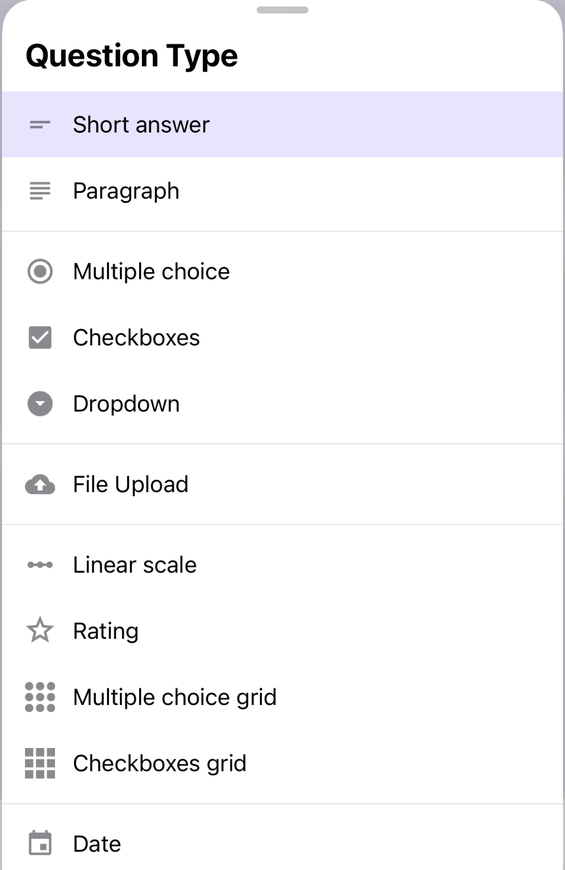
Response Limiter, which closes a form once a target response count is reached, is a PRO feature. That is one row, not a list: treat nothing else here as a statement about what is free.
The API’s ceilings, without writing the client
Form+ edits your real Google Forms on iPhone and iPad — your account, your Drive, no migration.
Get Form+ free on the App StoreFrequently asked questions
What are the Google Forms API rate limits?
Google’s Usage limits page publishes per-minute quotas and no daily cap. Read requests are 975 per
minute per project and 390 per minute per user per project. Expensive reads, which is what
forms.responses.list counts as, are 450 and 180. Write requests are 375 and 150. Per day per
project, all three are listed as Unlimited. Exceeding a quota generally returns HTTP 429.
Is there a limit on how many questions the Google Forms API can add to a form?
Google does not publish one in any API surface. The 300-item content ceiling appears in the consumer help
centre article about editing a form, which never mentions the API. The Usage limits page, the
forms.batchUpdate reference, the Apps Script Forms service reference and the machine-readable
discovery document all state no per-form item maximum, and none of them documents what happens when a batch
update crosses the ceiling.
Can the Google Forms API export a form?
No. The discovery document publishes exactly ten methods and the string “export” does not
appear anywhere in it. You can read a form as JSON with forms.get and write that out yourself,
but there is no export method and no PDF, CSV or DOCX output in the API.
Does the Google Forms API cost anything?
Google’s Usage limits page states that all standard use of the Google Forms API is available at no additional cost, and adds that exceeding the quota request limits is planned to incur charges to your Google Cloud billing account later in 2026.
Can the Google Forms API delete a response or a form?
Neither. The responses collection has only get and list, so there is no way to
delete a response through the REST API. For the form itself, Google’s own schema says a form is created
in Drive and that deleting a form is done via the Drive API. Apps Script does expose
deleteResponse and deleteAllResponses, so the capability exists on that surface and
not on this one.