Google Forms templates
Last updated September 2026 · ~12 minute read
Short answer: Google Forms has a Template Gallery, at the top right of forms.google.com — and Google's own instruction for it starts with “On your computer.” Two things surprise people: Google never publishes a list of what is in that gallery, and Google Forms has no feature for saving a form of your own as a template. The documented substitute is Make a copy.
Form+ brings ready-made templates — and saving your own forms as reusable ones — to iPhone and iPad, on your real Google Forms in your own Drive. Get Form+ free on the App Store.
This page is about the gallery: what Google documents, what it pointedly does not, how to use a ready-made form without inheriting the wrong settings, and what to do instead of the template feature that does not exist. Building a form from nothing is a different job — creating a Google Form from blank is its own guide.
How we checked
Every claim below about Google comes from Google's own Help Centre, read in September 2026 — the “Use templates” article (Computer and Android tabs), the create-a-form article, the screen reader article listing the More menu, the Google Workspace admin article on custom templates, and the Google Workspace Forms product page. Where Google says nothing, this page says so rather than filling the gap from somewhere else. An earlier guide here shipped on a premise nobody had checked and had to be publicly corrected; that is why the sourcing note is at the top rather than buried.
Where the Template Gallery is
Google's instruction is a single sentence, and the first three words are load-bearing:
- “On your computer, go to Google Docs, Sheets, Slides, or Forms. At the top right, click Template Gallery.”
So the gallery lives at the top right of the Forms home screen at forms.google.com, and clicking a template starts a new form from it in your Drive. Forms is genuinely in that list — this is not a Docs-and-Sheets-only feature.
It is a desktop feature, and Google says so twice
The same article has an Android tab, and Forms disappears from it: “open the Google Docs, Sheets, Slides, or Sites app… Tap Choose template”. No Forms. In case that reads as an oversight, the article states it outright: “To use templates for Google Forms, go to forms.google.com on a computer.”
Doubly awkward on a phone, because Google publishes no Google Forms app for iPhone and none for Android. The Google-provided route to a Forms template is a desktop browser, full stop.
Google's create-a-form instructions skip templates entirely
Worth knowing if you have hunted for a template step and not found one. Google's “How to use Google Forms” article documents one starting point — “Go to forms.google.com. Click Blank form. Name your untitled form.” — plus the routes in from Sheets and Drive. The word “template” never appears, which is much of why people assume the gallery is not there.
Which templates are in the gallery?
Google does not say. We looked in the five places a list would sensibly live — the “Use templates” article, the create-a-form article, the Forms cheat sheet, the screen reader walkthrough and the Workspace Forms product page — and not one names a single Google Forms template. The closest Google comes is its product page: “Choose from premade templates”, then “Select from a variety of surveys, questionnaires, and other templates to get started quickly.” That is the whole of it.
Lists elsewhere on the web carry confident totals. They are third-party counts of what one person saw on one day, and Google has never ratified them. We are not going to reprint template names under Google's authority when Google has not published them. The gallery is the only accurate index of itself: open forms.google.com on a computer and read it. The same goes for the category headings it groups templates under — real, but undocumented, so they can change without a release note.
Using a template without inheriting its mistakes
A template gives you questions, ordering and styling. It does not give you a considered set of response settings, and those decide whether the form behaves. Once your copy exists, walk them yourself — the defaults are Google's, not the template author's:
- Is it a quiz? A template that looks like a test is not graded until quiz mode is on and answer keys exist: making a quiz on Google Forms.
- One response per person? A sign-up or RSVP template will take the same person six times unless you say otherwise: limiting responses.
- Are you collecting email addresses? This cuts both ways. A registration template is useless without contact details; a staff feedback form is worse than useless if respondents think they are anonymous and are not: making a Google Form anonymous.
- Who can open it? Work and school accounts often restrict forms to the organisation by default, silently locking out every outside respondent.
- Is it open at all? Check the form is accepting responses before you send the link.
None of it is inherited. Treat a template as a first draft of the questions and nothing more.
There is no user template feature — here is what to do instead
If you have built a form you will run again — a monthly intake, the same onboarding questionnaire for every new hire — the obvious move is to save it as a template. Google Forms cannot do that, and no amount of hunting through menus will surface it, because it is not there.
1. Make a copy (documented, works on any account)
This is Google's actual answer. The More menu on a form offers, in the list Google gives as “options like”: Make a copy · Move to trash · Pre-fill form · Embed HTML · Print · Unpublish form. Make a copy duplicates the whole form — questions, sections, styling — into a new file you rename and edit, starting with zero responses and its own response destination. Keep one pristine “master” you never send out, copy it each time, and you have a template in everything but name. If the cadence is regular, reusing a Google Form every week sets the copy-each-time habit against simply leaving one form open.
2. Custom templates, if you are on Google Workspace
Work and school accounts get closer to a real template feature. Google's requirement is explicit: “To create templates, you need a Google Account through work or school and a computer.” Submitted templates land in your organisation's gallery on the Forms home screen, for colleagues to start from — never on personal Gmail accounts. More on the admin side below.
3. Keep your reusable forms on your phone with Form+
Form+ is a native iPhone and iPad client for your real Google Forms, and it carries a template gallery — plus one feature Google Forms has no equivalent for. Save as template stores a form you have already built — offered in the app as saving “this form's design and reuse it anytime” — into a My Templates gallery. It is PRO, and personal to your account, not a shared organisation gallery.
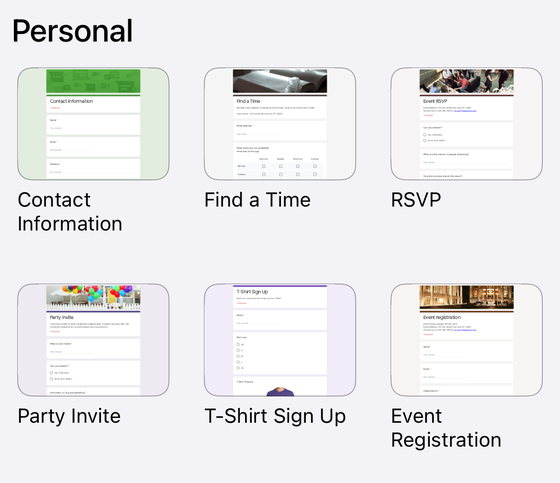
What is actually in the Form+ gallery
Unlike the Google gallery, this one really can be enumerated — and an earlier version of this page only half did it, listing six groups while claiming to have counted. Here is all of it, read off the app’s own template table rather than off thumbnails. In English the gallery builds thirteen groups: twelve fixed lists holding 85 templates between them, plus Recently Used, assembled at launch and the only one that varies.
- Recently Used — Blank Form · Create Form using ChatGPT · Copy Form from the web · Import Existing Form. The ChatGPT entry can be switched off remotely, and Import Existing Form appears only when the app is not already holding your Drive permission.
- Personal — Contact Information · Find a Time · RSVP · Party Invite · T-Shirt Sign Up · Event Registration
- Work — Event Feedback · Order Form · Job Application · Time Off Request · Work Request · Customer Feedback
- Education — Blank Quiz · Exit Ticket · Assessment · Worksheet · Course Evaluation
- Popular — Meeting Feedback Survey Template · Customer Service Template · Customer Satisfaction Survey Template · Employee Engagement Survey Template · Paradigm Belonging and Inclusion Template · General Event Feedback Template · Volunteer Feedback Template · Software and App Customer Feedback with NPS® · Website Feedback Template · University Instructor Evaluation Template · Working From Home Check-In · Net Promoter Score (NPS) Template
- Business — Artisan Product Sales · Bake Sale Order Form · Pizza Day Order Form · Personal Trainer Monthly Membership · Vegetable Basket Order
- School — General High School Satisfaction Template · Graduation Signup Form · Prom Dance Signup · K12 Distance Learning Template
- Sports — Sports Club Registration Form · Bicycle Race Registration · Jersey or Uniform Order · Baseball Team Registration
- Surveys — Health Survey · Camper’s Parent Satisfaction Survey · Customer Satisfaction Survey · Employee Feedback Form · School Safety Survey · Website Content Survey · Sports Club Survey Form · Website Visitor Survey
- Online Forms — Online Photography Contract Form · Gift Card Order Form · Online Homework Submission Form · Website Design Quote and Order Form · Online Storage Form · Online Order Form
- Registration Forms — Fitness Flyer Registration Form · Festival Volunteer Registration Form · Lodge Reservation Form · Gym Registration Form · Retreat Registration Form · Registration Form
- General Forms — Complaint Form · Military Service Form · Job Application Detailed Form · Emergency Contact Information Form · Employee Complaint Form · Sub-Contractor Information Form · School Book Request · Seminar Form · Real Estate Appraisal Request Form · Professional References Form · Job Application Form(V2) · Web Banner Design Request Form · Support Network Form · Vacation Request Form
- Other Forms — Vehicle Repair Form · Drug Addiction Counseling Referral Form · Life-Insurance Quote Form · Health Insurance Quote Form · Maintenance Request Form · Office Appointment Booking and Scheduling Form · Personal Trainer Sign-Up Form · Typical Customer Demographics Form · Student Paper Submission Form
Four of those groups are free and nine are PRO. Free: Recently Used, Personal, Work, Education. PRO: everything from Popular down. On a free account those tiles draw with a padlock and tapping one opens an upgrade prompt instead of the form — the larger library is what you are upgrading for, not something you already have. That is the complete split on this screen, and says nothing about the rest of the app. The thirteen-group list is also built only in English; every other language gets the first four groups and nothing below.
These are Form+ templates, not Google’s. Some group names will look familiar to anyone who has used Google’s gallery, but this is a separate library — and since Google publishes no list of its own, we are not going to tell you which of these it duplicates. The shape is the point: 85 ready-made forms, grouped, with a search field for finding one by name instead of scrolling.
Google Workspace: custom templates and the admin control
On a work or school account a second gallery exists alongside Google's, and an administrator decides who may fill it. The Google Workspace admin setting lets you “set who in your organization can submit custom templates for Google Docs, Sheets, Slides, Forms, and Sites” — Forms named explicitly. It lives in the Admin console under Apps > Google Workspace > Drive and Docs > Templates, and offers three modes:
- Open — “Anyone in your organization can add or remove templates without approval.”
- Moderated — “Admins with the Docs Templates privilege get an email request to approve each new template.”
- Restricted — “Only admins with the Docs Templates privilege can submit templates.”
So “why can't I submit a template?” on a Workspace account is usually an administrator's answer, not a missing feature — worth asking before you hunt for a workaround.
Google's gallery vs the Form+ gallery
| Google Forms Template Gallery | Form+ template gallery | |
|---|---|---|
| Where you open it | Top right of forms.google.com | Inside the app, on the new-form screen |
| Works on iPhone | No — Google says use a computer | Yes |
| Published list of what is in it | None — Google does not publish one | Enumerated above — 12 fixed groups, 85 templates, plus Recently Used |
| Search by template name | Not documented | Yes, a search field (English builds) |
| Save one of your own forms as a template | No such feature — use Make a copy | Yes — Save as template, into My Templates (PRO) |
| Organisation-wide custom templates | Google Workspace only, admin-controlled | No — the library is personal to your account |
| Where the resulting form lives | Your Google Drive | Your Google Drive — Form+ is a client, not a replacement |
A template gallery that works on the device you actually have
Form+ brings ready-made templates — and saving your own forms as reusable ones — to iPhone and iPad, on your real Google Forms in your own Drive.
Get Form+ free on the App StoreFrequently asked questions
Where is the Google Forms template gallery?
Google's instruction is: “On your computer, go to Google Docs, Sheets, Slides, or Forms. At the top right, click Template Gallery.” So for Forms it is at the top right of forms.google.com — and Google's own wording begins with “On your computer.”
Can I use Google Forms templates on my phone?
Not through Google. Google's mobile instructions cover the Docs, Sheets, Slides and Sites apps, and Forms is not among them; the same article's Android tab states “To use templates for Google Forms, go to forms.google.com on a computer.” There is also no Google Forms mobile app at all. A third-party client such as Form+ can carry its own template gallery on iPhone.
Which templates does Google Forms actually include?
Google does not publish the list. We checked Google's “Use templates” article, its create-a-form article, the Forms cheat sheet and the Google Workspace Forms product page: none of them names a single Forms template. Google describes the contents only as “a variety of surveys, questionnaires, and other templates”. Lists circulating elsewhere are third-party counts of what the gallery looked like on a given day, and we will not reproduce them as if Google had published them.
How do I make my own Google Forms template?
On a personal Google account you cannot — Google Forms has no user template feature. The documented substitute is the More menu's Make a copy, which duplicates a finished form so you can rename and edit the copy. On a work or school account you can additionally submit a custom template to your organisation's gallery, which Google says needs “a Google Account through work or school and a computer.”
Can my organisation add its own Google Forms templates?
Yes, on Google Workspace. An admin setting under Apps > Google Workspace > Drive and Docs > Templates controls “who in your organization can submit custom templates for Google Docs, Sheets, Slides, Forms, and Sites”, with three modes: Open (anyone can add or remove templates without approval), Moderated (admins with the Docs Templates privilege approve each new template) and Restricted (only those admins can submit).
Does a template come with the right response settings?
Do not assume so. A template supplies questions and styling; whether the form collects email addresses, limits people to one response, is a quiz, or is open at all are settings on your new copy that you should set yourself before you share the link.