Google Forms: release grades immediately, or later
Last updated September 2026 · ~8 minute read
Short answer: the setting does not change how the quiz is marked. Under either option the answer key runs at submission and the score exists straight away. “Release grades” decides only when the respondent is shown it — and picking Later, after manual review replaces an automatic reveal with a manual send that Google documents only for responses that carry an email address.
Form+ edits your real Google Forms natively on iPhone and iPad — quiz mode, answer keys, points and feedback, on your own account. Get Form+ free on the App Store.
That second half is the part that bites. People choose “Later” to buy themselves time, collect forty responses, and then discover there is no published way to hand a grade back to someone whose address was never recorded.
The two options, in Google's words
Google's quiz page puts the control under Settings → Release grades, with a heading of “Change how you release grades” and exactly two choices:
- Immediately after each submission
- Later, after manual review
The same page states the defaults for a new quiz flatly: “Grades will release immediately” and “Email addresses won't be collected.” Those two defaults ship together, which means a brand-new quiz is in the one configuration where nothing has to be sent by hand.
Marking and releasing are two different moments
This is the distinction the setting's name hides. Google's API guide for
quiz grading options says
that adding a correctAnswers field to a question “enables them to be automatically graded
when the quiz is submitted.” Submission, not release.
So under “Later, after manual review” the paper is already marked. Choosing it does not defer the calculation, buy you a draft, or leave anything unscored. It withholds a number that already exists, and hands you a switch to reveal it.
One caveat about reading those numbers back: the REST reference warns on
Grade.correct
that “a zero-point score is not enough to infer incorrectness, since a correctly answered question could be
worth zero points.” A zero in a spreadsheet column is not a wrong answer.
Does “Later” force you to collect email addresses?
This is the question the setting turns on, and the honest answer has two halves.
Google never states it as a requirement. The steps under “Change how you release grades” are three: open the quiz, click Settings, pick an option. No precondition, no warning, no mention of email.
But everything downstream of it is conditioned on email. Three separate sentences on the same help page do the work the setting's own description does not:
- Under Share results: “If you collect email addresses in your form, you can send results immediately or wait until you're ready to share them.”
- Under Grade individual responses: “If you collect email addresses, you can assign points and leave feedback on individual responses.”
- Under Email results after review: “At the top right of a response with a recorded email address, click Release score.”
Read together: the setting is not gated, but the only documented route from a held grade back to a respondent is. On a quiz with no email collection you can select “Later, after manual review” and Google publishes nothing that gets the grade out again.
There is a wrinkle Google leaves open. The Forms API defines three collection modes in
EmailCollectionType:
DO_NOT_COLLECT (“default value if the form owner uses a Google account”), VERIFIED
(“automatically based on the account of the signed-in user”, and the default for a Google Workspace owner),
and RESPONDER_INPUT (“using a field that the respondent completes on the form”). Nothing states
whether a typed RESPONDER_INPUT address counts as “a recorded email address” for the purpose of
Release score. It plainly is one on the row; whether Google treats it as releasable is not written down.
What the respondent actually sees
Under a heading Google words as “Choose what people see during and after the quiz,” the help page gives one sentence: “You can choose if people can see missed questions, correct answers, and point values.” The steps that follow are Settings → “Respondent settings,” then “change settings as needed.”
Three things are named. Two things are not:
- Whether they are three controls or one. “Change settings as needed” is plural, but the page never names an individual switch, and neither the REST reference, the discovery document, nor the Apps Script Forms reference contains a field or method for any of them.
- The score itself. Missed questions, correct answers and point values are listed. The total is not on that list, and Google does not say whether it can be withheld separately.
The word “during” in that heading is also never explained anywhere on the page.
How a released grade reaches someone
Google documents exactly one mechanism, and it is manual. From the quiz, open Responses → Individual, click Release score on a response with a recorded address, “check the boxes next to the people you want to email,” then click Send emails and release.
That button name is the whole design in four words. Releasing and emailing are one action. Google publishes no way to release a score without sending mail, no way to send it to somebody who has no address on the row, and no reverse step once it has gone.
None of this exists in the API
If you were hoping to script the release, the schemas settle it quickly.
In the REST
reference, FormSettings has exactly two fields — quizSettings and
emailCollectionType — and QuizSettings has exactly one, isQuiz. There is
no release field and no respondent-visibility field. Reading the
live discovery document confirms it:
the string “release” does not appear anywhere in the file.
Grades are readable and nothing more. Every field of Grade — score,
correct, feedback — is marked “Output only,” as is
FormResponse.totalScore, and forms.responses publishes two methods: get
and list. There is no write.
Apps Script goes further but
stops short of the same line. Across the whole Form class the only quiz settings are
setIsQuiz() and isQuiz(), and the word “release” appears nowhere on the page. What it does offer is grade writing:
ItemResponse.setScore(),
which “does not actually save the score in Forms until Form.submitGrades(responses) is called,”
and FormResponse.withItemGrade(),
which “applies only to form responses that have already been submitted.”
Two warnings on those pages are worth carrying. withItemGrade() ends with “If the ItemResponse
contains no grades, this method removes grades for the item” — pass an ungraded response and you erase a mark.
And submitGrades() “triggers the onFormSubmit condition and causes an infinite loop” if your
project has such a trigger. Neither page says whether submitting a grade releases it or emails anybody.
One last gap in the record: FormResponse.lastSubmittedTime is documented as “Does not track
changes to grades.” Nothing in the API stamps the moment a grade was altered or released.
Two facts to keep in view before you switch anything
- Turning quiz mode off is destructive.
QuizSettings.isQuizcarries the warning “Upon setting to false, all question Grading is deleted.” Release settings are the least of what you lose. - Releasing sends mail to real addresses. Under “Later, after manual review,” the scores of the people you tick leave Google as email to the addresses recorded on their rows. That is the only delivery Google documents, so it is worth checking the list before the click rather than after.
Where Google is genuinely silent
We checked four places for each of these — the help centre quiz page, the Apps Script Forms reference, the REST reference, and the discovery document. None of them answers:
- What the respondent sees on the confirmation screen under “Later” — whether they are told a grade is coming, or simply shown nothing.
- Whether switching from “Immediately” to “Later” after responses have arrived hides scores already shown.
- Whether the three respondent-visibility items are one control or three.
- Whether the release email carries the score alone or the whole marked paper.
- Whether an address the respondent typed counts as “a recorded email address” for Release score.
- Whether Apps Script's
submitGrades()releases anything to the respondent.
Each of those takes one test response and two minutes to settle for your own quiz, which beats a confident answer from anywhere else.
Doing it from an iPhone
Form+ is a native iPhone and iPad client that works on your real Google Forms, in your own Google account. Because these four settings are not in the Forms API, no client can reach them through it — Form+ exposes them on a native screen called Advanced quiz settings, reached from the Quizzes section of a form's Settings tab. That row is not drawn for everyone. It needs the form to already be a quiz — turn Make this a quiz off and the row disappears with it — and it needs the app’s newer-features flag, and several separate things can switch that flag off — your region, a remote switch, and, unless that test is itself disabled remotely, an install dating from before 2024. Where either is missing the Quizzes section is the single switch, and these four settings stay desktop-only.
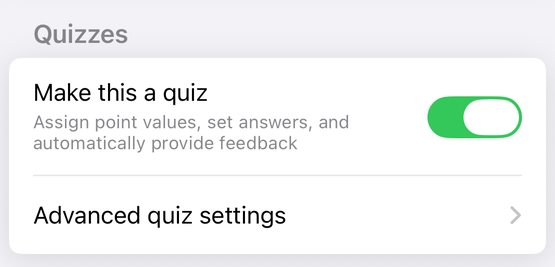
That screen carries the two release choices under a RELEASE GRADES heading, with the same wording Google uses, and three separate switches under RESPONDENT SETTINGS: Missed questions, Correct answers and Point values. Its own footnote under the release rows warns that choosing manual review needs Responses → Collect email addresses, and to turn that on first or scores cannot be released. That warning is the app's reading of the closed loop described above, not a quotation from Google.
Opening Advanced quiz settings presents the PRO screen, which reads “This feature is currently only available to PRO users” and offers no watch-an-ad alternative. That is one row, not a full account of what PRO covers. Separately, a Release grades button appears on the Responses tab of any form that is a quiz, and hides itself on a form that is not.
Run your quiz from your phone
Form+ edits your real Google Forms natively on iPhone and iPad — quiz mode, answer keys, points and feedback, on your own account.
Get Form+ free on the App StoreFrequently asked questions
Does “Later, after manual review” require collecting email addresses?
Google never states it as a requirement, and the steps for changing the setting carry no precondition. What Google does publish is that the release action works on “a response with a recorded email address,” and that sending results and grading individual responses both begin with “If you collect email addresses.” So the setting is not gated, but the only documented route from a held grade back to a respondent is.
Does choosing “Later” stop the quiz from marking itself?
No. Google's API guide says a correctAnswers field makes a question “automatically graded when
the quiz is submitted.” The score exists from the moment the response lands under either setting. Release
controls when the respondent is shown it, not when it is calculated.
Can I release grades with a script?
Nothing Google publishes describes one. The Forms REST API exposes forms.responses.get and
forms.responses.list and no write method, and every field of Grade is marked “Output
only.” Apps Script has Form.submitGrades(), which writes grades, but its reference never uses the
word release and says nothing about email. Releasing is documented only as a click on Google's own Responses
page.