Google Forms response ID
Last updated September 2026 · ~10 minute read
Short answer: every submitted response carries an ID. Google's API calls
it responseId and documents it in a single line — “Output only. The response ID.” You will not
find it anywhere in the Google Forms interface, and Google's help pages on responses never mention it. It exists
on the developer surfaces, where it is the one handle on a response that an edit does not move. Around it
sit two timestamps, createTime and lastSubmittedTime, and
respondentEmail — a field that is empty unless you collected addresses, and that can change
owner after an edit.
Form+ is a native iPhone and iPad client for your real Google Forms — your own Google account, your own Drive, no copies in someone else's database. Get Form+ free on the App Store.
Almost every question about response IDs is really a question about identity: can I point at one submission, be sure it is the same one a week later, and do something to it? Google answers parts of that precisely and leaves others unaddressed. This page separates the two and names the gaps rather than filling them in.
The ID Google never shows you
Google has two help pages that cover responses end to end — Choose where to save form responses and View & manage form responses. Neither uses the phrase “response ID” anywhere. Nothing in the Forms interface surfaces one either.
What the interface gives you instead is position. Google's own instructions for looking at one submission at a time are: “At the top of the form, click Responses → Individual,” then “To move between responses, click Previous or Next,” with the tip “To select from a list of responses, click the Down arrow.” That is an ordinal, and ordinals shift the moment a response is deleted. The same page frames the Individual view as finding answers “by person or, if you allowed people to submit the form more than once, by submission” — person, or ordinal. Never an ID.
Response IDs live entirely on the developer surfaces: the Forms REST API and Apps Script. If you have been hunting for one in the editor or in your linked spreadsheet, that is why you have not found it.
What a response actually carries
Here is the whole FormResponse resource, quoted from Google's reference:
| Field | Google's documentation |
|---|---|
responseId | “Output only. The response ID.” |
formId | “Output only. The form ID.” Note the footnote on the list method: “the formId field is not returned in the FormResponse object for list requests.” |
createTime | “Timestamp for the first time the response was submitted.” |
lastSubmittedTime | “Timestamp for the most recent time the response was submitted. Does not track changes to grades.” |
respondentEmail | “The email address (if collected) for the respondent.” |
answers | “The actual answers to the questions, keyed by questionId.” |
totalScore | “The total number of points the respondent received… Only set if the form was a quiz and the response was graded.” |
Two details in that table are worth pausing on. The answers are keyed by question ID rather than by
question text, so the answer map is not tied to the wording a respondent saw. And the ID is created by
submission, not before it: Apps Script's FormResponse.getId() “returns null if the
form response has not been submitted”, as do getTimestamp() and
getRespondentEmail() on an unsubmitted draft. A response has no identity until it is sent.
Two timestamps on one record
This is the part that answers the question people actually arrive with. There is one
responseId and two times: the first submission and the most recent one. An edited response is
therefore not a new response. It keeps its original createTime and gains a newer
lastSubmittedTime — same record, same ID, two dates.
Now read the second half of that field's definition again: “Does not track changes to
grades.” If you open a quiz, override an auto-marked answer and save a different score,
lastSubmittedTime does not move. Nothing in the response's metadata records that it happened.
Meanwhile totalScore is documented as including “points automatically awarded via autograding
adjusted by any manual corrections entered by the form owner” — so the number can change while both
timestamps sit still. If you are building anything on top of quiz results, see
how Google Forms quiz points work first, and do not treat a
timestamp as a change log.
The same trap sits in the API's only filter. forms.responses.list supports exactly two
filter expressions, timestamp > N and timestamp >= N, described as getting
“all form responses submitted after (but not at) timestamp N”. Google does not say which of the two
timestamp fields that filter compares. If your sync depends on the difference — will an edited response
reappear in tomorrow's incremental pull, or not? — that is a question you have to answer with a test on
your own form, because the documentation does not answer it.
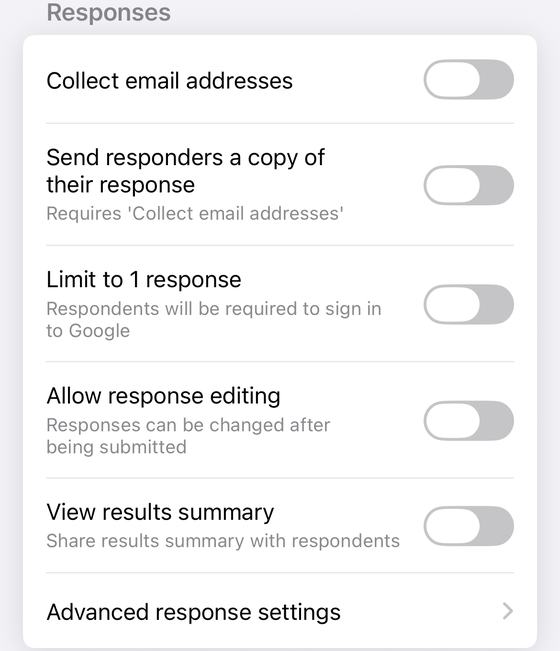
respondentEmail non-empty; it is off here, which is the default. Advanced response
settings, at the bottom, opens Google’s three-way version of the same setting — Do not
collect, Verified, Responder input — and can turn collection on from there. The rows between them
change what a response contains, how many arrive, and who may alter one; none of those changes
what a response is.The identity can change hands
Google is often silent about the consequences of its own features. Here it is not, and the sentence is
easy to miss because it sits in the Apps Script reference rather than in help. Describing
FormResponse.getEditResponseUrl(), Google writes:
“Anyone who visits the link can edit the response, although they need an
account with access to the form if the Form.setRequireLogin(requireLogin) setting is enabled.
If the Form.setCollectEmail(collect) setting is enabled, the form records the email
address of the user who edited the response instead of the email address of the original
respondent.”
Three things follow, and all three matter for identity:
- An edit link is a bearer key, and Google says so. Not “assume”, not “treat it as” — anyone who visits it can edit the response. If you turn on response editing, the URL handed to a respondent is a credential for that one record.
- The one lock named there is narrow and deprecated.
setRequireLoginis marked Deprecated in Google's own reference and is “available only for forms created by Google Workspace users. Users of other types of Google accounts can't be required to log in.” respondentEmailis not a name-tag. It holds whoever last touched the response, not necessarily whoever created it. TheresponseIdis the stable thing about a response; the email attached to it is not.
What you can actually do with a response ID
Less than most people expect, and the two toolsets differ sharply.
The REST API reads only. forms.responses publishes exactly two methods:
get (“Get one response from the form”) and list (“List a form's responses”).
There is no create, no update and no delete — the delete nearby in that navigation belongs to
forms.watches, which is push notifications, not responses. To fetch one response you “call the
forms.responses.get() method with the form ID and the response ID”. That first argument is
the form's own output-only identifier, and it has a guide of its own:
the Google Forms form ID.
The list method does not count. Its response body is exactly two fields —
responses[] and nextPageToken — with no total anywhere. You page until the token
stops coming, at up to 5,000 per page by default, and you count them yourself: the mechanical reason behind
much of the confusion about response counts.
Apps Script can delete. Form.getResponse(responseId) “gets a single form
response based on its response ID” and throws an error “if the response does not exist”.
Form.deleteResponse(responseId) “deletes a single response from the form's response store”,
carrying Google's own warning: “this method is irreversible.” So: not with the REST API, yes with Apps
Script.
The sheet holds copies, and Google will not say more
Google publishes one genuinely useful fact about the relationship between a response and its
spreadsheet row, and it is tucked inside the deletion method: deleteResponse “does not delete
copies of responses stored in an external response destination (like a spreadsheet), but does remove the
response from the form's summary view.” That is Google describing the linked sheet as a separate store
of copies. Delete a response and its row survives. The form's own response store and your spreadsheet
are two places, not one.
What Google does not publish is what an edit does to that row. Neither help page on saving or viewing responses says whether an edited response rewrites its original row or appends a new one, and no developer reference states it either. We are not going to guess, and you should distrust any page that states it flatly without a source. The test takes ninety seconds: submit a response, note the row and its timestamp, open the edit link, change one answer, resubmit, look again. That gives you a fact about your own sheet rather than a rumour about someone else's.
Google does document one more thing about that store: it degrades at volume. The summary stops appearing above 50,000 responses, Sheets syncing stops above 100,000, and above 10,000 the question and individual views disappear and CSV downloads are no longer sorted by submission time. Identity survives all of that — the interface you were using to reach it does not.
What a response ID is not
- Not a person. Identity, where any exists, is
respondentEmail, and only when email collection is on. - Not a position. “Response 3” in the Individual view is an ordinal that moves when something before it is deleted. The ID does not.
- Not documented as related to the edit URL. Google describes the edit link as “a URL that can be used to edit a response that has already been submitted” and never states any relationship between that URL and the response ID. Do not assume you can derive one from the other.
- Not documented as surviving a copied form. Google publishes nothing about what happens to response IDs when a form is duplicated, so do not build a cross-form key on one.
- Not a way to see someone else's answers. Reading responses by ID requires the response-reading OAuth scopes on a form you already have access to.
Working with individual responses on a phone
Form+ opens a form's Responses screen on iPhone and iPad and can show submissions one at a time rather than only as a summary. Its own per-response notes — a status, tags, an assignee — are keyed to the response's ID rather than its position in the list, which is the practical reason the distinction on this page matters: a label keyed to “row 3” follows the row, not the submission.
Read your responses one at a time, from your phone
Form+ is a native iPhone and iPad client for your real Google Forms — your own Google account, your own Drive, no copies in someone else's database.
Get Form+ free on the App StoreFrequently asked questions
What is a Google Forms response ID?
It is the string the Forms API calls responseId, documented as “Output only. The response
ID.” Every submitted response has one. In Apps Script, FormResponse.getId() returns it, and
returns null for a response a script has built but not yet submitted — identity arrives with
submission.
Where do I find a response ID in Google Forms?
You do not. Google's two help pages covering responses — Choose where to save form responses and View & manage form responses — never use the phrase at all. The Individual tab moves between responses with Previous and Next, which is a position, not an identity. Response IDs appear only on developer surfaces: the Forms REST API and Apps Script.
Does editing a response change its response ID?
Google documents two separate timestamps on one record: createTime is “the first time the
response was submitted” and lastSubmittedTime is “the most recent time the response was
submitted”. That is one response carrying both, so an edit updates the second and leaves the first. Google
does not document the ID changing.
Can I delete a single response by its ID?
Not through the REST API, which publishes exactly two methods on form responses: get and
list. Apps Script can: Form.deleteResponse(responseId) deletes one response, and
Google warns that it “does not delete copies of responses stored in an external response destination (like
a spreadsheet)” and that the method is irreversible.
Does a response ID tell me who answered?
No. Identity, when there is any, lives in respondentEmail, documented as “The email address
(if collected) for the respondent” — so it is empty unless you turned on Collect email
addresses. It is also not permanent: Google states that when someone uses an edit link, “the form
records the email address of the user who edited the response instead of the email address of the original
respondent”.