Google Forms deadlines: setting one, saying it, enforcing it
Last updated September 2026 · ~10 minute read
Short answer: a published Google Form can close itself on a date and time or after a number of responses — built in since January 2026, and off by default. What Google will not do is communicate the deadline. There is no countdown anywhere in Google Forms, Google never publishes whose time zone the close time uses, and it documents nothing about a submission that is in flight when the moment arrives. Setting the deadline is the easy half.
Form+ schedules your real Google Forms from an iPhone or iPad — opening and closing dates, a repeating daily window, and a message for anyone who arrives outside it. Get Form+ free on the App Store.
The setting takes about thirty seconds. Everything that goes wrong with a Google Forms deadline happens in the gap between the form closed and the responder understanding why — and Google's documentation is far thinner on that half than you would expect.
What Google actually gives you
Google announced automatic closing in Set Google Forms to automatically stop accepting responses, rolling out from 12 January 2026 for Rapid Release and 29 January 2026 for Scheduled Release, and available to all Google Workspace customers, Workspace Individual subscribers, and users with personal Google accounts. Three properties matter more than the feature itself:
- It is off by default. Google's wording: “This feature will be OFF by default and can be enabled by form creators after they publish a form.”
- It lives on a published form. If the setting is not where the instructions say it is, the usual reason is that the form is still a draft.
- Two triggers, documented as alternatives. View & manage form responses describes a close date or a response limit — not a pair you combine.
Notice how little machinery sits underneath. The
Forms REST API
carries no close-date, deadline or time-zone field on the Form resource; the only
response-acceptance control it exposes is a boolean,
publishSettings.publishState.isAcceptingResponses. The
Apps Script Form class
is the same shape — setAcceptingResponses(enabled), on or off, no date anywhere. As far as any
documented Google API is concerned, a deadline is a switch that something flips for you at a time you
cannot read back.
Set the deadline
- Publish the form. The setting does not exist on a draft.
- In the published form's response settings, under Accepting responses, choose Set close date or response limit.
- For a deadline, under On a date, click Choose date and time. For a cap instead, select After a number of responses.
- Rewrite the closed message. The default is generic and it is the only thing a late responder will read. More on this below.
- State the deadline where responders will see it — the form description and the message carrying the link, with an explicit time zone offset. Google never publishes which clock the close time uses, so yours is the only one anybody can act on.
- Pad the boundary. Set the close a few minutes past the deadline you announced; Google documents nothing about the instant of closing.
The closed message is the only thing a late responder reads
This part Google does document properly. On the same help page, under “Responders will see this message when the form is closed for responses,” there is an Edit control, and Google's own example text is: “This form is no longer receiving responses. Thanks!”
That default is polite and nearly useless, because someone who has just hit a closed form has exactly one question — did I miss it, or is this broken? — and the default answers neither. Put the answer in the box:
- Name the deadline and say it passed. “Registration closed at 17:00 on 14 March.” A date turns a dead end into an explanation.
- Give the next route. An email address, a later round, a waitlist. Most people hitting a closed form still want the thing behind it.
- Do not write “closed” and stop. An unexplained closed form and a broken link look identical from the outside, and one of them generates a support message.
One subtlety: the message is attached to acceptance, not to the deadline. Apps Script names the
same field setCustomClosedFormMessage(message) — “Sets the message to display if the form is
not accepting responses.” The same text therefore appears whether the form closed on schedule, hit its
cap, or you switched it off by hand, so write it to make sense in all three cases. It is not the
confirmation message, which is what people see
after a successful submission.
The time zone question Google never answers
You set a form to close at 23:59. Whose 23:59?
Google does not say. The help page documenting the close date never mentions a time zone. Nor does the
January 2026 announcement. The Form resource has no time-zone field; the Apps Script
Form class has no time-zone method. Four surfaces — help centre, announcement, REST API,
scripting API — and not one published answer.
Where Google is silent we will not fill the gap with a guess, so this page will not tell you it is the creator's zone, the responder's zone, or UTC. It will tell you that this particular silence is expensive: it reveals itself once, at the worst moment, to whoever was closest to the cut-off. Design around it:
- Never set a deadline at midnight. It is the one time where an hour of drift also moves the date, which is the part people remember.
- Announce with an explicit offset. “Closes 23:59 CET (UTC+1)” is unambiguous to a human whatever the setting does internally, and it is what people will quote back at you.
- Pad by an hour if your audience is spread out. Close at 01:00, announce 23:59. Early submissions are free; a contested one is not.
- Test it once if the deadline is consequential. A five-minute close date on a throwaway form settles it for your account in a way no amount of reading will.
What a responder mid-submission sees: Google is silent here too
A deadline has an edge and someone is always standing on it — the person who opened the form at 23:54, typed for six minutes and pressed Submit at 00:00. Does that submission land?
Google does not document it. The help page says the form stops accepting responses and says nothing about a response already in progress — nothing about a page loaded before the close time, nothing about a submission in flight, and no warning shown to someone whose form is about to shut under them.
The nearest thing Google publishes to a boundary statement is about the other trigger: “If multiple people respond at the exact same time, the form accepts responses regardless of the response limit.” That is Google's own help centre saying the response cap is approximate — a form set to close at 100 can end up with more. If the count trigger is admittedly fuzzy at its boundary, treating the date trigger as exact to the second is an assumption nobody has published. Plan so nothing important depends on the final minute.
The Apps Script route, and its limits
If you need a closing rule the built-in setting cannot express — a recurring window, a close that
depends on something else — Apps Script is the documented route.
Form.setAcceptingResponses(enabled) turns collection on and off, and an
installable time-driven trigger
can run a function “as frequently as every minute or as infrequently as once per month.” That is a better
deadline than the settings screen offers, and it repeats.
Two limits, both from Google's own documentation. First, the clock is approximate: the triggers page warns the time “might be slightly randomized,” and says that for a recurring 9 AM trigger “Apps Script chooses a time between 9 AM and 10 AM.” For a deadline people are racing, an hour of latitude is not a footnote.
Second — and this is the one people arrive hoping to disprove — nothing in Apps Script can draw a clock inside a Google-hosted form page. The script runs on Google's servers on a clock of its own; it never sees a particular person open the form, and it cannot put a pixel on the page they are looking at. Scripting buys a smarter close, not a countdown. If what you wanted was a per-person timer rather than a shared deadline, see add a timer to Google Forms.
Where Form+ fits
Form+ is a native iPhone and iPad client for your real Google Forms. Its Form Scheduler sits in the editor toolbar of any form your own account owns, and covers what the built-in setting does not: an opening date as well as a closing one, a repeating daily window, an explicit time zone, and a message for anyone who arrives outside the window.
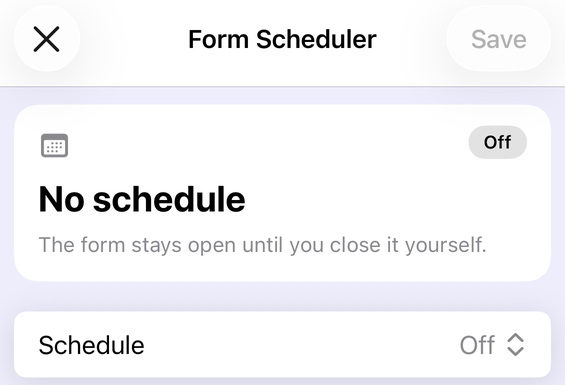
Three things bear directly on the problems above. The schedule carries an explicit time
zone you choose, and the screen flags it when your device is somewhere else — the one question
Google's own documentation does not answer. It can send you a push notification when the form's
status changes, so the close is an event you observe rather than one you hope happened. And the
close itself is real rather than in-app: Form+ shuts the form the same way a script would, by setting
your Google Form to stop accepting responses and writing your closed message onto it. The deadline
therefore applies to the ordinary forms.gle link, in any browser, on any device — and, being
trigger-scheduled like any Apps Script job, it is no more exact to the second than the rest of this page
suggests.
The full walkthrough is in
schedule a Google Form to open or close;
the response-count side is the separate
Response Limiter. Both are Pro tools, and both
carry the same ownership condition: on a form someone else shared with you the Scheduler button, the
Limiter button and the response-notifications bell are not drawn in the toolbar at all. They are removed
rather than locked, so there is no padlock and nothing to scroll to — a deadline on a colleague's form has to
be set from the owner's account. What Form+ does not do — and no iOS app can — is put a countdown
on the page Google serves at a docs.google.com or forms.gle address. That page is
Google's.
Deadline, cap, and countdown, side by side
| Close date | Response limit | A countdown | |
|---|---|---|---|
| Exists in Google Forms | Yes, since January 2026 | Yes, same setting | No — not documented anywhere |
| Responder sees it coming | No | No | That would be the point |
| Exact at the boundary | Not documented either way | No — Google says so explicitly | — |
| Time zone published | No | N/A | — |
| In the REST API | No — only a boolean | No | No |
| Custom closed message | Yes | Yes | — |
Give your deadline an opening date, a time zone, and a message
Form+ schedules your real Google Forms from an iPhone or iPad — opening and closing dates, a repeating daily window, and a message for anyone who arrives outside it.
Get Form+ free on the App StoreFrequently asked questions
Can a Google Form close itself on a deadline?
Yes, since January 2026. A published form can stop accepting responses on a date and time, or after a number of responses, set under Accepting responses in the published form's response settings. Google states the feature is off by default and is enabled by form creators after they publish a form.
What time zone does a Google Forms close date use?
Google does not say. The help page that documents the close date never mentions a time zone, the
January 2026 announcement never mentions one, the Forms REST API has no time-zone field on the
Form resource, and the Apps Script Form class has no time-zone method. Four
surfaces, no published answer. Announce your deadline with an explicit offset and do not schedule it near
midnight.
What happens if someone is mid-submission when the deadline passes?
Google does not document it. The help page says the form stops accepting responses and says nothing about a submission already in progress. The one boundary statement Google does publish is about the other trigger — “If multiple people respond at the exact same time, the form accepts responses regardless of the response limit.” Treat the moment of closing as fuzzy and set the close time a few minutes past the deadline you announced.
Do responders see a countdown before a Google Form closes?
No. Google documents no countdown, clock or time-remaining display of any kind. The quiz help page, the
response-management help page, the Forms REST API and the Apps Script Form class contain no
timer, duration or countdown field. A responder sees the form normally until it closes, and then sees the
closed message. Nothing counts down in between.
Can I set a Google Forms deadline from my phone?
Google's documented steps assume the published form's response settings in the desktop web editor. Form+ puts a Form Scheduler in the editor toolbar on iPhone and iPad, with opening and closing dates, a time zone row, and a message shown to anyone who reaches the form outside its window. It is one of the Pro tools, and it appears on forms your account owns — on a form someone else shared with you the button is absent rather than locked.