Is there a Google Forms app for iPhone?
Last updated September 2026 · ~8 minute read
Short answer: no. Google publishes separate iPhone apps for Docs, Sheets, Slides, Drive and Gmail — but there is no Google Forms app. On iPhone, the Google-provided way to use Forms is the website. Third-party native apps exist, and what matters is where they keep your data. Form+ for Google Forms, the app behind this site, is one of them: it edits the forms already in your Google Drive — free on the App Store.
This trips people up because the rest of the suite has apps. If you have Docs and Sheets on your phone it is reasonable to assume Forms is a download away. It is not.
How we checked
Rather than assert it: searching Apple's App Store catalogue for google forms and filtering to apps published by Google LLC returns Google Drive, Google Docs, Google Sheets, Google Slides, Gmail and the Google app. No Forms app appears, because none exists. Google's own help centre does have an “iPhone & iPad” section for Forms — and its first step is to open a mobile web browser and go to forms.google.com, so that is the mobile website.
The cleanest proof is the shape of Google's own help pages. Two of them, same “iPhone & iPad” tab, opposite instructions. The Sheets page opens with “Step 1: Download the Google Sheets app. Open Google Sheets on the App Store.” The Forms page opens with “On your iPhone or iPad, open a mobile web browser, like Safari. Go to forms.google.com.” One tells you to install. The other tells you to browse. (If you check this yourself, note that the iPhone text sits behind a tab: open either page on a computer and you land on the Computer tab, so both links above carry the iOS platform parameter.)
Your three options on iOS
1. The Google Forms website in Safari
Free, official, and almost everything is there because it is the same editor. The cost is that it is a desktop web app on a phone screen: small controls, a lot of pinching, and no notifications when a response arrives. Fine for a quick edit; wearing as a daily tool.
Almost, not quite. Under “Step 2: Edit and format a form or quiz”, Google's iPhone & iPad page for Forms warns: “Important: Date and time picker is not currently supported for iPhone and iPad.” The same page lists what you can do there — add, edit or format text, images or videos; create and grade quizzes; send responses to a Google Sheet. A capable editor with one documented hole, found at the worst moment.
2. Add it to your Home Screen
Open the form in Safari and add it to the Home Screen. This is a bookmark with an icon, not an app — it removes a couple of taps and nothing else. Worth knowing before you go looking for something to install.
3. A third-party native app
Several exist. The question worth asking about any of them is where your data lives, because that is what separates a client from a replacement.
What to look for in a third-party Forms app
- It works on your own Google account. Your forms stay in your Drive, owned by you.
- It uses Google's official Forms API rather than scraping or re-hosting.
- No migration. If an app asks you to re-create or import your forms into its own system, your responses are now in someone else's database and your Google Form is a copy.
- Real responses, not a mirror. Edits should write back to the same form a respondent is filling in, not to a parallel version.
Form+
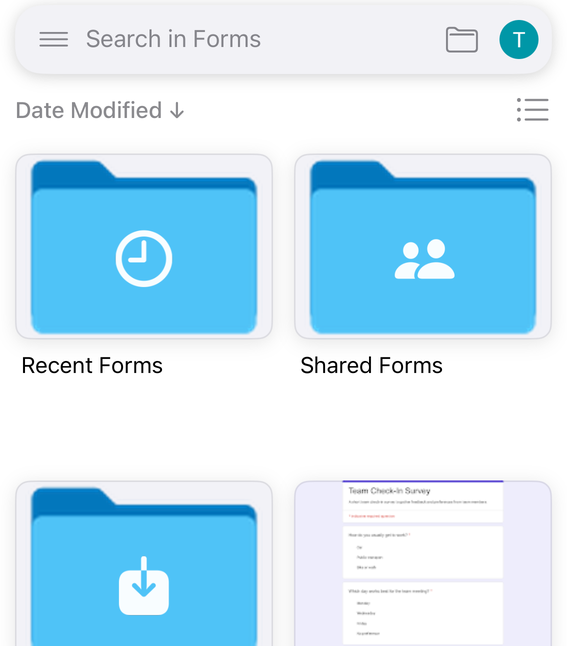
Form+ is a native Google Forms app for iPhone and iPad that works on your real Google Forms. It signs in to your own Google account, works on the forms already in your Drive, and writes back to those same forms:
What a native app can do that a browser tab cannot
Not “it looks nicer”. A handful of things a web page on iOS structurally cannot do are the only honest reason to install anything.
Tell you a response arrived
Google's Forms API supports this directly. An app registers a watch and Google delivers “EventType.RESPONSES, which notifies when form responses (both new and updated) are submitted”. Google documents the catch too: “Notifications do not contain detailed form or response data. After each notification is received, a separate API call is required to fetch fresh data.” That second round trip is the background errand an installed app can run and a closed Safari tab cannot. In Form+ it is the Response Push Notifications switch, and it is PRO.
Open a form you have already opened, instantly
Form+ keeps a local copy of every form it has loaded and of that form's responses, checked against the file's modification date in Drive. If the saved copy is still current the screen paints from disk instead of waiting on a download, and a Last fetch line in the responses header tells you whether you are reading live data or a saved copy — a distinction the mobile website never makes.

Hand the link to the rest of your phone
The Share form row passes your form's live link to the standard iOS share sheet — Messages, Mail, AirDrop, whatever you have installed — not to a web page's own copy-link box. Free and ungated.
Use the camera for something other than an upload
Be precise here: Google's iPhone page already says you can add images from a mobile browser. What a browser cannot do is turn a photograph into structure — Form+ can photograph a printed questionnaire and convert it into real questions (Scan questions using camera). PRO, as is inserting a camera image into a question.
What Form+ is not
- Not a Google product. Form+ is an independent app, not affiliated with, endorsed by or sponsored by Google. Google Forms, Sheets and Drive are trademarks of Google LLC.
- Not a Forms clone. No separate form engine, no separate form URL, no separate response database. It signs in to your Google account and edits the forms already in your Drive, through Google's official Forms API.
- Not a migration. Nothing is imported, duplicated or re-hosted. Delete the app and your forms are where they always were, because they never moved.
- Not a replacement for the web editor. The same form opens at forms.google.com, at the same address, the moment you put the phone down.
Where Form+ stops
Any client is bounded by the API underneath it — and Google publishes those bounds.
Responses are read-only. The Forms API's discovery document (v1, revision 20260909) lists four methods on forms — create, get, batchUpdate, setPublishSettings — and two on forms.responses: get and list. No submit. The REST reference marks every response field “Output only”, down to “Output only. The actual answers to the questions, keyed by questionId.” Google's comparison guide puts it in a line: “The REST API does not support the following: Submitting form responses.” Form+ reads, filters, exports and analyses your responses; it cannot invent one, and no app on this API can.
No single client has all of Google Forms. Google is explicit that even its two programmatic routes differ: “Both the REST API and the Forms Service on Apps Script support Forms features that the other does not. The exact list of supported features changes over time.” Apps Script's FormResponse has a submit() method — “Submits the response” — where REST has none; REST subscribes to Pub/Sub events, where Apps Script cannot. Google's published code samples, such as “Upload files to Drive from Forms”, sit on the script side for that reason. The upshot is reassuring: at any edge, the web editor is one tap away, on the same form.
What is free and what is PRO
Form+ is free to download and a real amount of it is free to use. Below is the split for the parts this guide touched — a sample of each column, not a full inventory, so read an absence as “not covered above” rather than “free”.
| Free | PRO | |
|---|---|---|
| Your forms | Sign in with your own Google account; browse and open the forms in your Drive | — |
| Editing | Add and edit the standard question types | File upload questions; images in a question; Customize form theme; Scan questions using camera; Print Form |
| Sharing | Share form, via the iOS share sheet; publish and unpublish | Form QR code (QR Studio); Create a poster — it wraps the same paid QR; Prefilled link & QR |
| Responses | Reading responses already loaded | Refreshing more often than the free window; Filter responses; the individual response reader; Email responses; Print all; export to CSV, Excel or Sheets |
| Alerts | — | Response Push Notifications; Form Scheduler; Response Limiter |
The word is PRO rather than “paid” on purpose: some gates can also be opened by watching an ad.
PRO is billed through the App Store rather than by us, so a subscription is changed or cancelled from your Apple account and not from anywhere inside the app. Our support page lists those taps in order, and the address to write to if a purchase or a sign-in goes wrong.
Website or native app?
| Forms website in Safari | Native app | |
|---|---|---|
| Cost | Free | Varies; Form+ is free to download |
| Built for a phone | No | Yes |
| Response notifications | No | Depends on the app |
| Works offline | No | Depends on the app |
| Your data stays in Drive | Yes | Only if the app is a client, not a replacement |
A native editor for the forms you already have
Form+ edits your real Google Forms on iPhone and iPad — your account, your Drive, no migration.
Get Form+ free on the App StoreFrequently asked questions
Is there an official Google Forms app for iPhone?
No. Google ships Docs, Sheets, Slides, Drive and Gmail as iPhone apps, but not Forms. Searching Apple's App Store catalogue for google forms and filtering to apps published by Google LLC returns Google Drive, Google Docs, Google Sheets, Google Slides, Gmail and the Google app, and no Forms app appears, because none exists. On iPhone the Google-provided way to use Forms is the website.
Can I edit a Google Form on my iPhone?
Yes — through the Forms website in a mobile browser, or a third-party native app. Google's iPhone & iPad help page tells you to open Safari and go to forms.google.com. There is simply no Google-published app to install.
Are third-party Google Forms apps safe?
It depends where your data goes. Prefer one that signs in to your own Google account, uses Google's official Forms API, and leaves the form in your Drive. If it asks you to migrate your forms into it, your data has left Google Forms.
Does Google Forms work properly in Safari on iPhone?
Mostly. Google's iPhone page confirms you can add, edit and format text, images and videos, build and grade quizzes, and send responses to a Sheet. It also warns that the date and time picker is not currently supported for iPhone and iPad.
Can I get a notification on my iPhone when someone responds?
Not from the website. Google's Forms API supports it — an app registers a watch and receives RESPONSES events — but that needs something installed and running in the background, which a Safari tab is not. In Form+ it is the Response Push Notifications switch, and it is PRO.
Is Form+ made by Google?
No. Form+ is an independent app, not affiliated with, endorsed by or sponsored by Google. It is a client for your own account: it edits the real forms in your Drive through Google's official Forms API and stores no copy of them.