Duplicate responses in Google Forms
Last updated September 2026 · ~9 minute read
Short answer: Google Forms has no de-duplication. It does not detect duplicates, does not merge them, does not warn you about them, and does not document any such behaviour anywhere in its help centre or its developer reference. Every submission that reaches the form is stored and counted. The one prevention lever Google gives you is Limit to 1 response, which limits by Google Account — and forces every responder to sign in to get there.
Form+ analyses your real Google Forms responses on your own account — duplicates, repeat submitters, bursts and spam — and lets you review before anything is removed. The app is free; this tool is part of Form+ Pro. Get Form+ free on the App Store.
That is an unsatisfying answer, so most articles on this topic quietly invent a better one. Below is what Google actually publishes, what it conspicuously does not, and how to tell the three very different things that all look identical when you are staring at two near-matching rows in a spreadsheet.
Three different things that look the same in the responses list
Before reaching for a setting, work out which of these you are looking at, because the fix is different in each case and two of them are not really duplicates at all.
- A double submission. One person, one intention, two rows — a double-tapped Submit button, a flaky connection where the browser retried, a back-button-then-submit-again. The answers are identical and the timestamps are seconds apart.
- A genuine resubmission. The same person deliberately filled the form in a second time, usually to correct something. The timestamps are far apart and at least one answer differs.
- Two different people with the same answers. On a short form — a yes/no RSVP, a three-option poll — identical answer sets are not evidence of anything. This is the case where automatic de-duplication would destroy data, and it is a decent reason no platform does it silently.
The distinction matters because only the first one is unambiguously safe to delete.
What Google gives you: Limit to 1 response
This is the whole of Google's prevention story. On its Publish & share your form with responders help page, the setting lives in Settings → Responses and the instruction is simply “Turn on Limit to 1 response.” Google states the consequence plainly on the same page: “To access and fill out the form, users must sign in to their Google Account.”
The developer reference is where the scope is defined precisely. Apps Script's
Form class
documents setLimitOneResponsePerUser as setting “whether the form allows only one response per
respondent”, and hasLimitOneResponsePerUser as determining the same. Per respondent.
A respondent, here, is a signed-in Google Account.
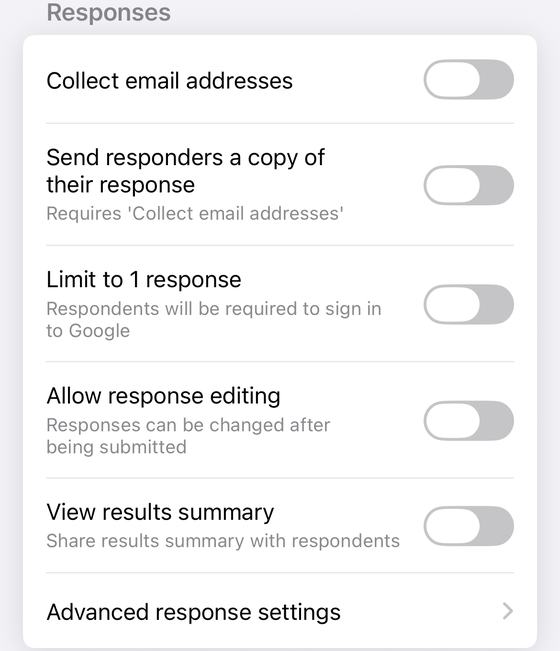
Two consequences follow, and both are the reason people turn the setting back off again:
- Anonymous forms cannot use it. The moment you require a Google sign-in, the form is no longer open to people without a Google Account, and it is no longer anonymous in the ordinary sense. If anonymity is the point of your form, see what anonymous actually means in Google Forms.
- It is one account, not one person. Anyone with a work address and a personal address has two respondents' worth of access, and creating a third Google Account costs nothing. The setting raises the effort of submitting twice; it does not make it impossible.
Limiting by email is not limiting by person
People frequently conflate Collect email addresses with duplicate prevention, and they are separate mechanisms doing separate jobs. Collection does not restrict anything at all — it only records who submitted.
The Forms API's FormSettings reference lists the three values collection can take, and the difference between them is exactly the difference between a recorded address and a trustworthy one:
| Value | What Google documents | Use as a duplicate key? |
|---|---|---|
DO_NOT_COLLECT | “The form doesn't collect email addresses. Default value if the form owner uses a Google account.” | No address to key on at all |
VERIFIED | “The form collects email addresses automatically based on the account of the signed-in user.” | Yes — it is the signed-in account |
RESPONDER_INPUT | “The form collects email addresses using a field that the respondent completes on the form.” | No — it is typed text, and can be anything |
That middle column is the part to internalise. Under RESPONDER_INPUT the email column is a
free-text field the respondent fills in, so a determined person types a different address and a careless one
types the same address with a typo. Counting distinct values in that column tells you how many distinct
strings you received, not how many distinct people responded. Only VERIFIED ties the
address to an account Google authenticated — and that is the same authentication Limit to 1
response demands.
Note also that DO_NOT_COLLECT is Google's documented default for a personal account, which
lines up with what the help centre says about identity: “Their usernames won't be recorded unless you turn on
the ‘Responses’ setting to collect email addresses.” On a default personal form you have no per-person key
whatsoever, so per-person duplicate detection is not merely absent — it is impossible.
Editing is not a duplicate, and this part Google does document
A common worry: if Allow response editing is on and someone edits and resubmits, do you
end up with two responses? In Google's own data model, no — and the
forms.responses
reference is unusually explicit about it. Each response carries one responseId, plus two
timestamps:
createTime— “Output only. Timestamp for the first time the response was submitted.”lastSubmittedTime— “Output only. Timestamp for the most recent time the response was submitted. Does not track changes to grades.”
Two submission times on one response object is precisely the shape you would expect from an edit updating
a record in place rather than appending a new one. If you need to know whether a response was ever edited,
those two fields are the check: createTime and lastSubmittedTime differ.
What Google does not say is what that looks like in your linked spreadsheet. And the
sheet is worth treating with suspicion here, because Google's own developer documentation is clear that the
sheet is a copy rather than the record: Apps Script states that “All forms… save a copy of responses in the
form's response store”, and its removeDestination() documentation notes that “The unlinked
former destination still retains a copy of all previous responses.” The spreadsheet is a mirror. Google
publishes nothing about what editing a cell or deleting a row in that mirror does back to the form, so
assume it does nothing and never treat sheet edits as corrections to your data.
What Google does not publish at all
This is the section other articles fill with confident invention, so here it is stated as an absence.
- No de-duplication in the responses view. Google's View & manage form responses help page covers the summary, question and individual views, downloading a CSV, notifications and stopping collection. Duplicates are not mentioned once. There is no duplicate flag, no merge, no warning.
- No de-duplication in the linked sheet. Rows arrive in submission order. Nothing marks one as a repeat of another.
- No API surface for it either. The Forms API exposes only
getandliston responses — there is not even a delete method, let alone a de-duplicate one. AndFormSettingsin the REST API carries just two fields,quizSettingsandemailCollectionType; Limit to 1 response and Allow response editing are not exposed there at all. - No documented account-switching behaviour. Google does not publish what happens when someone signs in to a second Google Account and submits again to a limited form. The wording “one response per respondent” is all you get, and the reasonable reading is the literal one.
Telling a genuine resubmission from a double-click
With no built-in signal, you are doing this yourself. Two attributes carry almost all the information:
- The timestamp gap. A double-click or a retried request lands within a second or two. Anything separated by minutes, hours or days was a deliberate second visit.
- How much of the answer set matches. An accidental double is identical in every field, because nothing was retyped. A deliberate resubmission almost always differs somewhere — the person went back in order to change something.
Combine them and the rule of thumb writes itself: identical answers, seconds apart is an accident and safe to remove; different answers, far apart is a correction, and the later one is usually the one to keep; identical answers, far apart is ambiguous and deserves a look before you delete anything. Do this before any headcount, invoice or attendance record depends on the number.
Finding them on your phone
Form+ includes a Duplicates & spam tool — a Pro feature — under Clean up in the response tools for a form. It runs four detectors over the responses already loaded on the device and groups what it finds:
- Duplicate answers — a response whose non-empty answer set is identical to an earlier one, compared case-insensitively.
- Repeat submitters — the same collected email address appearing more than once. The first submission is kept; the later ones are flagged.
- Rapid-fire submissions — six or more submissions inside a two-second window, which is not a human filling in a form.
- Possible spam — a text answer with a long run of repeated characters, two or more links, or a long stretch that is mostly symbols.
Two honest caveats. It is a review list, not a cleaner: each response is flagged at most once, nothing is deleted automatically, and removal happens only after you select rows, tap Remove, confirm, and save the responses screen. And it is a detector, not a preventer — it finds duplicates after the fact. Prevention is still Limit to 1 response, with the sign-in cost that comes with it.
Spot duplicates in your responses from your phone
Form+ analyses your real Google Forms responses on your own account — duplicates, repeat submitters, bursts and spam — and lets you review before anything is removed. The app is free; this tool is part of Form+ Pro.
Get Form+ free on the App StoreFrequently asked questions
Does Google Forms remove duplicate responses automatically?
No, and Google does not document any de-duplication anywhere. Its help page on viewing and managing
responses says nothing about duplicates, and the Forms API exposes only get and list
methods on responses — there is not even a delete. Every response that reaches the form is stored and
counted.
Does Limit to 1 response stop the same person responding twice?
It limits one response per Google Account, not one per human. Google's own wording is that the form “allows only one response per respondent” and that “users must sign in to their Google Account”. Someone with a second Google Account, or a work address and a personal address, is a second respondent as far as the form is concerned.
Does editing a response create a duplicate?
Not in Google's data model. The Forms API gives each response one responseId, a
createTime described as “Timestamp for the first time the response was submitted”, and a
lastSubmittedTime described as “Timestamp for the most recent time the response was
submitted. Does not track changes to grades.” Two timestamps, one response. What Google does not document is what that looks like in the linked
spreadsheet.
How do I tell a real resubmission from a double-click?
Look at the gap between the timestamps and at how much of the answer set matches. A double-click or a retried network request lands within a second or two and matches every field. A genuine resubmission arrives minutes or days later and almost always differs in at least one answer, because the person resubmitted in order to change something.
Can I find duplicate responses from my phone?
Yes. Form+ for iPhone and iPad has a Duplicates & spam tool, a Pro feature, that analyses the loaded responses on the device and groups what it finds under Duplicate answers, Repeat submitters, Rapid-fire submissions and Possible spam. It is a review list — nothing is deleted until you select rows, tap Remove, and save.