Google Forms response receipts: sending people a copy of their answers
Last updated September 2026 · ~8 minute read
Short answer: Google calls this Send response receipts. In Settings → Responses, next to “Send responders a copy of their response,” select When requested or Always. It only works if the form is collecting email addresses, and Google's help page documents almost nothing about the email itself — not what it contains, not who it comes from, not whether it can be sent again.
Form+ puts email collection and the advanced response settings in one screen — on your real Google Forms and your own Google account. Get Form+ free on the App Store.
Two clicks to switch on, then a long silence. This guide covers the setting, the dependency that trips most people up, and — the part no other guide will tell you — exactly where Google's documentation stops.
Turning response receipts on
Google's View & manage form responses help page has a section headed Send response receipts. It opens with one sentence of specification — “If you collect responder emails, you can choose whether respondents get a copy of their answers” — and then gives these steps:
- Open a form in Google Forms.
- At the top of the form, click Settings.
- To turn on “Collect email addresses,” select an option: Verified for verified email collection, or Responder entry for manual email collection.
- Next to “Responses,” click the Down arrow.
- Next to “Send responders a copy of their response,” select When requested or Always.
Read that last step carefully, because it is the whole feature. Google names exactly two values — When requested and Always — and nothing else. It never names an “off” value, never states which state a new form starts in, and gives no separate instruction for turning receipts back off. If you have read elsewhere that there are three clearly documented options, that is not what the help page says today.
The two values differ in who decides. Always means every submission produces a receipt; When requested leaves it to the respondent to ask for one. Google does not document how that request is made, so if that distinction matters to your form, open your own live form and look.
The dependency: no email address, no receipt
A receipt has to be posted to somewhere, so the form has to know an address. That makes Collect email addresses a hard prerequisite rather than a recommendation, and which collection mode you are in decides what the address is worth.
Google's Forms API reference gives the three states their unambiguous names:
| API value | Google's description | Can it send a receipt? |
|---|---|---|
DO_NOT_COLLECT | “The form doesn't collect email addresses.” | No — there is no address |
VERIFIED | “The form collects email addresses automatically based on the account of the signed-in user.” | Yes |
RESPONDER_INPUT | “The form collects email addresses using a field that the respondent completes on the form.” | Yes |
So a genuinely anonymous form cannot send receipts. That is not a bug to work around; it is the same fact stated twice.
One wrinkle worth knowing before you go looking for a control that does not exist: Google's help page
uses two different labels for the same option. Under Collect emails manually it says select
Responder input; three paragraphs later, under Send response receipts, it says
select Responder entry. Same setting, same value — RESPONDER_INPUT in the API
— written two ways on one page. Pick whichever label your screen shows and move on.
The difference between the two working modes matters more than the label does. Verified ties the receipt to a signed-in Google Account: respondents “must confirm their Google Account email address gets collected with their response,” and that confirmation “displays on each page of the form.” The address is real, but everyone answering needs a Google Account. Responder input asks people to type their address, which works for the general public and fails silently on a typo — the receipt for jhon@example.com goes to whoever owns that address, or nowhere. Our guide on seeing who responded to a form covers the trade-off between the two modes in depth.
What Google does not document about the receipt
This is the most useful section on the page, because it is the part everyone else guesses at. Beyond the steps above, Google's help pages publish exactly one fact about response receipts, and it is a warning: “In certain circumstances, responders may not receive expected response receipts due to spam filters or other counter-abuse measures.”
That is all. Google is silent on every one of these:
- What the email contains. No help page states whether the receipt lists every answer, how it formats them, whether uploaded files are linked, or whether quiz scores appear.
- Who it comes from. The sender address and the subject line are not documented anywhere in Google's help pages, so any mail rule or filter you plan to tell respondents about has to be derived from a receipt you have actually received.
- When it arrives. Nothing is published about timing or delivery guarantees — only the spam-filter caveat above.
- Whether it can be resent. There is no documented resend, and no documented way to send a receipt for a response that arrived before you turned the setting on.
- What editing a response does. Google documents the Allow response editing setting, but not whether resubmitting an edited answer produces a second receipt, an updated one, or nothing at all. (See editing a response after submitting.)
- Whether a copy can go anywhere else. Nothing documents sending the receipt to a second address, to you, or to a shared inbox.
The practical consequence: submit a test response to your own form and read the email that arrives. Two minutes of that tells you more than every help page combined, and it is the only way to know what your respondents will see before they see it. Do it again after any change to the form's questions, because undocumented behaviour is behaviour that can change without a changelog.
It is not the same as the other two emails
Three separate features get called “the Google Forms email,” and mixing them up is the usual reason someone thinks receipts are broken:
| Feature | Who gets it | Where it lives |
|---|---|---|
| Response receipt | The person who filled in the form | Settings → Responses → Send responders a copy of their response |
| New response notification | You, the owner | Responses tab → More → Get email notifications for new responses |
| Confirmation message | The respondent, on screen — not by email | Settings → Presentation → Confirmation message |
Quizzes add a fourth thing that is also not a receipt. Google documents a Release grades setting with two options, “Immediately after each submission” and “Later, after manual review,” and notes that if you collect email addresses “you can send results immediately or wait until you're ready to share them.” Those score emails are governed by the quiz settings, not by the receipt setting.
You cannot switch it on with a script
Worth knowing before you build anything: the receipt setting is not exposed to automation. In the Forms
API, FormSettings has exactly two fields — quizSettings and
emailCollectionType. There is no receipt field. In Apps Script, the Form class
offers setCollectEmail() and collectsEmail() and no receipt method at all.
So a script can turn email collection on for a hundred forms and still leave every one of them with receipts off. That part remains a manual visit to each form's settings — which is also why it is worth setting on a template form before you duplicate it.
Doing it from an iPhone
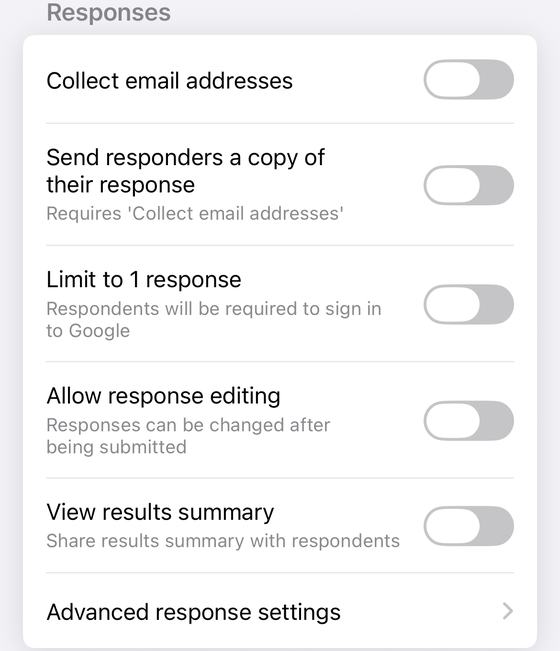
Both of the settings involved sit in the same group in Form+, as in the screenshot above. Collect email addresses is the first toggle; the Advanced response settings row at the bottom of that group opens your form's own response options — the same Collect email addresses and Send responders a copy choices Google's settings panel shows — on the phone. It is a PRO feature.
- Open the form in Form+ and go to Form settings.
- Turn on Collect email addresses — nothing below it works without that.
- Tap Advanced response settings to reach the Send responders a copy options. If that row is not on your settings screen, it is one of the two conditional rows described in the caption above, not something you have scrolled past.
Form+ also has its own switch in that same group, labelled Send responders a copy of their response, which lets the app email respondents a copy of their answers; it is a PRO feature and it carries the same prerequisite, so turning Collect email addresses back off switches it off too. It is the conditional row described in the caption above, so on an account without the app's own response trigger the group runs straight from Collect email addresses to Limit to 1 response and Google's native receipt setting is your only route.
Set up response receipts from your phone
Form+ puts email collection and the advanced response settings in one screen — on your real Google Forms and your own Google account.
Get Form+ free on the App StoreFrequently asked questions
Why are my Google Forms response receipts not being sent?
Start with the prerequisite: receipts require Collect email addresses, set to Verified or Responder input. After that, check whether the setting is on When requested rather than Always — on “When requested” a respondent who does not ask for a copy gets nothing. Google's only published caveat is the third possibility: “In certain circumstances, responders may not receive expected response receipts due to spam filters or other counter-abuse measures.”
Can a Google Form send a receipt without collecting email addresses?
No. Google's help page states the dependency directly — “If you collect responder emails, you can choose
whether respondents get a copy of their answers” — and a form set to DO_NOT_COLLECT has no
address to send to.
What is in the Google Forms response receipt email?
Google does not document it. No help page describes the receipt's contents, its sender address or its subject line. Send yourself a test response and read the result — that is the only reliable answer, and it is specific to your form.
Can I resend a response receipt, or does editing a response send a new one?
Google documents neither. There is no published resend, nothing about receipts for responses submitted before the setting was switched on, and nothing about what an edited resubmission does. Test it on your own form before any process depends on it.