Google Forms ownership and access
Last updated September 2026 · ~9 minute read
Short answer: a Google Form is a Drive file, so its owner is a Drive role — and not a Forms setting at all. The Google Forms API contains no ownership method of any kind. And what people call “the form” is usually three Drive objects with three separate owners: the form itself, its response spreadsheet, and the folder holding any uploaded files. Only one of those is what you hand over.
Form+ manages editors and responders on your real Google Forms from your iPhone or iPad — your account, your Drive, no copies. Get Form+ free on the App Store.
Almost every surprise here comes from treating a form as a single thing. Drive treats it as one file among several, and that difference decides who can delete what, and which data stays behind.
The Forms API has never heard of an owner
Worth checking rather than assuming, so we read the machine-readable source. The Google Forms API v1
discovery document (revision 20260909) publishes exactly ten methods: create,
get, batchUpdate and setPublishSettings on a form, two for reading
responses, and four for response notification watches. Not one of them reads or writes an owner, and no field
on a form exposes one.
Apps Script has the same shape seen from the other end. Its Form class offers
addEditor, removeEditor and getEditors, and no owner method at all;
getOwner and setOwner live one layer down, on Drive's File.
That is the whole situation in miniature. Editors are a Forms concept. Owners are a Drive one.
Owner versus Editor: four differences, all about deletion
Google's Drive roles
reference maps the API's role names onto the labels in the sharing dialog: owner is
Owner, which “Grants full control over the file or folder”, and writer is
Editor, which “Grants the ability to view the file, add comments, and edit the file.”
“Full control” sounds decisive. But the same page publishes an operations table, and for a file in My Drive — which is what a form is — the Owner and Editor columns are identical except in four rows.
| Operation on the form's file | Owner | Editor |
|---|---|---|
| Modify the content of the file | Yes | Yes |
| Modify the metadata of the file or folder | Yes | Yes |
| Share items from the My Drive folder | Yes | Yes |
| Can access detailed file permissions | Yes | Yes |
| Move items into the trash | Yes | No |
| Recover items from the trash | Yes | No |
| Empty the trash | Yes | No |
| Delete a file or folder | Yes | No |
That is the opposite of most people's mental model. An editor on your form can rewrite every question, change where the responses are written, and pass access on to other people; Drive's help centre adds one limit of its own, that an editor can share the file “but an editor can't change the owner.” What being the owner buys you is the bin — and the ability to hand the file on. Drive also gives owners a switch in the advanced sharing settings that prevents “Editors from changing permissions or sharing files”.
One note on scope: that table is Drive's, covering files and folders generally. Forms' own help pages do not answer the question, which is why you will read that it is undocumented. It is undocumented there, and documented in the Drive API reference.
You almost certainly own three things, not one
This is the part that goes wrong during a handover, and it is a matter of physical file layout rather than policy.
- The form. One Drive file. This is the only thing a transfer moves.
- The response spreadsheet. Google is unambiguous that “if you store responses in a
spreadsheet, you have a separate file in Google Drive”, and that “you can delete the spreadsheet and not
delete the form, or you can delete the form and not delete the spreadsheet.” The Forms API agrees by
omission: it exposes the sheet only as
linkedSheetId, an output-only pointer at another Drive file it cannot modify. Google's own housekeeping instruction is blunt — “To change or remove access, update permissions on both the form and the linked sheet separately.” - The uploads folder. “For the form owner, uploaded files are stored in a new folder
on Google Drive.” The API is more specific still: a file upload question carries a
folderId, “the ID of the Drive folder where uploaded files are stored”, and every submitted file comes back as its own DrivefileId. Those are separate Drive objects sitting in the original owner's Drive, and Drive states the rule that catches people even if the folder itself is handed over: “When you make someone else the owner of a folder, you still own the files inside.”
So a completed handover is not one action. Whoever inherits the form inherits neither the spreadsheet nor the collected uploads unless those files are dealt with as files, on their own. The mechanics of the handover itself are on copying a form to another account; this page is about what ownership is.
Two Google references disagree about personal accounts
Here is a contradiction worth knowing about before you plan anything. The Apps Script documentation for
File.setOwner
states flatly: “Drive does not support changing the ownership for items which
are owned by gmail.com accounts; it's supported for Workspace accounts.”
Google's Drive
API transfer guide says the opposite in as many words: “Ownership of files can be transferred
between one consumer account to another.” It then describes a two-step handshake — the current owner
marks the recipient pendingOwner, and “the prospective owner accepts the ownership transfer
request”. Drive's help centre documents the same consumer flow, right down to the search operator
pendingowner:me for finding requests waiting on you.
Both are current Google documentation. Our reading — an inference, not something Google states — is
that they describe different things: setOwner is a single call that completes immediately,
and a personal-account transfer cannot complete immediately because it requires the recipient's consent.
Treat the Apps Script sentence as a limit on that method rather than on Drive. If you are scripting this,
the consenting two-step path is the documented one.
Does the form keep working while ownership moves?
Google does not say, and we are not going to invent an answer. What the documentation does establish is
the mechanism: a transfer is a permission written to files/{fileId}/permissions. The file id does
not change, and the responder link is an output-only property of the same form. Nothing in either
reference describes the form being recreated, re-addressed or taken offline.
Two documented caveats are worth carrying anyway. Drive warns that “if you transfer ownership of a lot
of files and folders at once, it may take some time for you to see the changes.” And the Drive API's
moveToNewOwnersRoot option, if set, moves the item “to the new owner's My Drive root folder
and all prior parents removed” — so a form that lived in a carefully shared folder can quietly leave it.
Where Google publishes nothing
We looked in four places: the Drive and Docs Editors help centres, the Apps Script reference for both
Form and File, the Drive API reference and its transfer guide, and the Forms API
v1 discovery document. Three questions come back empty in all four.
- The linked spreadsheet during a transfer. Its separateness is documented; its fate when the form changes owner is not.
- An existing uploads folder and the files in it. Where they live is documented; whether anything about them changes is not.
- What a respondent sees. Nothing addresses the respondent side at all.
On an iPhone, ownership is something you read, not change
This one is unambiguous. The iPhone & iPad tab of Google's own ownership page carries the heading “You can't change owners from an iPhone or iPad”, and under it a single instruction: “To change the owner of a file, go to drive.google.com on a computer.” Google's mobile Drive surface simply does not carry the action, so a computer is the route Google supports.
What an iPhone can do is the access side, which is where the day-to-day work is. In Form+ that lives behind Manage access, whose subtitle sets the scope honestly: “Choose who can respond to and co-edit your form.”
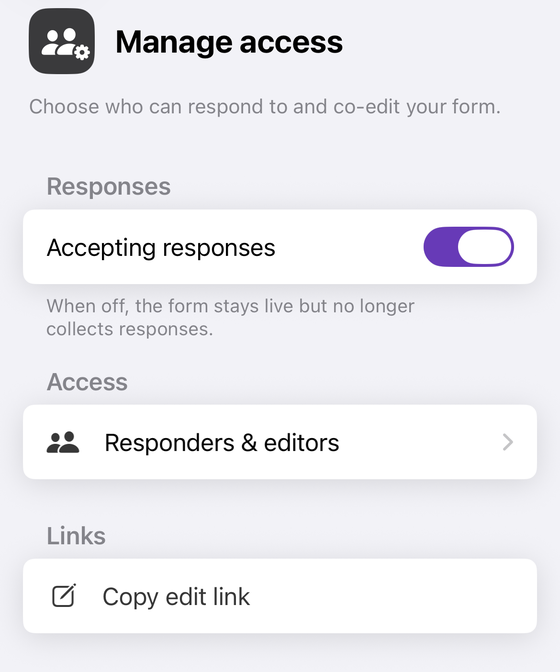
- It speaks Drive's roles in Forms' words. Inside Responders &
editors it renders Drive's
writerrole as Editor — Drive's own label for it — andreaderas Responder. That second word is the app's, not Drive's: the same roles reference labelsreaderViewer, which “Grants the ability to view the file”, and publishes no Responder role at all. Nor is it the same grant Google's samples make: their add-a-responder request body carries"view": "published"next to"role": "reader", and the app writes the plain role. Editor vs responder takes that difference apart. - It shows the owner and will not let you change them. The owner carries an Owner label and the row does not respond to a tap. It reads Drive's pending-owner flag too, so a transfer started on a computer shows as ownership rather than as an ordinary editor.
- It writes only those two roles. It can add, promote, demote and remove editors and responders, and it never sends an ownership change.
- If you are not the owner it says so. Rather than failing quietly: “Only the form's owner can change sharing. You can manage it in a browser from the edit link.”
Manage access is not behind the app's Pro gate. It once was; the paywall check on that screen was removed deliberately in August 2026, and nothing has replaced it.
See who owns your form, and change who can reach it
Form+ manages editors and responders on your real Google Forms from your iPhone or iPad — your account, your Drive, no copies.
Get Form+ free on the App StoreFrequently asked questions
Who owns a Google Form?
Whoever owns the Drive file. A form is a file in Google Drive, and Drive's owner role is
what makes someone its owner — there is no ownership setting inside Google Forms, and no ownership method
in the Google Forms API. Google's Drive roles reference describes the owner role as granting “full control
over the file or folder”.
What can a Google Forms owner do that an editor cannot?
Delete it, and change who owns it. Google's Drive API roles reference lists the operations each role
permits for a file in My Drive, and the owner and writer (Editor) rows are
identical except for four: moving items into the trash, recovering them, emptying the trash, and deleting
a file or folder. Drive's help centre adds one more limit on editors: an editor can share the file, “but
an editor can't change the owner.”
Does the response spreadsheet have the same owner as the form?
Not necessarily, and nothing keeps the two in step. Google states that “if you store responses in a
spreadsheet, you have a separate file in Google Drive”, and that you can delete the spreadsheet without
deleting the form. The Forms API only exposes the sheet as a read-only linkedSheetId pointing
at another Drive file. Google's own instruction is to “update permissions on both the form and the linked
sheet separately.”
Who owns the files people upload to a Google Form?
They sit in the form owner's Drive. Google states that “for the form owner, uploaded files are stored in a new folder on Google Drive”, and the Forms API models a file upload question as carrying “the ID of the Drive folder where uploaded files are stored”, with each submitted file identified by its own Drive file id. Drive also states that “when you make someone else the owner of a folder, you still own the files inside.”
Can I change the owner of a Google Form on my iPhone?
No. Google's help page for transferring ownership says plainly, on its iPhone & iPad tab, that “You can't change owners from an iPhone or iPad”, and that to change the owner of a file you should “go to drive.google.com on a computer.” Form+ does not offer it either: the app manages editors and responders and never sends an ownership change.