How to add a dropdown with “Other” in Google Forms
Last updated September 2026 · ~9 minute read
Short answer: you cannot — and the reason is worth two sentences. Google's question-type reference prints “You can include ‘Other’ as an option. Responders can type a short answer.” under Multiple choice and under Checkboxes, and under nothing else. The Dropdown entry says only “You can provide a set of options. Responders can choose only one option.” To offer a write-in box, switch the question to Multiple choice — it is single-select in exactly the same way a dropdown is.
Form+ gives you the question-type picker, the options list, and the add “Other” row on a phone — working on your own Google account and your real forms. Get Form+ free on the App Store.
That swap costs you almost nothing, because the two types collect an identical shape of answer. What follows is the documentation that settles it, what “Other” actually writes into your data, and the two settings most people wrongly assume it cooperates with.
Which question types actually offer “Other”
Google states it twice, in two places, and the two agree.
The help centre's question-type reference repeats one sentence — “You can include ‘Other’ as an option. Responders can type a short answer.” — under Multiple choice and under Checkboxes. It is absent from Short answer, Paragraph, Dropdown, File upload, Linear scale, Rating, Multiple choice grid, Checkbox grid, Date and Time.
The Google Forms API says
the same thing in machine-readable form. A choice option carries an isOther flag, documented
as: “Whether the option is ‘other’. Currently only applies to RADIO and
CHECKBOX choice types, but is not allowed in a QuestionGroupItem.”
RADIO is Multiple choice, CHECKBOX is Checkboxes, and DROP_DOWN —
the third member of the same enum — is not on that list. A dropdown has no place to keep an “Other” row.
| Question type | “Other” option? | What Google says |
|---|---|---|
| Multiple choice | Yes | “You can include ‘Other’ as an option. Responders can type a short answer.” |
| Checkboxes | Yes | Same sentence, repeated under Checkboxes. |
| Dropdown | No | No mention of “Other”; the API restricts isOther to RADIO and CHECKBOX. |
| Multiple choice grid · Checkbox grid | No | No mention of “Other”; the API adds that isOther “is not allowed in a QuestionGroupItem”, the grid item type. |
| Every other type | No | No option list to attach one to. |
Adding it: the four steps that matter
- Change the type away from Dropdown. Open the question's type menu and pick Multiple choice for one answer, or Checkboxes if people may pick several. Both keep your existing options — see changing a question type.
- Add the “Other” row. Beneath the last option the editor offers Add option or add “Other”. Take the second. It appends a row you do not get to label — it is a write-in box, permanently.
- Decide what happens to the typed text before responses start arriving, because afterwards it is a cleaning job rather than a design decision.
- Re-check branching if the question routes people to different sections. This is where “Other” gets genuinely murky, and it is covered below.
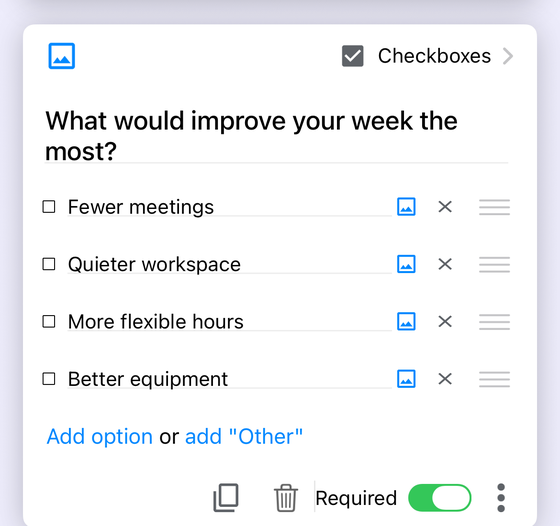
What the responder sees, and what you get back
Google describes the responder's side in one clause — they “can type a short answer” — and that is exactly what the row is: one more entry in the list, ending in a blank line instead of a label, with a text field to fill in. It obeys the rule of the type it sits on. On Multiple choice, where Google says responders “can choose only one option”, picking “Other” is picking an option. On Checkboxes, where they “can select multiple answers”, it is one more box, tickable alongside the fixed ones.
On the collection side, the important fact is a negative one. The typed text lands in
the question's own column — the same column as “Marketing”, “Sales” and “Support” — and
not in a column of its own. Google's API documents the answer value for a RADIO question as
“A single string corresponding to the option that was selected”, and publishes no separate marker
that distinguishes a typed answer from a picked one — it also publishes nothing specifically about how an
“Other” answer is laid out in the linked spreadsheet, so treat the detail as observed rather than
guaranteed. The practical consequence is the one that bites: if somebody types Sales into the
“Other” box, your spreadsheet cannot tell you they did not simply tick Sales.
That is the trade in one line: “Other” buys you coverage and spends your column's tidiness.
What “Other” costs you: free text in a categorical column
The whole point of a choice question is that the answers arrive pre-sorted — four options in, four values out, and a summary chart that means something. “Other” punctures that. Ten responders will produce “n/a”, “N/A”, “NA”, “none”, “—”, “see below”, a misspelling of an option that was already on the list, and a paragraph. Your response chart grows a long tail of one-count slices, and every downstream count needs a cleaning pass before it can be trusted. See response charts and responses in Google Sheets for what that looks like in practice.
What “Other” costs you: no validation on the box
This surprises people, and it is worth being precise about. Google's response validation page documents rules for exactly five question types: Short answer, Paragraph, Checkboxes, Multiple choice grid and Checkbox grid.
Multiple choice is not one of them. So on the type most people use “Other” with, there is no rule to attach — no regex, no number range, no length limit, no error message. Whatever is typed is accepted.
The Checkboxes entry on that list is a real exception, but a narrower one than it looks: a checkbox rule governs how many boxes are ticked, not what is typed into the write-in box. If you need a typed answer that is checked against a rule — an email address, a postcode, a number — that is a Short answer question with a validation rule, and no “Other” row will substitute for it.
“Other” and branching
Google's conditional logic page is unambiguous about which types can route people: “Go to section based on answer” is only available for Multiple choice and Dropdown question types. Since only one of those two can hold an “Other” row, the combination only exists on Multiple choice at all.
And there, Google publishes nothing about what an “Other” answer does to branching. Not a sentence about whether the “Other” row gets a destination of its own, whether it inherits the question's default next section, or how it interacts with a rule set on the listed options. The documentation is simply silent, so treat any confident claim you read elsewhere — including a claim that it definitely does or definitely does not route — as somebody's observation of one form on one day, not as a published behaviour.
The practical response to silence is a test, not a guess: add the “Other” row, submit a real response through it, and watch where you land. If routing is load-bearing for your form — a screening question, a consent gate — consider keeping the routing question free of “Other” entirely and asking for the write-in one question later, where a wrong turn costs nothing. More on the mechanics in conditional logic in Google Forms.
“Other” and shuffled options
Google documents the setting plainly: “You can shuffle answers to multiple choice, checkbox, and drop-down questions,” reached from the question's overflow menu as Shuffle option order. All three choice types support it.
What Google does not document is where the “Other” row lands once the order is shuffled — whether it is pinned to the bottom, as it sits in the editor, or thrown into the shuffle with everything else. There is no published sentence either way. If the placement matters — and for a long option list it does, because an “Other” row in the middle of a list reads as an option rather than an escape hatch — open the live form a few times and see. See also shuffling in Google Forms, which covers the difference between shuffling options inside a question and shuffling the questions themselves.
Converting a dropdown you have already built
Switching an existing Dropdown to Multiple choice carries your options across, and the reverse direction is where the asymmetry shows up. Form+ handles a type change on your iPhone the way the data model requires: converting between Multiple choice, Checkboxes and Dropdown brings the choices over intact, but converting to Dropdown drops the “Other” row on the way, because a dropdown cannot hold one. Nothing else about the question changes.
So the order of operations matters if you are experimenting. Build the write-in on Multiple choice, and if you then try Dropdown to see how it looks, expect the “Other” row to be gone when you come back.
Edit real Google Forms from your iPhone
Form+ gives you the question-type picker, the options list, and the add “Other” row on a phone — working on your own Google account and your real forms.
Get Form+ free on the App StoreWhen “Other” is right — and when it is not
Use “Other” when your list is genuinely incomplete and you would rather learn that than force a wrong answer. Early-stage surveys, “how did you hear about us”, job titles, dietary requirements, anything where the long tail is the interesting part. A forced-choice question with no escape hatch does not eliminate bad data; it hides it inside whichever option was closest.
Reach for a separate optional Short answer question instead when any of these is true:
- You will count the answers. Keep the choice column clean and categorical, and let the free text live in its own column beside it.
- The write-in needs checking. Only Short answer and Paragraph can carry a text validation rule; an “Other” box on a Multiple choice question cannot.
- The question does branching. Google is silent on how “Other” routes, and a screening question is a poor place to find out.
- You want a real answer, not a word. “Other” invites three characters. A question that asks “If none of the above, what were you looking for?” invites a sentence.
The middle path is often the best one: keep the choice question closed, add a final option called Something else, and follow it with an optional Short answer. You get a countable column, a clean chart, and the detail — in three separate places instead of one muddled one. And if the list really is long, a dropdown plus that optional Short answer gets you the compact list and the escape hatch that a dropdown alone cannot offer.
Frequently asked questions
Can a Google Forms dropdown have an “Other” option?
No. Google's question-type reference offers “You can include ‘Other’ as an option” under Multiple
choice and Checkboxes, and not under Dropdown. Google's Forms API says the same thing in code: the
isOther flag “Currently only applies to RADIO and CHECKBOX choice
types”.
Which Google Forms question types support “Other”?
Multiple choice and Checkboxes. Google's reference repeats the sentence “You can include ‘Other’ as an option. Responders can type a short answer.” under both of those and nowhere else — not Dropdown, and not the grid types.
Can I put a validation rule on an “Other” answer?
No. Google's response-validation page documents rules for exactly five question types: Short answer, Paragraph, Checkboxes, Multiple choice grid and Checkbox grid. A Multiple choice question is not among them, so its “Other” box accepts anything typed into it.
Where does an “Other” answer appear in the spreadsheet?
In the question's own column, as the text the responder typed — it is not split into a second column. Google does not publish a separate marker distinguishing an “Other” answer from a listed option, so a typed answer that matches an existing option is indistinguishable from picking it.
Does “Other” get shuffled with the rest of the options?
Google is silent on this. It documents that “You can shuffle answers to multiple choice, checkbox, and drop-down questions,” but publishes nothing about where the “Other” row lands when the order is shuffled. Check it on a live form if the placement matters to you.