How to reuse a Google Form every week
Last updated September 2026 · ~10 minute read
Short answer: Google automates none of this — no recurring form, no weekly reset, no “archive and start fresh” button, and no recurrence field in the Forms API. You have two strategies, both manual: one long-lived form collecting into one growing sheet, or a fresh copy each week with clean data and a new link to hand out. Pick one before the first week — switching later means reconciling two shapes of data.
Form+ puts Make a copy, Rename and Copy Link on one sheet, on your real Google Forms and your own Google account. Get Form+ free on the App Store.
Almost everything written about this topic skips straight to the workaround. The useful question comes first: which strategy do you actually want, and what does the other one cost?
First, what Google automates here: nothing
Worth checking rather than asserting, because “surely there's a setting” wastes the afternoon. Three places to look; all three come back empty.
The interface. Google's page on where responses go, Choose where to save form responses, documents linking a spreadsheet and deleting responses — nothing about recurrence, resetting on a schedule, or archiving a batch and starting over.
The API. The
live Forms REST v1 discovery
document lists everything the API can do. Search it for recurrence, schedule,
repeat, interval, weekly or reset and the only hit is an unrelated
sentence about push-notification watches expiring. The forms resource has four methods —
create, get, batchUpdate, setPublishSettings — so no
recurrence, no reset, and, a detail that matters below, no copy method.
The forum. Google's community carries years of threads asking for exactly this — “Create a recurring Google Form?”, “How do I clear responses from google form automatically” — with no product answer. Not proof of absence, but alongside the checks above, as close as this topic gets.
Weekly reuse is something you operate.
Strategy A — one form, collecting forever
You create the check-in once, publish the link once, and never touch it again. Every week's submissions land in the same spreadsheet tab, stacked in order of arrival.
What it gives you. One link that never changes — pin it in Slack, print it on a poster, put it in a recurring calendar invite. One sheet, so trends across weeks are a chart rather than a merge. One set of settings, and one place to fix a typo in question three.
What it costs you. Every question you ask of the data now begins with a date filter. The summary view inside Forms goes first — it charts all responses ever received, so by week six the pie chart is a portrait of your history, not your week. And a clean slate means deleting responses, which Google flags as irreversible and which does not touch the rows already in your spreadsheet.
Strategy B — a fresh copy every week
Each week you duplicate last week's form, rename it, and send the new link. Each copy is a separate Drive file with its own responses and its own spreadsheet.
What it gives you. Clean data per week, with no filtering at all. The in-Forms summary becomes meaningful again, because it only ever describes one week. Week-specific edits — a changed roster, a one-off question — do not contaminate history, and a week that goes wrong can be deleted alone.
What it costs you. A new link every week, which has to reach everyone every time — and the previous link keeps quietly working unless you close it. A new Drive file weekly, which becomes a naming-discipline problem by month two. A new spreadsheet, so cross-week reporting turns into manual consolidation. And every per-form setting has to be re-verified on each copy.
What a copy does and does not carry
Two operations get called “copying a form”, and conflating them produces wrong advice.
Drive's Make a copy is the one you actually use. Google never enumerates what travels with it, so the detail lives on its own page — how to duplicate a Google Form marks each row documented or inferred. Read it before you commit to Strategy B.
The API's forms.create is not a copy at all, and this is where
automation plans die. Its reference is explicit: “Only the form.info.title and
form.info.document_title fields are copied to the new form. All other fields including the
form description, items and settings are disallowed.” You get an empty form with a title; to
reproduce last week's questions you must
create one
and rebuild every item with batchUpdate. Duplicating a form is a Drive
files.copy operation, not a Forms one.
One thing worth labelling honestly: that a copy leaves the responses behind is an inference, not a published rule. Google does not say it in the copy instructions. It follows from what Google does document — responses belong to the form, and a spreadsheet of responses is “a separate file in Google Drive” that the copy never touches. Treat it as a strong inference, and check your first copy rather than trusting a web page.
Timestamps are the only ordering Google gives you
Whichever strategy you pick, weeks are separated by time and nothing else — Google Forms has no concept
of a batch, a round or a cohort. The API makes the vocabulary plain: a response carries
createTime,
“Timestamp for the first time the response was submitted”, and lastSubmittedTime,
“Timestamp for the most recent time the response was submitted. Does not track changes to grades.”
Read that pair carefully: it decides how an edited response behaves. If responders may change answers
after submitting, an edit updates lastSubmittedTime and leaves createTime exactly
where it was. A response first submitted on Monday and corrected on Thursday belongs to Monday's week by
one field and Thursday's by the other. Decide which your weekly cut-off means before you filter on it.
There is no third field. If your weeks need a label no clock can derive — “sprint 14”, “the Tuesday cohort” — the only way to record it is to ask: a short required question, or a pre-filled link that answers it for the responder. Unglamorous, and the one thing that makes Strategy A comfortable.
The spreadsheet is the real workhorse
For a recurring form the sheet is not a nice-to-have — it is where the strategy lives. You get one tab, one timestamp column, and the whole of Sheets to slice it with: filter views for “this week” that disturb nobody else's view, a pivot by week, a summary tab that reads the raw tab instead of replacing it. Responses in Google Sheets covers linking, unlinking, and the two-files-not-one structure that trips people up.
The habit that pays off: never delete last week's rows to make this week readable. Filter instead. Keep the raw tab raw and read somewhere else in the file.
Closing last week, if it needs closing
A weekly copy leaves last week's link live unless you close it. Google can stop a form accepting responses on a date and time, but not on a recurring rule — a weekly close is still a weekly action. See scheduling a form to open or close and Google Forms deadlines.
The weekly ritual, in order
- Pick the strategy before week one. Switching in month three means reconciling two shapes of data.
- Export whatever the form already holds. Reusing a form that has responses? Download them first — see exporting to Excel. Deleted responses cannot be undone, and Forms has no version history.
- Send responses to a spreadsheet. One tab, one timestamp column — what makes either strategy workable.
- For the copy route, copy and rename in one move. Give the copy a name that carries its week — Standup Check-in 2026-09-14, not Copy of Standup Check-in. Three weeks later, identically named copies are indistinguishable in Drive.
- Re-check the copy, then distribute its new link. A copy is a different file with a different URL; last week's link still points at last week's form. Confirm the copy's published state and response destination first.
Running the weekly copy from an iPhone
Google has no Forms app for iPhone or iPad, so every path above assumes a desktop browser — awkward for a chore you would rather do on a phone. Form+ puts the whole ritual on one sheet:
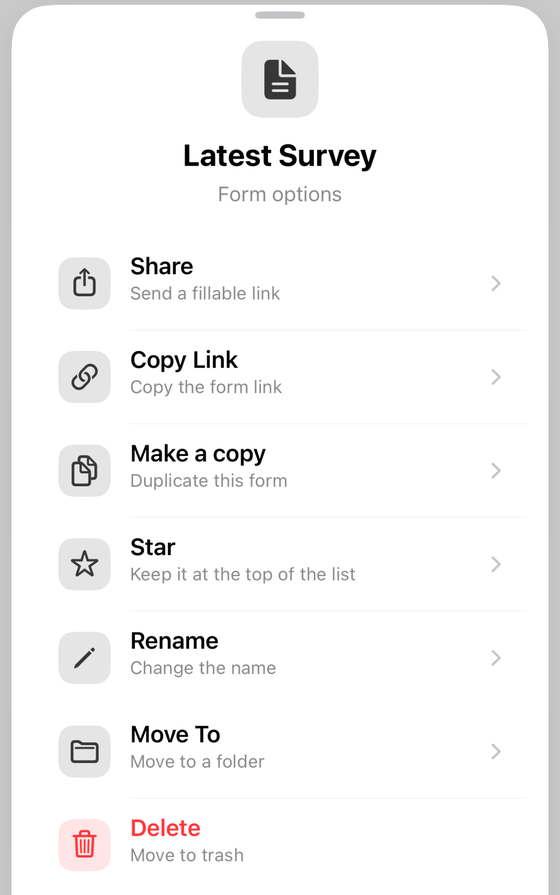
Two specifics. Make a copy asks for a name, pre-filling “Copy of …”, and
refuses a name identical to the original's — mildly annoying once, useful by week seven. Underneath it
runs the same Drive files.copy the web editor does, so it is a real duplicate in your own
Drive, not an export. And when the app already holds that form's downloaded responses, the dialog offers
Copy with responses as a second button: a frozen, read-only snapshot carried into the new
form's Responses tab. The copy's live Google responses still start at zero.
Two PRO tools suit a recurring cadence. Link to Google Sheets, on the Responses tab, sends submissions to a spreadsheet on your Drive. And Response digest email, in the editor's tools menu under Automate, emails you a summary of new responses daily or weekly — weekly by default, and, as the app puts it, “sent only when there are new ones”. For a form that some weeks gets nothing, that clause is the difference between a signal and inbox noise.
Which strategy suits which cadence
| Your situation | Pick | Why |
|---|---|---|
| Weekly team check-in, same questions, you want the trend | One form | The trend is the point, and one sheet gives it to you for free. |
| Weekly class or event sign-up with a capacity | Weekly copy | Counts and cut-offs are per week, and a cap on a cumulative form is meaningless. |
| A different audience each week | Weekly copy | Separate links keep audiences from seeing each other's data or reusing an old one. |
| Daily | One form | A copy per day is 250 files a year. Filter by timestamp instead. |
By the fifth copy, what you are really maintaining is a template. Google Forms templates covers keeping one master form as the source of every copy — cleaner than copying last week's copy.
Run the weekly copy without opening a laptop
Form+ puts Make a copy, Rename and Copy Link on one sheet, on your real Google Forms and your own Google account.
Get Form+ free on the App StoreBefore you reuse a form that already has responses
One step, and the only one you cannot add afterwards: export what is already there. Not because reuse is dangerous, but because the moment you decide to “start clean” you are one menu item from an irreversible delete — and the export takes thirty seconds while it is still optional. Download the CSV, open it, confirm the rows are there. Then reuse the form however you like.
Frequently asked questions
Can a Google Form repeat itself every week?
No, and Google does not claim otherwise. There is no recurring form, no scheduled reset and no archive-and-start-fresh action in Google Forms, and the live Forms REST API discovery document contains no recurrence, schedule or repeat field. Weekly reuse is something you operate, not something Google runs.
Should I copy my weekly form or keep using the same one?
Keep one form when the weeks are the same question asked repeatedly and you want a trend across them — a standup check-in, a recurring order. Copy weekly when each week is a self-contained event with its own roster, its own cut-off or its own audience, or when someone other than you has to read the raw sheet.
Does copying a Google Form bring the responses with it?
A copy starts empty. Google does not state this in its copy instructions, so it is an inference rather than a published rule — but a firm one, since responses belong to the form and, in a spreadsheet, to a separate Drive file the copy never touches. Note also that copying is a Drive operation: the Forms API has no copy method at all.
How do I separate this week's responses from last week's?
By timestamp, in the spreadsheet. That is the only ordering Google gives you: the API records
createTime as the timestamp for the first time the response was submitted, and
lastSubmittedTime for the most recent. Filter the timestamp column rather than deleting
last week's rows.
Can I reuse a Google Form from my phone?
Google has no Forms app for iPhone or iPad, so every path in its documentation assumes a desktop browser. Form+ puts Make a copy, Rename and Copy Link on one options sheet in the forms list, which is the whole weekly ritual in one place.