How to make a Google Form anonymous
Last updated September 2026 · ~9 minute read
Short answer: there is no “anonymous” switch. Open Settings → Responses → Collect email addresses and choose Do not collect. Then turn off Limit to 1 response and remove any file upload question — Google documents both as requiring respondents to sign in. But: not collecting an email address is not the same as a response being untraceable. Read what it does not guarantee before you promise anonymity to anyone.
Form+ puts the email-collection switch on your phone and warns you in plain words which settings force respondents to sign in — on your real Google Forms and your own Google account. Get Form+ free on the App Store.
This page sticks to what Google's own documentation says, quotes it, and is explicit about the places where Google says nothing at all. If you are about to tell a class, a team or a customer that their answers are anonymous, the unstated parts matter more than the steps.
First: check what your form is set to right now
The default is not the same for everyone. Google's Forms API reference documents the three values of the email-collection setting like this:
- Do not collect (
DO_NOT_COLLECT) — “The form doesn't collect email addresses. Default value if the form owner uses a Google account.” - Verified (
VERIFIED) — “The form collects email addresses automatically based on the account of the signed-in user. Default value if the form owner uses a Google Workspace account.” - Responder input (
RESPONDER_INPUT) — “The form collects email addresses using a field that the respondent completes on the form.”
That second line is the one people miss. If your form lives on a work or school (Workspace) account, verified email collection is the default — the form was collecting identifiable addresses from the moment you created it, without you switching anything on. Check it; do not assume it.
Google's help page describes what respondents see in the Verified mode: “Respondents must confirm their Google Account email address gets collected with their response. The confirmation displays on each page of the form.” Google's own AppSheet documentation puts the requirement plainly — “Collect verified email addresses. Users must be signed in to a Google account.”
Turn off email collection
- Open the form in Google Forms.
- At the top, click Settings.
- Next to “Responses”, click the Down arrow to expand the section.
- Under Collect email addresses, choose Do not collect.
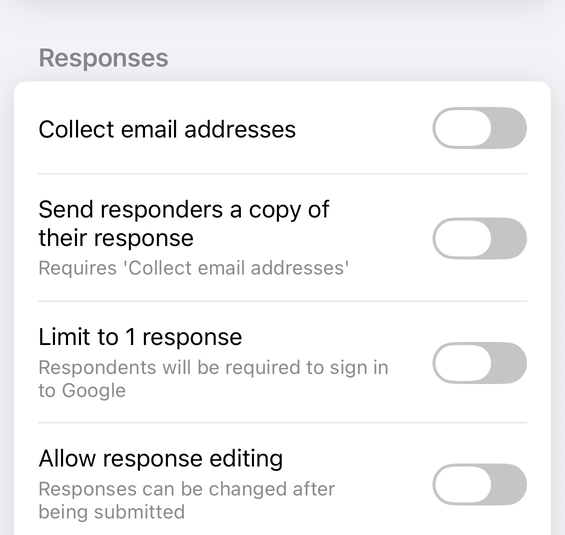
Be careful with the third option. Responder input is still email collection: it simply asks the respondent to type an address instead of reading it from their account. Google's documentation is blunt about what that is worth — “there is no way to verify the email address that the users enters”. It is unverified, not anonymous. If you want anonymity, the answer is Do not collect.
What this does not guarantee
This is the part almost every other article skips, and it is the part that matters. Setting Do not collect means one specific thing: Google Forms does not record an email address alongside the response. It does not mean the response cannot be attributed to a person.
Your own questions can identify people
The setting has no opinion about what you ask. A “Your name” field, a student or employee number, or a “Which team are you on?” plus “What is your role?” pair will identify someone perfectly well with email collection off. Read your questions as an attacker would, not as an author.
Small groups are not anonymous
If eleven people receive the link and one response says “I manage the night shift”, that response has a name on it. Free-text answers are especially revealing — phrasing, specific incidents and grievances all narrow the field. Anonymity is a property of the population, not only of the settings.
Timestamps stay
Responses carry a submission timestamp. If you sent the link to different people at different times, or someone answered in front of you, the timestamp is a link back.
Things Google does not state
Where Google's documentation is silent, this page will say so rather than reassure you:
- IP addresses and device data. Google's Forms help pages do not state whether an IP address, device identifier or other technical data is logged with a response. We therefore cannot tell you that none is.
- Workspace administrator visibility. Google's Forms help pages do not state what a Workspace administrator can see about form activity on a managed account. If you are promising anonymity to colleagues or students, ask your own administrator before you do.
- Retroactive effect. If the form previously collected email addresses, those responses already carry them. Google's help pages do not state that changing the setting removes addresses from responses already received. Check your existing responses yourself.
- Add-ons, scripts and linked sheets. Anything you have connected to the form is outside the scope of this setting and outside Google's documentation of it.
None of this is legal advice, and nothing here is a privacy guarantee. If a legal or ethical obligation attaches to the word “anonymous” in your situation — research ethics, whistleblowing, regulated reporting — get that reviewed by someone qualified rather than by a settings page. If that review comes back asking you to record an agreement as well, Google Forms has no consent field either — building a consent form in Google Forms sets out what a required question can and cannot record.
Settings that quietly break anonymity
You can set Do not collect and still end up with a form that demands a Google sign-in. Three documented settings do that, and they sit in different places.
Limit to 1 response
Google's help page for publishing and sharing a form is explicit: with Limit to 1 response turned on, “To access and fill out the form, users must sign in to their Google Account.” Google adds that their “usernames won't be recorded unless you turn on the ‘Responses' setting to collect email addresses” — so Forms does not store who they are, but they must identify themselves to Google to get in, and only people with a Google Account can answer at all. Whether that counts as anonymous enough is your call; it is not the same as an open form.
File upload questions
Google's help page on question types states: “To answer this question, responders need to sign in to a Google Account.” A single file upload question therefore forces sign-in for the whole form, and Google adds that “For the form owner, uploaded files are stored in a new folder on Google Drive.” If you need uploads and anonymity together, Google Forms cannot give you both — see our guide on adding a file upload question to Google Forms for what that question actually does.
Restricting the form to your organisation
Google's documentation notes that “Before owners publish a form, they can restrict the access to a domain, trusted audience, or group of users.” Checking that someone belongs to a domain or group requires them to be signed in, and it narrows the pool of possible respondents to a known list. Google's help pages say usernames are not recorded unless email collection is on; they do not state what a domain administrator can see. Treat an org-restricted form as “confidential within the org”, not “anonymous”.
The test that settles it
Open the responder link in a private or incognito window while signed out of every Google account. If the form loads and submits with no sign-in prompt and no email field, the settings are doing what you think. If it asks you to sign in, one of the three above is still on. Do this before you share the link, not after.
What each setting actually does
| Setting | Forces sign-in? | What gets recorded |
|---|---|---|
| Collect email addresses: Do not collect | No | No email address is recorded with the response |
| Collect email addresses: Verified | Yes — “Users must be signed in to a Google account” | The signed-in account's address, confirmed on each page of the form |
| Collect email addresses: Responder input | No | Whatever the respondent types — “there is no way to verify” it |
| Limit to 1 response | Yes — “users must sign in to their Google Account” | Usernames “won't be recorded unless you turn on” email collection |
| A file upload question | Yes — “responders need to sign in to a Google Account” | Files land in a folder on the owner's Google Drive |
| Restricted to a domain or group | Yes, to check membership | Not stated by Google beyond the usernames line above |
| Your own “name” question | No | Everything you asked for — no setting overrides this |
Checking and changing it from your phone
Google's settings live in the desktop web editor. Form+ puts the same controls on iPhone and iPad, using Google's own names so there is nothing to translate. The row that catches people out is drawn on every account: Limit to 1 response, spelling out the consequence in its subtitle — “Respondents will be required to sign in to Google”. It is one of four rows the Responses group shows everyone, alongside Collect email addresses, Allow response editing and View results summary. Switching email collection off — the anonymity step on this page — is that first switch, and it is never gated.
Google's three collection modes sit a tap deeper, in a COLLECT EMAIL ADDRESSES section on an Advanced response settings screen offering Do not collect, Verified and Responder input. That row is not drawn for everyone: it needs the app's newer-features flag, and several separate things can switch that flag off — your region, a remote switch, and, unless that test is itself disabled remotely, an install dating from before 2024. If the row is absent you have not scrolled past it, and the switch above still answers the question this page asks — with Collect email addresses off, no address is recorded in any mode.
Changes are written to your real Google Form on your own Google account. Whichever tool you use, finish with the signed-out private-window test above — that checks the live form, not the switch.
Check your form's response settings from your phone
Form+ puts the email-collection switch on your phone and warns you in plain words which settings force respondents to sign in — on your real Google Forms and your own Google account.
Get Form+ free on the App StoreFrequently asked questions
Are Google Forms responses anonymous by default?
It depends on the account that owns the form. Google's Forms API reference states that
DO_NOT_COLLECT is the “Default value if the form owner uses a Google account”, while
VERIFIED is the “Default value if the form owner uses a Google Workspace account”. A form
created on a work or school account can therefore collect verified email addresses from the moment it is
made. Check the setting rather than assuming.
Does turning off Collect email addresses make a form truly anonymous?
No — it makes Google Forms stop recording an email address with each response. That is not the same as a response being untraceable. Your own questions can still identify people, a small respondent pool can narrow a response to one person, and Google's help pages do not state what other technical data, if any, is retained. Do not promise more than the setting delivers.
Why does my form still ask people to sign in?
Three documented settings require a signed-in Google Account regardless of the email setting: Collect email addresses set to Verified, Limit to 1 response, and any file upload question. Restricting the form to an organisation or group also requires sign-in so membership can be checked. Turn off whichever applies, then retest the responder link in a private window.
Can a file upload question be anonymous?
Not in Google Forms. Google's help page for question types states that “To answer this question, responders need to sign in to a Google Account,” and that “For the form owner, uploaded files are stored in a new folder on Google Drive.” If you need file uploads and anonymity together, Google Forms cannot give you both.
Can a Workspace admin see who submitted an anonymous form?
Google's Forms help pages do not state what a Workspace administrator can or cannot see about form activity, so this page will not tell you either way. If you are promising anonymity to colleagues or students on a work or school account, ask your own administrator what visibility exists before you make that promise.