Google Forms for small business
Last updated September 2026 · ~9 minute read
Google Forms is a strong intake tool and a weak commerce tool. It will collect enquiries, bookings, feedback, files and order requests reliably, for free, and drop them into a spreadsheet you already know how to use. It will not take money, capture a signature, hold stock against individual options, or promise you an email when someone submits. Almost every disappointed business hits one of those four, so they are worth reading before you design anything.
Form+ edits your real Google Forms on iPhone and iPad — per-option choice limits, response limits, QR codes, exports and check-in, on your own Google account. Get Form+ free on the App Store.
This page is a map, not a tutorial. Each limit below is stated once, with the Google page it comes from, and then hands you off to the guide that deals with it properly.
Four things Google Forms will not do for a business
1. It cannot take a payment
There is no payment question, no price field and no checkout step. Google's own help page on choosing a question type lists twelve types — short answer, paragraph, multiple choice, checkboxes, dropdown, file upload, linear scale, rating, the two grids, date and time — and none of them takes money. The Forms API tells the same story from the other side: eight question kinds, no payment kind. And paying Google more does not change it — the Workspace pricing comparison lists one Forms line, a survey builder, identically for Starter, Standard, Plus and Enterprise. Everything sold as “payments in Google Forms” is a form plus a separate checkout somewhere else, and the honest set of those handoffs is in collect payments with Google Forms.
2. There is no signature question type
Same list of twelve, same absence: no signature field and no drawing field. That rules out a signed order confirmation, a signed quote acceptance and a signed waiver collected inside the form. Google's eSignature feature is real, but it lives in Google Docs and on PDFs in Drive — its help page never mentions Forms. The workable substitutes, and what each one is actually worth, are in add a signature to Google Forms.
3. Capacity is form-wide, not per option
Since January 2026 a published form can stop accepting responses at a date and time, or after a set number of responses — a genuinely useful setting, off by default, described on Google's view & manage form responses page. But that number applies to the form. It closes the whole thing. You cannot say “Saturday 10am: 20 places, Saturday 2pm: 12” and have each option retire on its own, and Google notes that if several people submit at exactly the same moment the form accepts them regardless of the limit. See limit responses on Google Forms for the setting itself, and Google Forms for event registration for the slot problem specifically.
4. Notifications have no delivery guarantee
The switch is one line in the Responses tab — “Get email notifications for new responses” — and Google documents no delivery time for it and no way to add other recipients; the same help page sends you to an add-on if you want “more notifications options”. For an enquiry form that is an annoyance. For an order form that quietly stops emailing you on a Friday afternoon, it is a lost customer you never knew about. Do not build a process that assumes the mail arrives; build one where the spreadsheet is the record and the email is a convenience. Diagnosis when it goes wrong: Google Forms notifications not working.
The jobs it actually does well
Taking orders
Treat a Google Form as an order request, not a till. It is good at capturing what someone wants, in what quantity, with what notes, and putting that in a row you can work from. Make the quantity and contact fields strict so you are not chasing people — data validation covers the built-in rules and regex validation the awkward cases like order references. Then the money moves somewhere else, and the payments guide is the decision about how far away that handoff sits.
Bookings and slots
Fine for “pick a time from this list”, weak the moment two slots have different capacities. The form-wide cap and the open/close schedule handle “stop at 60” and “close on Friday”. For per-option capacity, Form+ has a Choice limits (eliminator) tool — a Pro feature — that caps how many times each individual option can be chosen and removes it from the live form once it is full. On the day itself, the Event check-in scanner, which is free in the app, checks arrivals against your responses and flags anyone scanned twice.
Collecting files from clients
One of the best things Forms does, with two consequences worth knowing before you send the link. Respondents must sign in to a Google Account to answer a File upload question — so the form cannot be anonymous — and the files land in your Drive, against your storage. Both are Google's own behaviour, spelled out in add a file upload question. A photographed signature usually arrives this way, which is why the file question and the signature problem keep meeting. The same two consequences decide the shape of a hiring form, where the file is a CV and the person sending it is a stranger rather than a client — see Google Forms for job applications.
Feedback and reviews
The lowest-friction job on the list: a short form, a QR code on the counter or the receipt, and no account required if you keep it anonymous. The main risk is junk — a public link on a table tent collects bots as well as customers. Form+ has a Duplicates & spam review, a Pro feature, that flags likely repeats and junk entries and lets you decide each one; the detection is a heuristic assistant, not a guarantee. Distribution options are in share a Google Form.
Lead capture
Embed the form on your site, validate the email field so you can actually reply, and use conditional logic to keep it short for the people who do not need the long version. Turn on notifications, but re-read limit 4 first.
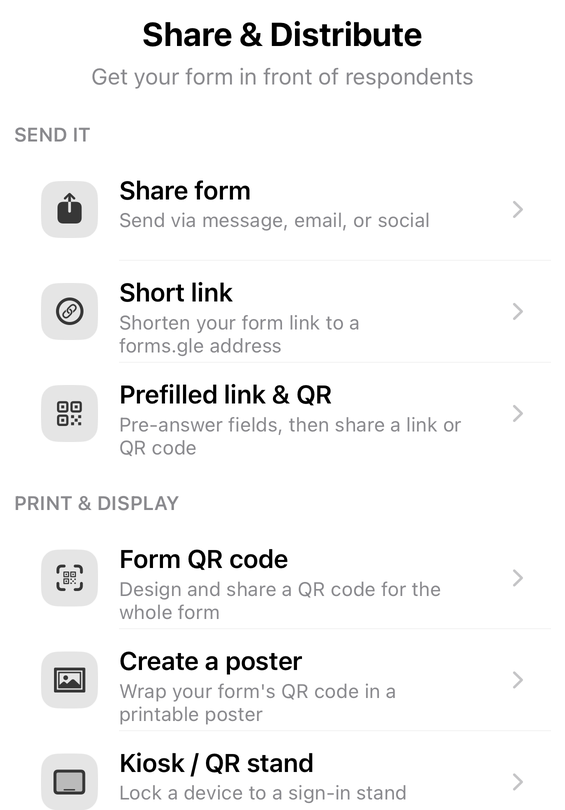
Sharing, QR codes and the counter
Form+ builds the distribution artefacts on the phone, and all three are Pro tools: QR Studio designs a branded, scannability-checked QR code, Prefilled link & QR produces links with fields already filled for a particular customer or batch, and Kiosk mode turns a spare device into a full-screen QR stand.
Responses, and getting them into your books
Responses live with the form. From the phone, Form+ can Export responses as CSV or XLS for a spreadsheet or your accountant, Export to Sheets to push them into a Google Sheet in your Drive, and run Documents (mail merge) to generate one personalised document per response from a template you supply — confirmation letters and the like. On the desktop side, export Google Forms to Excel covers the same ground. Form+ can also send you a response notification — push, email, or both, set per form — so a busy form stays quiet while an important one reaches you. Those four are Pro features too: the app is free to download and to sign in with, and every Form+ tool named on this page except the check-in scanner is part of Form+ Pro — a subscription, or a one-time Lifetime purchase.
Where the data actually sits
Worth being concrete, because a form is often the first place a business collects other people's details. The responses belong to the form, which belongs to the Google account that created it. Anyone you give edit access to can read every response, and that access outlives the individual form — sharing with collaborators explains what each role can see. A Sheets export creates a second copy that is shared separately; a CSV export creates a third copy that leaves Google entirely, on whichever device you saved it to. Uploaded files sit in your Drive. None of that is a problem in itself — it is simply the map, and if you are collecting anything sensitive, that map is what your own accountant or legal advisor will want to see. This page does not give that advice.
When to stop using a form
A workaround is fine. Three workarounds is a product you are maintaining by hand. The point where Forms stops being free is usually one of these:
- You are reconciling by hand. Payments arrive in one place, orders in another, and someone matches them up every evening. That hour a day is the real price.
- You have oversold something. Per-option capacity cannot be enforced by a form-wide cap, and a manual check does not survive a busy Saturday.
- Someone disputes what they agreed to. A typed name in a text field is not the same artefact as a signed document, and you will only discover the difference when it matters.
- You missed something because an email did not arrive. Once is bad luck; twice is a process built on an undocumented delivery promise.
At that point the comparison worth running is not “Forms versus nothing” but “Forms plus my time versus a tool that does it in one step”. Google Forms vs Jotform is the closest like-for-like on that question. Plenty of businesses do the honest thing and split the difference: Forms for intake, feedback and file collection, where it is genuinely excellent, and a real system for anything that touches money.
Run your forms from the phone that is already in your pocket
Form+ edits your real Google Forms on iPhone and iPad — per-option choice limits, response limits, QR codes, exports and check-in, on your own Google account.
Get Form+ free on the App StoreFrequently asked questions
Can Google Forms take payments for my business?
No. There is no payment or price question type: Google's help page on choosing a question type lists twelve options and none of them takes money, and the Forms API exposes eight question kinds with no payment kind either. Upgrading Google Workspace does not add one — the pricing comparison lists the same single Forms line, a survey builder, across Starter, Standard, Plus and Enterprise. Every method described as payments in Google Forms is really a form plus a separate payment page.
Can I get a signed order confirmation from a Google Form?
Not from Google Forms itself. There is no signature question type and no drawing field in the twelve question types Google lists. The usual substitutes are a File upload question for a photographed signature, or a typed-name attestation. Form+ offers a per-form Consent gate with an optional signature pad, but it appears in the app's own branded fill screen, not on the public Google Forms web link — and on an English-language device the current build draws no way into that screen, because its only entry point, a Preview branded form… row in the editor, is switched off. The row is still drawn on a device set to one of the app's 21 other languages, because the filter that hides it matches the translated title.
Can I limit how many people book each time slot?
Not with the built-in setting. Since January 2026 Google Forms can stop accepting responses at a date and time or after a number of responses, but that count is for the whole form — it closes everything, and Google notes that simultaneous submissions can still push past the number. There is no per-option cap in Google Forms. Form+ has a Choice limits (eliminator) tool — a Pro feature — that caps how many times each individual option can be picked and removes an option once it is full.
Is Google Forms enough to run a small business on?
It is enough for intake — enquiries, bookings, feedback, files, order requests — and it is free. It is not enough for anything where money, a signature and stock levels have to move together in one step. A useful test: count the workarounds you are maintaining. One is fine. Three, each needing manual reconciliation, usually costs more per month in your own time than a purpose-built tool would.