Google Forms multiple choice limit: how many options can one question have?
Last updated September 2026 · ~8 minute read
Short answer: Google publishes no maximum. There is no documented cap on the number of options in a Multiple choice, Checkboxes or Dropdown question — not in the help centre, and not in the Forms API reference. The nearest published figure belongs to the whole form: you can “add and edit up to 300 pieces of content, like questions, descriptions, images, and videos”. That counts blocks, so a 200-option question spends one of the 300, not 200.
Form+ works on the forms already in your Drive — your account, no migration, no copies. Get Form+ free on the App Store.
This search hides three different questions, and they have three different answers. One is about the editor, one is about the responder, and one is about the form's inbox. Sorting out which one you are asking is most of the work; two of the three have real, documented settings behind them.
The three things “multiple choice limit” can mean
| What you mean | The answer |
|---|---|
| How many options may I put in the list? | No published limit. Google is silent; the 300-block form ceiling is the only related number. |
| How many options may a responder tick? | A real setting — but on Checkboxes, not Multiple choice. Select at least, Select at most, Select exactly. |
| How many responses will the form take? | A different subject entirely. See Google Forms response limits for the published thresholds, and how to limit responses for capping submissions deliberately. |
1. How many options a question can hold
Google does not say. That is the finding, and it is worth stating plainly rather than dressing it up as “unlimited”, which is a claim Google has not made either.
Two places would carry a number if one existed. The first is the help centre. Google's Edit your form page is where the ceilings live, and the ceilings it lists are whole-form ones: 300 pieces of content, and up to 75 sections. The separate question types page gives each choice type a single line — Multiple choice: “You can provide a set of options. Responders can choose only one option.” Neither page puts a number near the options.
The second place is the API, which is stricter than prose and would have to declare a cap for the
service to enforce one. The live machine-readable description of the Google Forms API — its discovery
document, at forms.googleapis.com/$discovery/rest?version=v1 — defines
ChoiceQuestion.options as nothing more than “Required. List of options that a respondent must
choose from.” It is an unbounded array. The document does carry numeric limits elsewhere, where they exist:
a file upload question has maxFiles and maxFileSize, and listing responses returns
“at most 5000” per page. Options have no such field. If Google enforced a per-question option count, this
is the file that would say so, and it does not.
Why the 300 does not apply
The 300 figure gets misread as an option budget constantly. It counts content blocks — a question is one, a description is one, an image is one. The options inside a question are part of that one block. A ninety-option question and a yes/no question cost the same against the 300. This matters in the other direction too: if you are near the ceiling, splitting one long choice into three shorter questions costs you two more of your 300, not ninety.
2. How many options a responder may pick
This one has a real answer, and the reason people miss it is that it is on a different question type. Multiple choice takes exactly one answer by design — Google's own description is “Responders can choose only one option” — so there is nothing to limit. If you want people to pick two, or up to three, or at least one, you want a Checkboxes question.
On Checkboxes, response validation offers exactly three rules, each taking a number you type. Google's How to set rules for your form page lists them as Select at least (“Set a minimum number of boxes that can be checked”), Select at most (“Set a maximum number of boxes that can be checked”) and Select exactly (“Specify the number of boxes that must be checked”). These are validation rules, so a responder who breaks one cannot submit the form until they fix it.
Note what this does not do: it does not cap the length of your list. You can offer forty options and require exactly three. Dropdown, like Multiple choice, has no such setting, because it also takes a single answer.
3. “Limit to one response per column” is a grid control
Search results for this topic routinely serve up this setting, and it belongs to neither of the first two questions. Limit to one response per column appears on the Multiple choice grid and the Checkbox grid — both grid types, and only those. Google describes the effect on its rules page: responders “choose one row item (A, B, C) for each column (1, 2, 3). If they check multiple rows in a column, they get an error message.”
In practice it is how you build a ranking or a rota: rows are the people or the items, columns are the ranks or the slots, and the rule stops two rows claiming the same slot. It says nothing at all about how many options a plain Multiple choice question may carry. If you opened a Multiple choice question looking for it, you were in the wrong question type — the setting is not hidden there, it does not exist there.
What actually breaks before Google's silence does
The useful reframing is that the constraint is never the platform. Three things fail long before any theoretical cap.
It becomes unusable on a phone
A long radio list is a long scroll with no search, no type-ahead and no way to jump. Most Google Forms are filled in on a phone, and the option a responder wanted may be thirty swipes down. Our mobile-friendly guide covers the wider problem; for choice questions specifically, the rule of thumb is that a list that no longer fits on one screen is a list people will answer carelessly.
You cannot validate it
Choice questions have no format rules — the whole point is that the answers are pre-written. That is fine for eight options and a liability for six hundred, because a long hand-maintained list is exactly where a duplicate, a typo or a stale entry hides, and nothing in Forms will flag it.
The spreadsheet column becomes unpivotable
Every option is a distinct string in one column of the linked spreadsheet. Eight options make a chart. Four hundred make a column with a long tail of ones, which no pivot table renders usefully and no summary chart can draw. The cost of a long list lands on the person doing the analysis, weeks later.
What to do when the list really is long
- Use a Short answer with validation. If the values are structured — a staff number, a postcode, an order reference — a text question with a number or pattern rule is more robust than a list and produces a cleaner column. See number validation for the range and whole-number rules.
- Split the choice across two questions. Country then city, department then team, category then item. Two short lists are easier to answer than one long one, and with section logic the second can depend on the first. Each extra question costs one of the 300 blocks.
- Switch to a dropdown. Same lack of a published limit, but it collapses to one row until tapped, which is kinder on a phone. See add a drop-down.
“Other” is not a way round it
The common instinct is to trim the list and add Other as an escape hatch. That is a
reasonable design decision, but it is not a limit workaround — there is no limit — and it has a boundary
of its own. Google offers “Other” on Multiple choice and Checkboxes only, and the API
draws the same line: the Option.isOther field is documented as “Whether the option is
"other". Currently only applies to RADIO and CHECKBOX choice types, but
is not allowed in a QuestionGroupItem” — that last clause ruling it out inside grids as well as dropdowns.
Our guide on a dropdown with “Other”
covers the workarounds.
The other thing to know is where the typed text lands: in the question's own spreadsheet column, alongside the fixed labels. “Other” converts a controlled list into partly free text, which is the opposite of what a choice question is for. Use it to catch the long tail, not to carry it.
Where Form+ fits
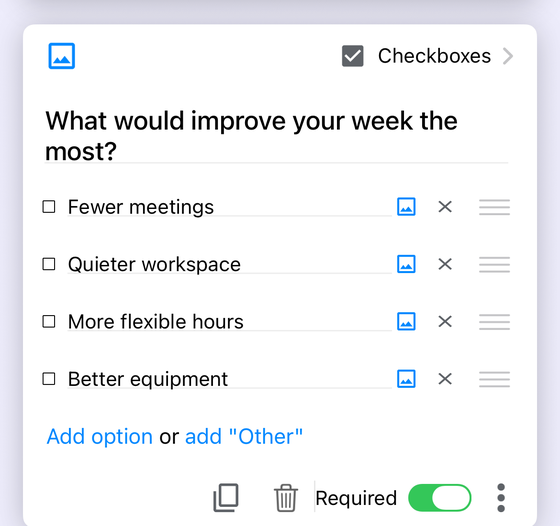
Form+ is a native iPhone and iPad editor for your real Google Forms, working on your own account through the official API. Options are added with the blue Add option row in the screenshot above, reordered with the drag handles, and the Checkboxes rules — Select at least, Select at most, Select exactly — are in the same editor.
There is also one thing Form+ does that Google Forms does not, and it is worth naming precisely because of how easily it is confused with this page's subject. Choice limits caps how many times each individual option can be chosen — when an option fills up it is removed from the live form, which is what you want for sign-up slots or limited stock. It is a capacity limit on an option, not a limit on the number of options, it is a PRO feature, and it works through an automation script installed on your own account.
Edit your real Google Forms from your phone
Form+ works on the forms already in your Drive — your account, no migration, no copies.
Get Form+ free on the App StoreFrequently asked questions
How many options can a Google Forms multiple choice question have?
Google publishes no maximum. No help page and no part of the Forms API reference states a cap. The nearest published figure is the whole-form one — 300 pieces of content — and it counts blocks, so a 200-option question spends one of them, not 200.
Can I limit how many options a responder picks?
Only on Checkboxes, because Multiple choice already takes exactly one answer. Checkboxes validation offers Select at least, Select at most and Select exactly.
What does “Limit to one response per column” do?
It is a grid setting, offered on the Multiple choice grid and Checkbox grid question types only. It stops two rows from sharing the same column, which is how you build a ranking or a rota where each slot is used once. It has nothing to do with the number of options on a plain Multiple choice question.
Does adding “Other” get round the option limit?
There is no option limit to get round, and “Other” is not a workaround in any case. Google offers it on
Multiple choice and Checkboxes only, and the Forms API confirms the same boundary: the isOther
field currently only applies to RADIO and CHECKBOX choice types, and is not allowed
in a question group. Typed “Other” text also lands in the question's own spreadsheet column, so it is free
text, not a new option.