Google Forms Editor vs Responder
Last updated September 2026 · ~9 minute read
Short answer: these are two different Drive permissions, not two
settings inside Forms. An Editor is Drive's writer role. A Responder is Drive's
reader role restricted to the published view — what Apps Script names the
PUBLISHED_READER role. An editor can read every individual response. A responder can read
nobody's answers but their own, unless one setting is switched on.
Form+ reads and changes editor and responder access on your real Google Forms from your iPhone or iPad — your account, your Drive, no copies. Manage access is free. Get Form+ free on the App Store.
The two words sit a row apart in the same dialog, which is why people read them as strength levels of one thing. They are not. Google's own code samples write them as different objects, and that difference is what decides who can open your responses.
The difference is visible in Google's code samples
Google's developer guide for
publishing and managing
responders shows how to add a responder. The request body is the entire answer:
{"view": "published", "role": "reader", "type": "user", "emailAddress": "…"}. An editor is
the same kind of object without that first word — role: "writer", no view.
Drive's roles and
permissions reference explains what the extra word does: “A permission with view=published
and role=reader grants reader access to the published view of the file, but it doesn't grant
reader access to the file.” Apps Script gives the arrangement a name: Google's publish guide says you can
“retrieve a list of all users who have responder access (the PUBLISHED_READER role) using
Form.getPublishedReaders()”.
That exposes a trap worth naming. Drive's own table maps reader to
Viewer, “Grants the ability to view the file.” The word Responder appears
nowhere in Drive's role list. A form's Responder is not Drive's Viewer; it is Drive's reader aimed at the
published view and nothing else. If you only ever read Drive's documentation you would conclude a
responder can open your form file, and that is not what Google's samples create.
The Forms API has no roles at all. Nothing in the
v1 REST reference
or the discovery document behind it creates, reads or changes a permission. The schema's one description of
what a responder actually receives is responderUri — “the form URI to share with responders.
This opens a page that allows the user to submit responses but not edit the questions.” Roles belong to Drive.
Publishing belongs to Forms. Nobody owns both.
What an editor can see
Google states this plainly in the Workspace Learning Center: “Whoever you invite can edit any part of your form, including responses and where they are saved.” Individual responses, in other words — beside whatever identities the form collected, and with the power to change the destination they are written to.
The sharper statement is in the Apps Script
Form reference, on
getSummaryUrl(): it “Gets the URL that can be used to view a summary of the form's
responses. Unless setPublishingSummary(enabled) is set to true, only the users
with edit permission to the form is able to access the URL.” Read that as the default. Your response
summary is an edit-permission document, and edit permission is the gate on it.
What a responder can see
Narrow, and three sources agree on where the edges are.
- The form itself.
responderUri“opens a page that allows the user to submit responses but not edit the questions.” - Their own submission, and nothing structural. Google's publish guide describes removing a responder as revoking “their ability to view and submit the form” — view and submit is the whole grant.
- No one else's answers, by default.
setPublishingSummary(enabled)“Sets whether the form displays a link to view a summary of responses after a respondent submits the form,” and Google records that “The default for new forms isfalse.”
The one setting that changes it
Settings → Presentation → View results summary. Google's warning on the publishing page is the sentence to read twice: “After someone fills out your form, they get a link to the results. Response summaries show full text responses or charts for each question and are visible to anyone who can respond to the form.”
Two things are packed in there. Full text — not tidy percentages, but whatever people typed. And the audience is anyone who can respond, which is a property of how the form is published rather than a list you maintain; people who have not answered it are inside that audience too. The longer version of that warning, including what the summary cannot be narrowed to, is in sharing responses with someone and the Summary tab.
Promotion is one-way, and removal is not role-scoped
The Apps Script reference documents four methods whose small print does not mirror, and the asymmetry catches people mid-cleanup.
addEditor: “If the user was already on the list of viewers or responders, this method promotes the user out of the list.”addPublishedReader: “If the user was already on the list of editors or viewers, this method has no effect.”removePublishedReader: “For Drive files, this also removes the user from the list of viewers and editors.”removeEditormirrors it, also removing them from “the list of viewers and responders”.- Both removals carry the same caveat: they don't “block users from accessing the Form if they belong to a class of users who have general access — for example, if the Form is shared with the user's entire domain, or if the Form is in a shared drive that the user can access.”
So you can raise a responder to editor by adding them as one. You cannot lower an editor by adding them as a responder — that call quietly does nothing. And “remove” never means “remove from this one role”: taking away responder access takes editor access with it.
What unpublishing does to each role
The responder side is documented, repeatedly. “When you publish a form, responders
can access it. If the form is unpublished, responders with the link can't access it.” Apps Script's
setPublished puts it as a precondition — “A form needs to be published for it to be
accessible to responders” — and the publish guide as a consequence: “Unpublishing a form makes it
unavailable and automatically stops it from accepting responses.” The help centre adds the blunt version:
“You can't accept responses in unpublished
forms.” The gentler state, still published but closed, leaves the link opening on a message instead
of questions; that pair is
published vs accepting responses.
The editor side, Google never addresses. We looked in five places — the Docs Editors
and Workspace help centres, the Apps Script Form reference, the Forms REST reference, the v1
discovery document, and Google's published Python, Node.js and Apps Script samples. Every one of them
describes unpublishing in terms of responders. None says an editor keeps access; none says an editor
loses it.
What sits nearby is shape, not a guarantee, and we will label it as an inference: unpublished is now
where API-created forms begin — “Forms created with the API after June 30, 2026 will have an unpublished
state by default” — and the entire publish guide is written around building a form first and publishing
it afterwards, which only works if editors can work on an unpublished form. Two further silences are
worth naming rather than filling: nothing describes the responder permissions being cleared when a form
is unpublished, and nothing describes what an unpublished link actually renders. And not every form has
the switch at all, which is why Apps Script ships
supportsAdvancedResponderPermissions() — responder permissions exist only on forms that
support publishing.
The two roles, at permission level
| What it is | Editor | Responder |
|---|---|---|
| Drive role written | writer | reader |
| Restricted to a view | No | Yes — view: "published" |
| Drive's own label for that role | Editor | Viewer — Drive publishes no “Responder” |
| Apps Script | addEditor / getEditors | addPublishedReader / getPublishedReaders |
| Individual responses | Yes — “including responses and where they are saved” | No |
| The response summary URL | Yes, by default | Only with View results summary on |
| When the form is unpublished | Google does not say | Can't access it |
For the day-to-day version of this comparison — which link to hand out, what removal does not undo — see sharing a form with collaborators. For what neither role can do, see ownership and access.
Reading both roles on an iPhone
Google's steps assume the desktop web editor. Form+ puts the same Drive permissions on iPhone and iPad, on your real Google Forms in your own Google account: open a form, tap Share & Distribute, then Manage access — subtitled “Who can edit and respond”.
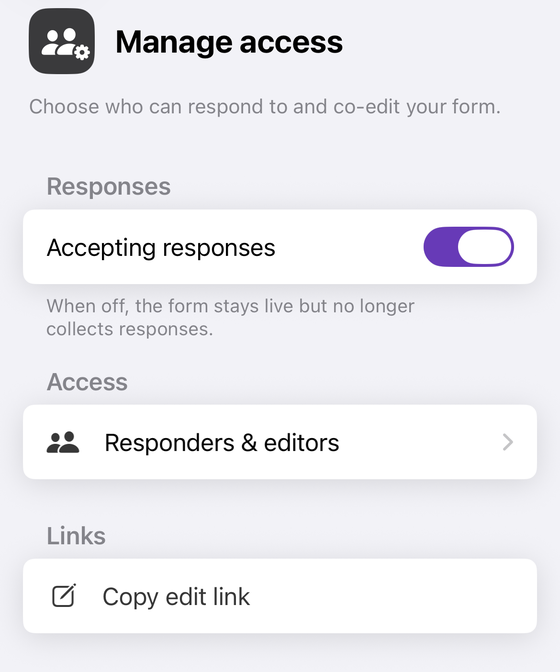
Responders & editors is where the two roles live, and the screen it opens is built around the distinction this page is about. People with access lists each person with Editor, Responder or Owner beside their name. Drive file sharing holds two link rows — File access (editors) and File access (link viewers) — under a footnote that says what they are not: “Who can open this form's file in Google Drive. This does not control who can answer the form.” The separate Who can respond section reads out Accepting responses and Published as Yes or No. Links offers Copy edit link, deliberately labelled so it is not confused with the link you send responders.
One honest note, because this page is about exactly this distinction: Form+ writes Drive's roles
directly — writer for Editor, reader for Responder — and does not add the
view: "published" restriction that Google's own samples use when they add a responder. The
two grants are not identical, so a responder added in the app and one added in Google's Share dialog are
not guaranteed to be the same object.
Manage access is not behind the Form+ Pro gate. The paywall check on that screen was removed deliberately in August 2026, and nothing has replaced it.
See who can edit and who can only answer
Form+ reads and changes editor and responder access on your real Google Forms from your iPhone or iPad — your account, your Drive, no copies. Manage access is free.
Get Form+ free on the App StoreFrequently asked questions
Can a Google Forms editor see individual responses?
Yes. Google's Workspace Learning Center states that whoever you invite can edit any part of your form, “including responses and where they are saved”. Apps Script says the same thing from the other end: the URL that shows a summary of the form's responses is reachable only by “users with edit permission to the form”, unless you switch the published summary on.
Can a responder see other people's answers?
Not by default. Apps Script documents that the setting which shows respondents a summary of responses
defaults to false on new forms. Turn it on and the audience is wide: Google states that
“response summaries show full text responses or charts for each question and are visible to anyone who
can respond to the form” — which is defined by who can answer, not by a list you keep.
Is a Google Forms Responder the same as a Drive Viewer?
No, and Drive's own reference never uses the word Responder. Google's code samples add a responder as
a Drive permission with role: "reader" and view: "published", and Drive's roles
reference states that such a permission “grants reader access to the published view of the file, but it
doesn't grant reader access to the file.” Drive's plain reader role is labelled Viewer and
described as granting “the ability to view the file”.
What happens to responders when a Google Form is unpublished?
They lose access. Google states that “when you publish a form, responders can access it. If the form is unpublished, responders with the link can't access it.” The developer guide adds that “unpublishing a form makes it unavailable and automatically stops it from accepting responses”, and Apps Script notes that “a form needs to be published for it to be accessible to responders”.
Does unpublishing a Google Form lock the editors out too?
Google does not say. Its help centre, Apps Script reference, REST reference, discovery document and code samples all describe unpublishing in terms of responders only. Nothing states that editors keep access and nothing states that they lose it, so we will not assert an answer here.