How to add a paragraph question in Google Forms
Last updated September 2026 · ~8 minute read
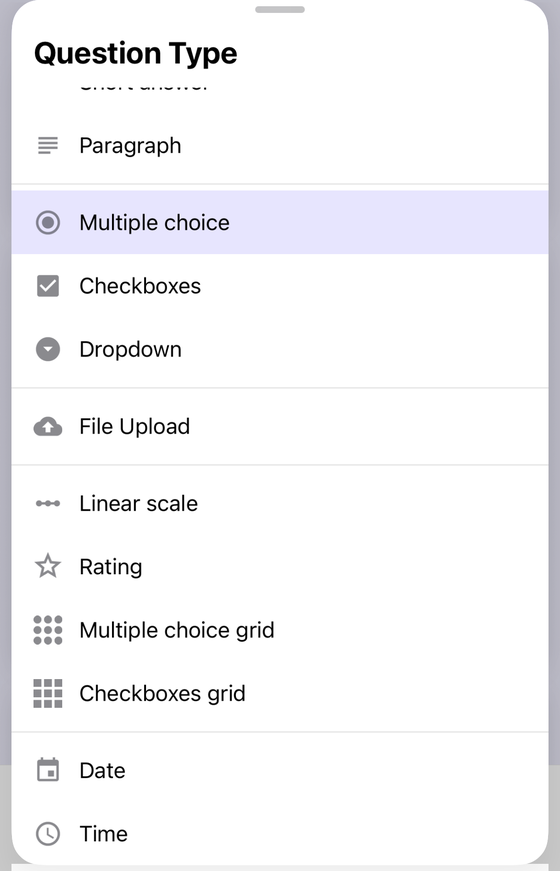
Short answer: add a question, then change its type to Paragraph — the second entry in the type menu, directly under Short answer. Google describes it as an open question where “Responders can write long answers in paragraphs.” It accepts exactly two validation rule families, Length and Regular expression. It cannot route anyone to another section, and it cannot carry a quiz answer key.
Form+ gives you the full question type list, response validation and your responses on iPhone and iPad — on your own Google account, on your real forms. Get Form+ free on the App Store.
Paragraph is the least configurable question type in Google Forms, and that is the whole point of it. Everything interesting about it is a constraint — what it accepts, what it refuses, and what happens to a 4,000-character answer once it reaches your spreadsheet.
Adding one
- Open the form in the editor and add a question. Google Forms starts every new question as Multiple choice.
- Open the question type menu beside the question text and choose Paragraph.
- Type the prompt. There is nothing else to fill in — a Paragraph question has no options, no rows and no columns, so the prompt and the optional description are the entire question.
On iPhone and iPad, Form+ puts the same list behind the question type row:
Short answer vs Paragraph, in Google's words
People assume the difference is a character limit. It is not. Here is what Google's Choose a type of question for your form page actually says about each.
| Type | Google's description |
|---|---|
| Short answer | “You can provide an open question. Responders can find one line to write their answer in a few words.” |
| Paragraph | “You can provide an open question. Responders can write long answers in paragraphs.” |
Both are described as an open question. The published difference is the shape of the input — one line versus a multi-line box — and an expectation about answer length, not an enforcement of one. Google describes a rule you add rather than a ceiling the platform applies — and it words the two types differently, which is easy to miss: Short answer gets “You can set rules such as maximum character count”, while Paragraph gets “You can set rules such as maximum or minimum character count.” Only the Paragraph sentence mentions a lower bound.
So the practical rule is a social one. A one-line box tells a respondent to be brief; a paragraph box tells them they are allowed to think. Choosing Short answer for a question that deserves three sentences does not truncate anything — it just makes people write less, which is sometimes exactly what you want.
What you can constrain on a Paragraph question
Turn on Response validation from the question's overflow menu. Google's How to set rules for your form page lists the rule families by question type, and a Paragraph question gets two of them:
- Length — “Maximum or Minimum character count”, plus a number.
- Regular expression — “Contains, Doesn't contain, Matches, Doesn't Match”, plus a pattern.
Short answer, on the same page, gets four: Number and Text as well as those two. That is the one substantive functional difference between the two text types, and it runs the opposite way to most people's intuition — the smaller box is the more configurable one. If you need an answer validated as a number, an email address or a URL, you need Short answer; Paragraph will not offer you those rules at all.
Both rule families come with a Custom error text field. Fill it in. A respondent who overruns a 500-character cap without being told the number will guess, trim, and guess again. Our data validation guide covers the full set of categories across every question type, and the regex guide covers pattern rules specifically.
In Form+, a Paragraph question's Response validation menu offers the same two families and nothing else — Length and Regular expression — which is the app mirroring Google's rule set rather than inventing its own.
Three things a Paragraph question cannot do
It cannot branch
Google's branching help page is explicit: “Go to section based on answer” is “only available for Multiple choice and Dropdown question types”. A Paragraph question can sit inside a branch — it is perfectly happy in a section that only some respondents reach — but it can never be the question that decides where someone goes next. If you want free text and routing, ask a Multiple choice question first and put the Paragraph question in the section it leads to. Our conditional logic guide walks through that pattern.
It cannot carry an answer key
In a quiz, Google's quiz help page lists the types that can take an answer key: “Short answer, Multiple choice, Checkboxes, Dropdown, Multiple choice grid, Checkbox grid.” Paragraph is not on that list. The same page notes that “You can assign points and add feedback on all question types”, so an essay question can still be worth 10 marks — you just award them by hand, per response, after the fact. That is the correct behaviour for an essay, but it is worth knowing before you build a 40-question quiz around it.
It has no published length limit
There is no character ceiling published for a Google Forms answer — not for Short answer, not for Paragraph, and not in the Forms API. We went looking for one and wrote up where we looked in Google Forms character limit; the short version is that Google is silent, and every number circulating for this question is either the Length rule quoted back as if it were a platform maximum, or a limit borrowed from a different product.
Silence is not a promise of infinity. It means untested, and if your form genuinely invites thousand-word answers you should set a Length rule yourself rather than discover the edge in production.
What a long answer does downstream
The ceiling that does exist is not in Forms at all. Google's Drive file-size page publishes the per-cell limit for Google Sheets: a cell with more than 50,000 characters is dropped. Google states that figure in the context of converting a file from Excel — it is not written as a rule about form responses — but it is the only per-cell character number Google publishes anywhere, and every answer to a Paragraph question lands in exactly one cell of the linked sheet.
Fifty thousand characters is roughly 8,000 words, so this is not a limit a feedback box will ever reach. It matters for the genuinely long stuff: pasted transcripts, log dumps, a support form where people paste an entire email thread.
The everyday problem is smaller and far more annoying. One answer, one cell — so a column of paragraph responses is a column of cells that either overflow across their neighbours, get clipped at the column edge, or wrap into rows tall enough that four responses fill your screen. Sheets gives you the choice via its text-wrapping setting, but there is no setting that makes long prose comfortable to read in a spreadsheet grid. Our guide on responses in Google Sheets covers the linked-sheet mechanics.
Printing has the same shape of problem. Google publishes no layout guarantee for how a long answer is rendered when you print a response or save it as a PDF — the browser paginates it, and a 3,000-character answer will simply run across pages wherever it happens to land. If you print responses regularly, see print Google Forms responses and responses to PDF.
When to reach for Paragraph
- Use it when the answer is prose you intend to read: feedback, an explanation, an incident description, a short essay.
- Use Short answer when the answer is a value you intend to sort, filter, count or validate — a name, a reference number, an email address, a postcode.
- Use Multiple choice when you are tempted to ask for prose but will end up hand-categorising the answers anyway. A hundred paragraph answers is a hundred things to read; a hundred choices is a chart.
The honest trade is that Paragraph is the easiest question to ask and the most expensive to analyse. One per form, placed last, is usually the right dose.
Build and edit real Google Forms from your phone
Form+ gives you the full question type list, response validation and your responses on iPhone and iPad — on your own Google account, on your real forms.
Get Form+ free on the App StoreFrequently asked questions
What is the difference between Short answer and Paragraph in Google Forms?
Google describes both as “an open question”. For Short answer it says responders “can find one line to write their answer in a few words”; for Paragraph, that they “can write long answers in paragraphs”. The other published differences are the validation rules each accepts — Paragraph gets two families, Short answer four — and the fact that Short answer can carry a quiz answer key while Paragraph cannot.
Can you set a character limit on a Paragraph question?
Yes. Turn on Response validation, choose Length, then Maximum or Minimum character count and a number. That is a limit you impose. Google publishes no platform maximum for the length of an answer — see Google Forms character limit.
Can a Paragraph question send people to a different section?
No. Google states that “Go to section based on answer” is “only available for Multiple choice and Dropdown question types”. A Paragraph question can sit inside a branch, but it cannot decide one.
Can a Paragraph answer be graded automatically in a quiz?
No. The types that can take an answer key are Short answer, Multiple choice, Checkboxes, Dropdown, Multiple choice grid and Checkbox grid. Paragraph is not among them — though Google notes you can “assign points and add feedback on all question types”, so you mark it by hand.