Google Forms: published vs accepting responses
Last updated September 2026 · ~8 minute read
Short answer: they are two different switches, and Google's API
settles it. A form's publish state is an object with two required booleans —
is_published and is_accepting_responses — and one of them overrules the other:
“If is_published is set to false, this field is forced to
false.” So unpublishing always stops responses, but stopping responses never
unpublishes. Both are reversible, and neither is documented as touching responses you have already
collected.
Form+ puts the whole publish state — accepting responses, publishing, unpublishing — on iPhone and iPad, on your real Google Forms, in your own Google account. Get Form+ free on the App Store.
These two sit next to each other in the interface, they sound like synonyms, and people pick between them under time pressure — a form that has to stop right now. They are not synonyms. The difference is not a matter of interpretation either: it is written into the data model, and you can read it yourself.
Two booleans, one of which outranks the other
Google publishes a machine-readable description of the Forms API at
https://forms.googleapis.com/$discovery/rest?version=v1. In it, the schema called
PublishState — “the publishing state of a form” — has exactly two properties:
isPublished— “Required. Whether the form is published and visible to others.”isAcceptingResponses— “Required. Whether the form accepts responses. Ifis_publishedis set tofalse, this field is forced tofalse.”
That second sentence is the whole answer to “are they the same thing?” If they were the same thing,
there would be one field. Instead there are two, and the first one can override the second. The wrapper
object spells out the consequence: “When updating publish_state, both
is_published and is_accepting_responses must be set. However, setting
is_accepting_responses to true and is_published to
false isn't supported and returns an error.”
Apps Script draws the same hierarchy in words rather than field masks.
Form.setPublished(enabled)
is documented as “A form needs to be published for it to be accessible to responders. This method
supersedes calls to setAcceptingResponses(enabled).” Its counterpart,
setAcceptingResponses(enabled), carries a throw condition — “Error — if enabled on an
unpublished form” — and a warning that “the state is overwritten when the publish state of the
form is changed.” Supersedes, overwrites, throws. One switch is above the other.
Only three states exist, not four
Two booleans normally give you four combinations. Here the fourth is unreachable, which is why the two controls feel overlapping without being interchangeable.
| State | Published | Accepting | What it is |
|---|---|---|---|
| Live | Yes | Yes | The normal state of a form you have shared. |
| Closed | Yes | No | The link still opens; the form shows a closed message instead of questions. |
| Unpublished | No | Forced to no | The link stops working. Accepting is not a separate decision here — it is taken for you. |
| — | No | Yes | Does not exist. The API “isn't supported and returns an error”; Apps Script throws. |
Google's own request bodies make the asymmetry visible. To unpublish, its
publish
guide sends one field, "isPublished": false, and lets the other follow:
“Unpublishing a form makes it unavailable and automatically stops it from accepting responses.”
To close a form without unpublishing it, the same guide has to send both —
"isPublished": true and "isAcceptingResponses": false — because staying
published is the part you are deliberately holding on to.
What each state shows a respondent
This is where the practical difference lands, and Google documents the two halves unevenly.
Closed, still published. The guide is explicit: “To stop accepting responses for a form without unpublishing it… Responders to your form will see the closed form page and message.” The help centre's version of the same behaviour is that responders “get a message ‘The form is no longer accepting response’ or a custom message” (Google's own phrasing, singular “response” and all). Your form still answers the door; it just says no. Writing that message is covered in stop accepting responses.
Unpublished. Google says what stops, not what appears. From Publish & share your form with responders: “When you publish a form, responders can access it. If the form is unpublished, responders with the link can't access it.” From View & manage form responses: “Tip: You can't accept responses in unpublished forms.” And from the developer guide: unpublishing “makes it unavailable.”
Where Google is silent: what an unpublished form's link actually renders. We looked
in four places — the help centre pages above, the Apps Script Form reference, the Forms REST
guides and reference, and the v1 discovery document — and none of them describes the page a respondent
lands on. “Unavailable” and “can't access it” are outcomes, not screens. There is no documented custom
message for this state either: the message editor Google documents sits under “Accepting responses”, and
a form that is unpublished is not in that state any more. If the exact wording a stranger sees matters to
you, unpublish a test form and open the link yourself —
testing a Google Form before sending it
covers doing that on a real form without leaving a stray response behind. We are not going to guess in
public and present it as documentation.
What neither of them touches
Responses you have already collected. Nothing in publish settings is described as affecting them —
and the API goes further than silence here, by putting publishing outside the form's content altogether.
The revisionId field notes that “form content excludes form metadata, including:
sharing settings (who has access to the form), publish_settings (if the form supports
publishing and if it is published).” Flip either switch and the form's content revision does not
even change. Your Responses tab, your charts and your linked spreadsheet stay where they are; losing
responses takes a different and explicitly irreversible action.
Both switches are also round trips. Publish again and the form is live again; turn Accepting responses back on and submissions resume on the same link. One caution worth stating plainly: neither action recalls anything. Every link you emailed, every QR code you printed, every embed on a page stays exactly as valid as it was. You have changed what those things lead to, not whether they exist.
Legacy forms, and a default that changed in June 2026
Not every form has a publish state at all. The API's setPublishSettings method is
documented as “Legacy forms aren't supported because they don't have the publish_settings
field,” and the Form resource adds that the field “isn't set for legacy forms…
All newly created forms support publish settings.” On such a form there is no publish switch to
find, only the accepting-responses one.
In the other direction, Google changed what a brand-new API-created form starts as. The publish guide
now carries the notice: “Forms created with the API after June 30, 2026 will have an unpublished
state by default.” The discovery document backs it with a create-time parameter,
unpublished: “Optional. Whether the form is unpublished. If set to true,
the form doesn't accept responses. If set to false or unset, the form is published and
accepts responses.” Note that this parameter bundles both booleans into one word — more evidence
that at creation time Google treats “unpublished” as a package, not as a synonym for one switch.
Both switches on an iPhone
Google's steps assume the desktop web editor. Form+ puts both states one tap apart on iPhone and iPad, working on your real Google Forms in your own Google account. Open a form, tap Share & Distribute, and the Manage & Publish group at the bottom holds Manage access and, below it, Unpublish form.
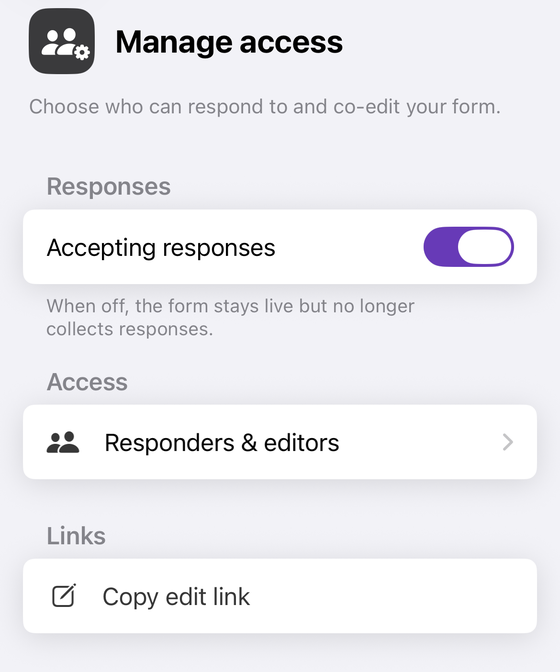
Turning that switch off leaves the form published. Unpublishing is the separate red row, and because it takes a live link offline it asks first: “Your form link will stop working, so anyone who already has it won't be able to respond. Responses you've already collected are kept, and you can publish the form again at any time.” The app also honours the API's rule in the one place it bites — switching Accepting responses on for a form that is not published publishes it too, because the state where it would not is the one that does not exist. Neither control is behind the Form+ paywall.
Publish, close and unpublish from your phone
Form+ puts the whole publish state — accepting responses, publishing, unpublishing — on iPhone and iPad, on your real Google Forms, in your own Google account.
Get Form+ free on the App StoreFrequently asked questions
Is unpublishing a Google Form the same as turning off Accepting responses?
No. They are two separate fields on the same object. The Forms API's PublishState
carries is_published and is_accepting_responses, and Google's guide says that
“unpublishing a form makes it unavailable and automatically stops it from accepting responses.”
Unpublishing therefore does both things; turning off Accepting responses does only the second one and
leaves the form published.
Can a Google Form be unpublished and still accepting responses?
No, and the API refuses to let you try. Google's own field documentation says that if
is_published is set to false, is_accepting_responses “is forced to
false”, and that “setting is_accepting_responses to true and
is_published to false isn't supported and returns an error.” In Apps
Script the equivalent call throws: “Error — if enabled on an unpublished form.”
What do respondents see in each of the two states?
A published form that is not accepting responses still opens: Google says “responders to your form will see the closed form page and message”, and the help centre's version is that responders “get a message ‘The form is no longer accepting response’ or a custom message.” An unpublished form does not open at all: “if the form is unpublished, responders with the link can't access it.” Google never describes what that inaccessible link actually renders.
Does either one delete responses I already collected?
Neither of them touches collected responses in anything Google documents. Publish settings are not
even part of a form's content: the API's revision-ID field states that “form content excludes form
metadata, including: sharing settings (who has access to the form), publish_settings (if the
form supports publishing and if it is published).” Deleting responses is a separate, explicit
action.
Can I switch between the two states on my iPhone?
Google's own steps assume the desktop web editor. Form+ puts both in the Share & Distribute sheet on iPhone and iPad: Manage access holds the Accepting responses switch, and Unpublish form sits one row below it. Neither is behind the Form+ paywall.